



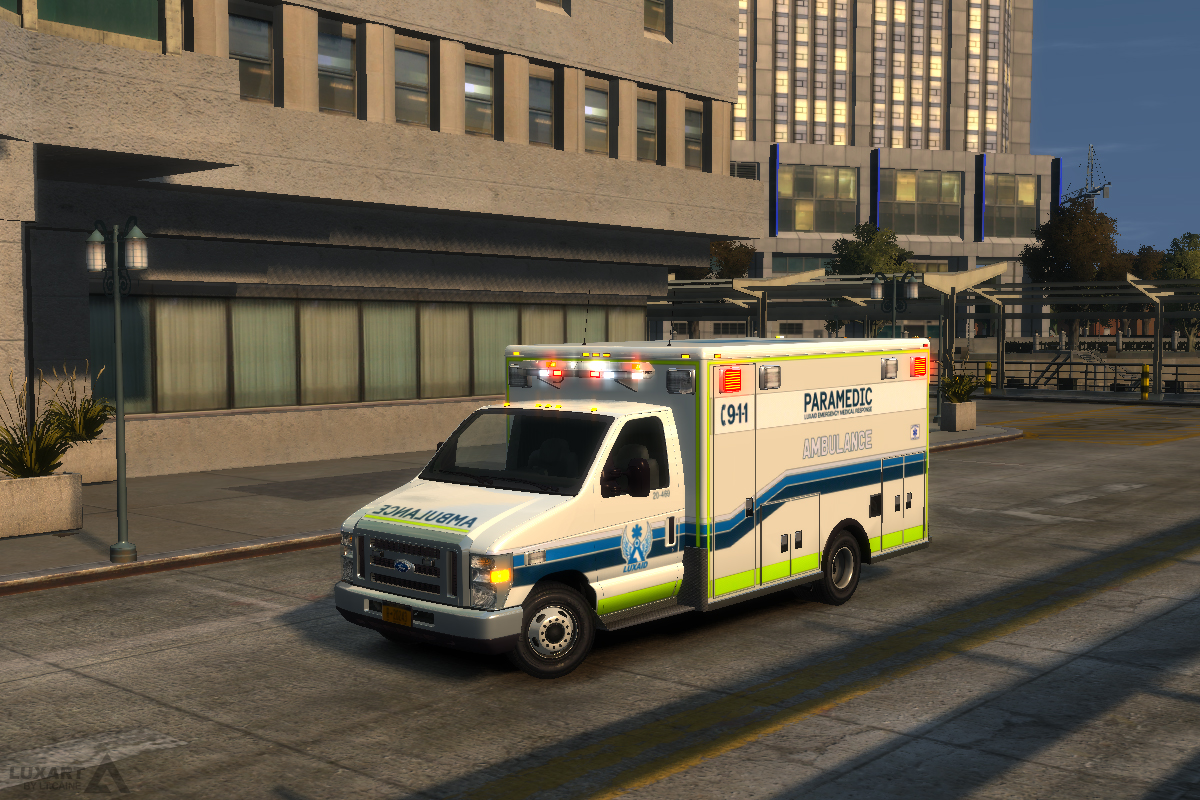


A Ford E-450 ambulance with a DRO2 ELS type Mx-7000 lightbar and multiple liveries.
NOTES
- The vehicle model is provided unlocked. If you wish to modify it with the intent to redistribute, the permission of the author is not required so long as proper credit is given.
- This vehicle is ELS enabled (pro-ELS) and requires the Emergency Lighting System to work correctly.
- Custom handling line and ELS VCF provided in the download.
IMPORTANT
- Requires ELS-IV V8.5 or higher.
- Make sure to use the ELS vehicle configuration file (VCF) included in the download for optimal results.
CREDITS
- Original Ford E450 cutaway cab model procured from www.3dcadbrowser.com (and provided by Bxbgus123).
- The cab model was converted to GTAIV by Lt.Caine.
- The entire vehicle model was extensively optimized, modified, and templated by Lt.Caine.
- Cab interior is default GTAIV vehicle “Speedo
What's New in Version R02 (E450 V2.2)
Released
- R02
- Fixed missing line in VCF (e450_mx7000.ini). Thank you Cj24 for pointing this out!
The cab model was converted to GTAIV by Lt.Caine.
The entire vehicle model was extensively optimized, modified, and templated by Lt.Caine.
Cab interior is default GTAIV vehicle “Speedo� interior, modified and installed by Lt.Caine.
Light bars, quadraflares and all other emergency lighting equipment made by Lt.Caine.
Laptop is generic GTAIV vehicle laptop made by Rockstar Games, modified by Lt.Caine.
Wheel rims made by Lt.Caine.
All additional textures made by Lt.Caine.
Special thank you to Bxbugs123 for helping me iron-out some critical bugs with the model.









Recommended Comments