Skip to content
View in the app

A better way to browse. Learn more.

LCPDFR.com

A full-screen app on your home screen with push notifications, badges and more.

To install this app on iOS and iPadOS
  1. Tap the Share icon in Safari
  2. Scroll the menu and tap Add to Home Screen.
  3. Tap Add in the top-right corner.
To install this app on Android
  1. Tap the 3-dot menu (⋮) in the top-right corner of the browser.
  2. Tap Add to Home screen or Install app.
  3. Confirm by tapping Install.

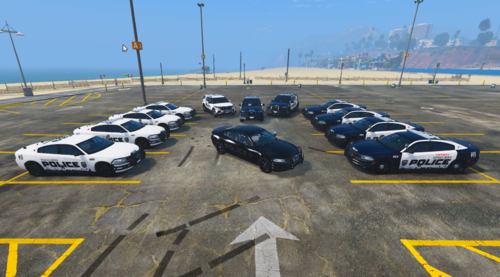
Fictional New York State Trooper V1

(4 reviews)

5 Screenshots

THIS IS MY FIRST SKIN. So don't have a go at me if it's not great. I know there are something's which are out of place and I know something's need fixing, I'll do these in the next version.

>>Fictional New York State Trooper<<

This isn't a copy or the real thing, just what I came up with.

Hopefully you'll like it, and hopefully I'll get better and make more!

Thanks!

User Feedback

Recommended Comments

GreenAid

Members

Wasn't better if you made it in liberty city state police?

ASTTrprDillon95

Members

it looks good but the yellow makes the car look terrible. If you want to keep the yellow, don't spread out the color too much..

Cheers,

ASTTrprDillon95

Official Tester,

Liberty Modding Studios

GreenAid

Members

No man, it's a custom texture it's nice how it is...

flanders

Members

Minus the few little issues, this is a good job for your first go. Keep it up!

HulaRula

Members Author

Yes I know there's a few issues, I'll fix them when I have time.

ASSTrprDillion95, personal preference. I like the yellow personally.

Thanks as well guys :)

Guest Enough of all this

Guest Enough of all this

Guests

If its you taste then its good but for my taste its terrible.But getting some new ideas is hard

CEO

Members

nice textures dem! keep it up.

HulaRula

Members Author

Thanks man!

Create an account or sign in to comment

Account

Navigation

Search

Search

Configure browser push notifications

Chrome (Android)
  1. Tap the lock icon next to the address bar.
  2. Tap Permissions → Notifications.
  3. Adjust your preference.
Chrome (Desktop)
  1. Click the padlock icon in the address bar.
  2. Select Site settings.
  3. Find Notifications and adjust your preference.