Skip to content
View in the app

A better way to browse. Learn more.

LCPDFR.com

A full-screen app on your home screen with push notifications, badges and more.

To install this app on iOS and iPadOS
  1. Tap the Share icon in Safari
  2. Scroll the menu and tap Add to Home Screen.
  3. Tap Add in the top-right corner.
To install this app on Android
  1. Tap the 3-dot menu (⋮) in the top-right corner of the browser.
  2. Tap Add to Home screen or Install app.
  3. Confirm by tapping Install.

D&R Intimidator Siren 1.0

(2 reviews)

1 Screenshot

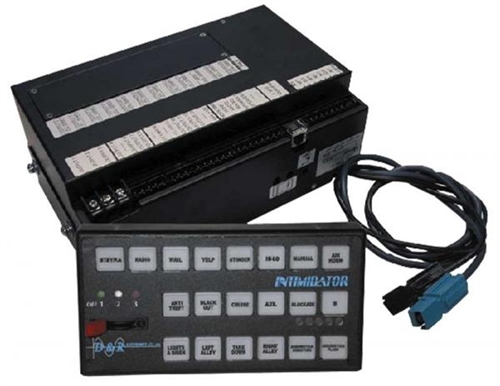
This siren is made by a company called D & R Electronics in Bolton, ON (Canada). This is my second siren ive done and its been a lot more challenging than the first.....Any feedback and constructive criticism is greatly appreciated.... And if you do not like the SuperHyperYelp (4th Tone) there will be a version where that is replaced by a Hi-Lo tone in the future. Enjoy!

This siren is best used with any canadian EMS Rapid Response Unit (Peel Paramedics, Toronto EMS ERU, Halton EMS RRU, etc.)

Here is a demonstration of this siren on my channel:

User Feedback

Recommended Comments

TheRealNBK71

Members Author

Sounds pretty good 5/5

TheRealNBK71

Members Author

Realy nice 15/10

TGM

Members

Really nice, this is my favorite siren!

Takao

Members

OHHHHHH!!!!!

Takao

Members

10/10

StarScream

Members

This is a nice siren. I really like the sound. Good work.

TheRealNBK71

Members Author

This is a nice siren. I really like the sound. Good work.

KN1IGHT

Members

Love the siren!

Will go perfectly with a Leduc County Charger and texture I'm planning on making, as it sounds the exact same!

15/10! :D

TheRealNBK71

Members Author

Love the siren!

Will go perfectly with a Leduc County Charger and texture I'm planning on making, as it sounds the exact same!

15/10! :D

10 DAVID 01

Members

i like this alot, changing to this now!

kacer58

Members

How name ENB?! nice video.. :3 (y)

TheRealNBK71

Members Author

How name ENB?! nice video.. :3 (y)

TheRealNBK71

Members Author

i like this alot, changing to this now!

SnoDawg

Members

damn! i love the els lighting, where did u download it?

TheRealNBK71

Members Author

damn! i love the els lighting, where did u download it?

TheRealNBK71

Members Author

Finally a Respect-able Siren!

Create an account or sign in to comment

Latest Mods

Account

Navigation

Search

Search

Configure browser push notifications

Chrome (Android)
  1. Tap the lock icon next to the address bar.
  2. Tap Permissions → Notifications.
  3. Adjust your preference.
Chrome (Desktop)
  1. Click the padlock icon in the address bar.
  2. Select Site settings.
  3. Find Notifications and adjust your preference.










