




-----------------------------------------------------------------
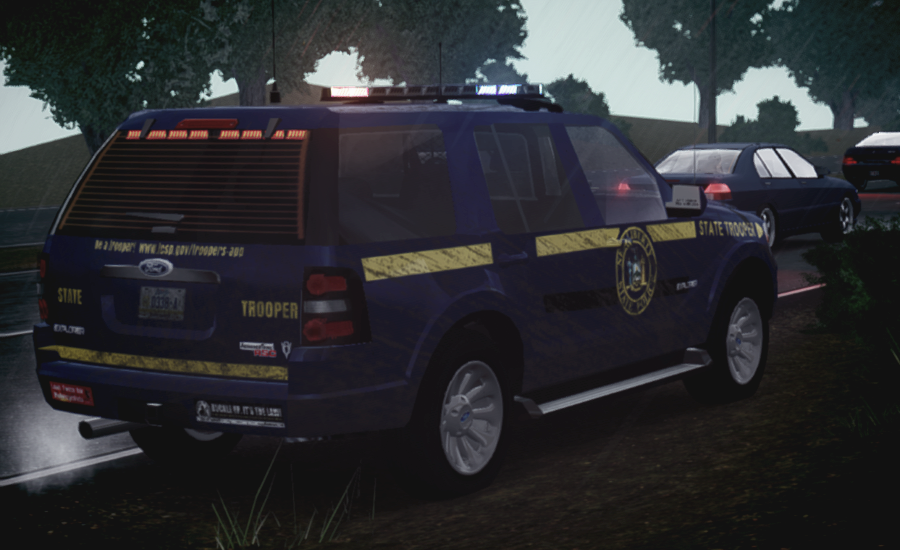
NAME: -2008 FORD EXPLORER 1.1
AUTHORS: -ORIGINAL MODEL: MotiveTime, Ltd.
-RIP: Cyrax
-GTA IV CONVERSION/POLICE CONVERSION: SheriffVanDyck
MODEL STATUS: -LOCKED
OPTIMIZED FOR: -POLPATRIOT, POLICE, POLICE2.
MULTIPLE LIVERIES: X4 (TEMPLATE INCLUDED)
------------------------------------------------------------------
INFORMATION
YOU ARE NOT ALLOWED TO RIP, MODIFY OR UPLOAD THIS MODEL TO ANY SITE WITHOUT
WRITTEN PERMISSION FROM THE AUTHORS, PLEASE RESPECT OTHER PEOPLE'S WORK.
------------------------------------------------------------------
THIS MODEL HAS BEEN MODIFIED AND CONVERTED TO GTA IV WITH OPEN PERMISSION,
PLEASE VISIT www.GameModels.ru FOR MORE INFORMATION.
THANKS ARE GOING TO GameModels.ru AND THE RESPECTIVE OWNERS OF THE MODEL FOR
SHARING.
------------------------------------------------------------------
NOW, THE CREDITS FOR THE VEHICLE PARTS!
EXTERIOR:
-Antennas v1.1 by PriMan
-Spotlights by Cj24
-NLSP Texture original from BxBugs123, i just scaled it and add/change some stuffs, but the main skin is from him.
LIGHTING EQUIPMENT:
-FedSig Integrity Lightbar By 0taku
-Federal Signal CN SignalMaster scratch modeled and converted by Hilth0.
-Lighting Set-up by SheriffVanDyck
INTERIOR:
-Dashboard and seats taken from Ford F150 FX4 OffRoad V2.0 by Converted by TarteXs
-Generic Siren Box Original model by RockstarGames, modified and converted by Sergiyj
-Red buttons and Motorola radio taken from PoliceConsole from PFCBarefoot
-Whelen CanTrol WC CANCTL1 Light and Siren System by Chippy
- Switch by NickieB
-INTELLIswitch990 60 Amp Digital Switch by Casey1989
-Generic Police Scanner
• Modeled and created by Heisenberg.
• Texture created by Heisenberg.
-Panasonic Toughbook by PFCBarefoot
-Screen texture by SheriffVanDyck
-WGVS by BxBugs123
-Equipment (Cones, Tape and Extinguisher) by Vertex3D
-M16 original from RockstarGames, modified by SheriffVanDyck
-Holdall original from RockstarGames, textures from SheriffVanDyck.
---------------------------------------------------------------------------
ENJOY!!
PS: Make sure you change the "APC" part in vehicles.ide line for the one you are using. IE: Polpatriot = POLPAT
-RIP: Cyrax
-GTA IV CONVERSION/POLICE CONVERSION: SheriffVanDyck
EXTERIOR:
-Antennas v1.1 by PriMan
-Spotlights by Cj24
-NLSP Texture original from BxBugs123, i just scaled it and add/change some stuffs, but the main skin is from him.
LIGHTING EQUIPMENT:
-FedSig Integrity Lightbar By 0taku
-Federal Signal CN SignalMaster scratch modeled and converted by Hilth0.
-Lighting Set-up by SheriffVanDyck
INTERIOR:
-Dashboard and seats taken from Ford F150 FX4 OffRoad V2.0 by Converted by TarteXs
-Generic Siren Box Original model by RockstarGames, modified and converted by Sergiyj
-Red buttons and Motorola radio taken from PoliceConsole from PFCBarefoot
-Whelen CanTrol WC CANCTL1 Light and Siren System by Chippy
- Switch by NickieB
-INTELLIswitch990 60 Amp Digital Switch by Casey1989
-Generic Police Scanner
• Modeled and created by Heisenberg.
• Texture created by Heisenberg.
-Panasonic Toughbook by PFCBarefoot
-Screen texture by SheriffVanDyck
-WGVS by BxBugs123
-Equipment (Cones, Tape and Extinguisher) by Vertex3D
-M16 original from RockstarGames, modified by SheriffVanDyck
-Holdall original from RockstarGames, textures from SheriffVanDyck.





![[ELS][ADDON]Los Santos Parish Sheriff 2014-2018 Charger Pack](http://s3-screenshots.int-cdn.lcpdfrusercontent.com/resize/500/-/monthly_2026_10/Sideview.thumb.jpg.4dd898c819788afb4840609a6b5d1a55.jpg)
Recommended Comments