Skip to content
View in the app

A better way to browse. Learn more.

LCPDFR.com

A full-screen app on your home screen with push notifications, badges and more.

To install this app on iOS and iPadOS
  1. Tap the Share icon in Safari
  2. Scroll the menu and tap Add to Home Screen.
  3. Tap Add in the top-right corner.
To install this app on Android
  1. Tap the 3-dot menu (⋮) in the top-right corner of the browser.
  2. Tap Add to Home screen or Install app.
  3. Confirm by tapping Install.

NYPD&LCPD ESU New Model + Uniforms 1.1

(7 reviews)

5 Screenshots

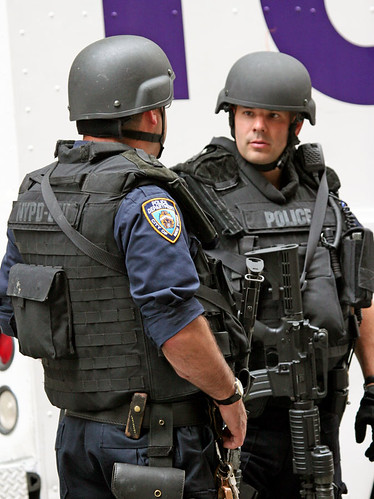
The file conversion done by hl2poo- skin by me, this is extremely accurate to NYPD ESU uniforms in the present day. See reference..3579861835_65481ee7b7.jpg
3055255880_462a20f862.jpg

What's New in Version 1.1

Released

  • 1.0 - Added Black Helmets
  • 1.1 - Added LCPD version

User Feedback

Recommended Comments

Naruto607

Members

Shit... nearly 14 MB for a hat texture file (m_y_swat_p.wtd)?

Sad to say, some PCs work with HD textures, some other not.


My advice:

  • Lower the image resolution. If it's 4096x4096 for example, drop it to 25% (1024x1024) or 12.5% (512x512) of its original. Any image-editing software like Photoshop can reduce its image resolution, so that the size will be smaller when compressed.
  • Compress the image. If the image is HD and in Bitmap RGB (A8R8G8B8 in OpenIV) state, compress it to either DXT1, DXT3, or DXT5. DO NOT CHOOSE L8 (in OpenIV) as it will turn the texture to a Grayscale.

What do I see after a quick look on m_y_swat_p.wtd (either NYPD or LCPD) is that all images are in 2048x2048 resolution: diffuse, bump map, and specular. If some of you are running the issue of unable to spawn with Trainer and in police station, drop ONLY bump map and specular textures size to 25% (512x512) or 12.5% (256x256) of its original. That should help most of them who can't spawn the SWAT model.


I hope this helps. I do have an experience like that as well with an MP5SD mod which all images are HD and solved by dropping its bump map and specular images size. I should guarantee that there'll be no quality loss, except if you drop the diffuse texture resolution as well. :teehee:

the12thdoctor1

Members

On ‎2‎/‎3‎/‎2015 at 1:51 PM, OfficerFive0 said:

if u remove 2 helmets from the file ull be fine heres a link for a tutorial


What did you mean by two helmets? Just two random helmets?

OfficerFive0

Members

7 minutes ago, the12thdoctor1 said:

What did you mean by two helmets? Just two random helmets?

no, the two helmets it came with

the12thdoctor1

Members

I've got the SWAT odd open, what do I do to delete the helmets?


OfficerFive0

Members

1 minute ago, the12thdoctor1 said:

I've got the SWAT odd open, what do I do to delete the helmets?


the12thdoctor1

Members

(edited)

Quote
8 minutes ago, OfficerFive0 said:


That's how I've got the SWAT odd open, I've got it in the text file, I just don't know how to delete the helmets.


Edited by the12thdoctor1

OfficerFive0

Members

8 minutes ago, the12thdoctor1 said:

That's how I've got the SWAT odd open, I've got it in the text file, I just don't know how to delete the helmets.


its been over a year since ive done any gta 4 stuff, let alone ped editing, but if i recall correctly, you see what the helmets are called in openiv, then find those in notepad and delete those.

ForeverStars

Members

Nice! 10/10

Officer Zertac

Members

Cool models. For new people installing mods: Use SparkIV, Go to ´open´ pc>models>cdimages and componentdrops.img then click ´import´ and select the files of this mod without the _p at the end and click save. After that do the ´open´ thing again but this time you wanna go to pepdrops.img and  import the files with _p at the end.

Create an account or sign in to comment

Account

Navigation

Search

Search

Configure browser push notifications

Chrome (Android)
  1. Tap the lock icon next to the address bar.
  2. Tap Permissions → Notifications.
  3. Adjust your preference.
Chrome (Desktop)
  1. Click the padlock icon in the address bar.
  2. Select Site settings.
  3. Find Notifications and adjust your preference.










