Skip to content
View in the app

A better way to browse. Learn more.

LCPDFR.com

A full-screen app on your home screen with push notifications, badges and more.

To install this app on iOS and iPadOS
  1. Tap the Share icon in Safari
  2. Scroll the menu and tap Add to Home Screen.
  3. Tap Add in the top-right corner.
To install this app on Android
  1. Tap the 3-dot menu (⋮) in the top-right corner of the browser.
  2. Tap Add to Home screen or Install app.
  3. Confirm by tapping Install.
Due to overzealous filtering on Microsoft’s side, some emails to Outlook and Hotmail addresses may not be delivered. If you’re affected, please use a different email address or try again later.

1 Screenshot

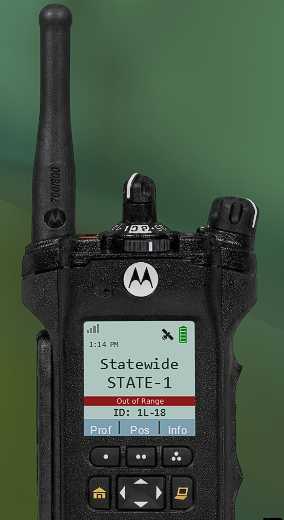
ApxRadio UI is a functional Motorola APX7000 style radio UI for LSPDFR. It includes a handheld and in-car radio for a nice visual display for dispatch plugins like, GrammarPolice, NexusDispatch, etc. It CAN be used with any dispatch plugin.

v1.3.3

Features include:

  • Interactive handheld and in-car radio controls

  • Up to 16 customizable zones with 16 channels per zone

  • Resize, reposition, and save both radios independently

  • Wi-Fi Smart Connect, Bluetooth, and GPS controls

  • GPS based Nearest Location display

  • Zone, channel, clock, profile, information, and TMS menus

  • Time synchronized day and night displays

  • Animated signal, connection, and transmission indicators

  • Tunnel signal loss and water radio failure

  • Customizable callsign, keybinds, sounds, and voice prompts

  • Partial controller support

  • Extensive configuration through apxconfig.ini or the in-game menu.

radio_body_night.png

out-of-range photo example

Press "F8" to open the in-game configuration menu. Keybinds can optionally be changed in the INI.

ApxRadio is a visual and immersion-focused plugin and does not replace your existing dispatch plugin.

Tutorial & YouTube Preview

(The last video is a tutorial. The other one is an example of the radio in action!)

Check the Instructions.txt file for more information on setting this plugin up. After installation, you MUST match ApxRadio’s transmit keybind to the transmit keybind used by your primary dispatch plugin if you want the "transmitting" text to appear on your radio.

Requirements:

  1. GTA V Legacy

  2. RAGE Plugin Hook

  3. LSPDFR

I'm trying to make it as "spec" as possible. I do intend to give the in-car radio better realism, as right now it's only partial. Though if anyone has suggestions to improving, please leave them in the comments.

If you need further assistance or find a bug, just shoot me a message; I'll see what I can do to help.

Edited by OwenAb
v1.3.3 update

What's New in Version 1.3.3

Released

This update was mainly focused on fixing a few outstanding bugs, with the added benefit of a few QoL improvements. Controller players who use this plugin should absolutely download this update, as the necessary fixes have been made.

What's new in V1.3.3?

  • Improved the startup process. A connection to "155.475 MHz" appears on initial startup.

  • Improved controller support with expanded button mapping options. Controller support can now be enabled or disabled directly from the in-game menu. (Off by default)

Previous Version - v1.3.2

  • In-game menu added, w/ Improved UI movement handling. Keybinds can be changed in the ini.

  • Day and night profiles now remain active and don't change, with a daylight cycle mode enabled by default.

  • Signal/Range logic revamped. Less sensitive.

  • Option added to automatically power the radio on start and to disable the out of range setting.

  • Radio now starts disconnected, requiring an initial connection to a zone.

  • Improved startup sequence.

  • Fixed other minor bugs.


Short Description

A fully functional Motorola APX-style handheld and in-car radio UI compatible with any dispatch plugin.

AI disclosure

The author has disclosed that AI tools were used in creating the following aspects of this file:

  • Mod and Mod Content (Moderate)

Fixing broken code/debugging.

User Feedback

Recommended Comments

bigroy36

Insiders

I'm still having the issue of the in-car radio texture disappearing after the new update.

Could contain: text, screenshot, car

craio2lk

Members

24 minutes ago, bigroy36 said:

I'm still having the issue of the in-car radio texture disappearing after the new update.

Could contain: text, screenshot, car

Same here thought I was tweaking lol

azzkik79

Members

where can i get that speedometer

OwenAb

Members Author

1 hour ago, bigroy36 said:

I'm still having the issue of the in-car radio texture disappearing after the new update.

Could contain: text, screenshot, car

I just re-released it, this SHOULD fix the issue, if not my only guess is your on an older LSPDFR or RPH version and you'll have to update. If this isn't the case and your on the newest version please DM me I'd like to help fix the issue. Account is on my profile.

bigroy36

Insiders

18 minutes ago, OwenAb said:

I just re-released it, this SHOULD fix the issue, if not my only guess is your on an older LSPDFR or RPH version and you'll have to update. If this isn't the case and your on the newest version please DM me I'd like to help fix the issue. Account is on my profile.

I'm all up to date so not sure why it was still happening. If you just re-released the most recent update, I'll have to update it and see what happens.

bigroy36

Insiders

Well, it's still doing it for me. It only disappears on the night version. Is there a way where I can just keep the day version on all the time and yes, I'm all up to date?

2 hours ago, bigroy36 said:

Well, it's still doing it for me. It only disappears on the night version. Is there a way where I can just keep the day version on all the time and yes, I'm all up to date?

i recommend deleting the folder and dll file and installing it again into plugins lspdfr (how i fixed mines)

BJ USA

Members

Nice! This seems more like visual instead of a plugin or script unless I missed something

Owen1422

Members

This is fantastic; it's exactly what I've been hoping to see on lspdfr. I'd appreciate the addition of a panic button (clickable with the mouse) and new models APX7500 and APX8000 (for smaller screens).

nova2727

Members

Is this mod a display only unit or can you chat dispatch too

bigroy36

Insiders

18 hours ago, Joshua2Shmood808 said:

i recommend deleting the folder and dll file and installing it again into plugins lspdfr (how i fixed mines)

I already have the files in that location.

Sergeant Jones

Members

does it really work with Nexus Dispatch? for me it crashes nexus dispatch and by that the whole Game.

shadownitecreed

Members

Do you need to have the Nexus MDT also to use this mod?

nova2727

Members

Crashes nexus mdt don’t use it with nexus MDT

OwenAb

Members Author

On 8/3/2026 at 5:23 PM, bigroy36 said:

I already have the files in that location.

I've been busy lately sorry about the delay but I'll go ahead and keep looking into it, and I'll add that feature where you can just keep it on the day mode just to be safe.

On 8/7/2026 at 12:34 PM, Sergeant Jones said:

does it really work with Nexus Dispatch? for me it crashes nexus dispatch and by that the whole Game.

I'm seeing a lot of complaints about it not working with NexusDispatch so I'll look deeper into it. I don't exactly have a copy of NexusDispatch to do my own testing with but I'll see what I can do, and will release a new version in a few days.

On 8/2/2026 at 8:17 PM, unitedOrange66 said:

Changing a hotkey to "None" applies the default hotkey instead.

Nobody's caught that until now, I'll fix it in the following update.

On 8/11/2026 at 2:48 AM, OwenAb said:

I've been busy lately sorry about the delay but I'll go ahead and keep looking into it, and I'll add that feature where you can just keep it on the day mode just to be safe.

I'm seeing a lot of complaints about it not working with NexusDispatch so I'll look deeper into it. I don't exactly have a copy of NexusDispatch to do my own testing with but I'll see what I can do, and will release a new version in a few days.

Nobody's caught that until now, I'll fix it in the following update.

when there comes a new version of APX Radio UI could you add a UI like the Tommy's radio script for fivem and make it so that we can change our callsigns in game instead of the .ini file

OwenAb

Members Author

On 8/26/2026 at 11:35 AM, William Bradford said:

when there comes a new version of APX Radio UI could you add a UI like the Tommy's radio script for fivem and make it so that we can change our callsigns in game instead of the .ini file

Yes, I've been working on that for a bit now. It's coming either tomorrow or sometime this weekend. I've been super busy; I'll get this update out asap.

On 8/31/2026 at 9:11 PM, Narobic on YouTube said:

Is there a way to make it start on instead of having to manually turn it on each session?

I will have that as an option on the menu.

5 hours ago, OwenAb said:

Yes, I've been working on that for a bit now. It's coming either tomorrow or sometime this weekend. I've been super busy; I'll get this update out asap.

I will have that as an option on the menu.

can you also make the like callsign change as Tommy's radio and a more realistic way of starting and connecting the radio to the zones and channels please bc that would make the radio so much more realistic btw i love the radio i mainly use it for LAPD METRO SWAT and CHP SWAT and LASD SEB and LASD OSS

Hunter0119

Members

Can you make a setting to disable controller support?? I think that was a bad feature as myself along with probably 90 percent of the community at this point already have a billion things mapped on our controllers.. It conflicts with too many mods so I am deleting until you update. thanks

OwenAb

Members Author

(edited)

7 hours ago, Hunter0119 said:

Can you make a setting to disable controller support?? I think that was a bad feature as myself along with probably 90 percent of the community at this point already have a billion things mapped on our controllers.. It conflicts with too many mods so I am deleting until you update. thanks

You can just set the controller keybinds in the INI to "None".

I'll have to fix that; I mistakenly made it fall back to the default keybind when set to "None". However, it can still be mapped to whatever combo in the INI.

Edited by OwenAb

bigroy36

Insiders

4 hours ago, OwenAb said:

You can just set the controller keybinds in the INI to "None".

I'll have to fix that; I mistakenly made it fall back to the default keybind when set to "None". However, it can still be mapped to whatever combo in the INI.

So how do you make it not use the controller at all? I don't want this on my controller, it's really messing me up. I have everything set to none.

nellyb

Members

Great mod and easy to use! I had to uninstall because the controller support though sadly.

Create an account or sign in to comment

Latest Mods

Account

Navigation

Search

Search

Configure browser push notifications

Chrome (Android)
  1. Tap the lock icon next to the address bar.
  2. Tap Permissions → Notifications.
  3. Adjust your preference.
Chrome (Desktop)
  1. Click the padlock icon in the address bar.
  2. Select Site settings.
  3. Find Notifications and adjust your preference.