


.png.3e87945f9bc54d0231b4407054892e52.png)
.png.62cba4180f7779fce9a8612150178a7e.png)
.png.528149b9ba410e7eaa3737d112999a68.png)
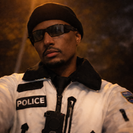
A custom white police snow jacket created for winter patrol and field operations. Designed for realism and immersion in EUP Single Player and LSPDFR
⭐ Special Features
- Custom white police snow jacket designed for winter patrol and field operations
- Inspired by an existing jacket and reworked for snowy environments
- Created in a short time with a clean and practical design in mind
- Includes two options:
- Version A: No "POLICE" text on the back
- Version B: "POLICE" text on the back
- Fully compatible with EUP Single Player & LSPDFR
🔧 Installation
1. Open OpenIV
2. Navigate to:
mods\update\x64\dlcpacks\eup\dlc.rpf\x64\eup_componentpeds.rpf\mp_m_freemode_01_mp_m_importexport_01
3. Install or replace the jacket files
4. Launch the game and equip the jacket via EUP Menu
✨ Notes
This project was made for fun and realism — staying clean in the field is not guaranteed 😉
Edited by officer Mshari
What's New in Version 1.0.0
Released
just fixed a small texture issue. you're now good to patrol
Short Description
Original jacket author unknown.
This jacket was found in previously installed EUP files and has been reworked and retextured by ME.
If you are the original creator, please contact me for proper credit or removal.

.thumb.jpg.53b34831893b714bdea2520e5d0a8595.jpg)











![[ELS-Hybrid | DLC/Addon ] Low-Profile z71 Tahoes](http://s3-screenshots.int-cdn.lcpdfrusercontent.com/monthly_2026_05/25_1(1).thumb.png.7bdf0066d86afe565fac5e2684baa3e8.png)
![Blaine County Sheriff's Office Package [Replace/Addon]](http://s3-screenshots.int-cdn.lcpdfrusercontent.com/monthly_2026_05/Screenshot2026-05-02002834.thumb.png.c4675a1f9cbe0dc058244f158c7ee8a1.png)

Recommended Comments
Create an account or sign in to comment