Skip to content
View in the app

A better way to browse. Learn more.

LCPDFR.com

A full-screen app on your home screen with push notifications, badges and more.

To install this app on iOS and iPadOS
  1. Tap the Share icon in Safari
  2. Scroll the menu and tap Add to Home Screen.
  3. Tap Add in the top-right corner.
To install this app on Android
  1. Tap the 3-dot menu (⋮) in the top-right corner of the browser.
  2. Tap Add to Home screen or Install app.
  3. Confirm by tapping Install.

ExternalPoliceComputer 2.0.1.0

(22 reviews)

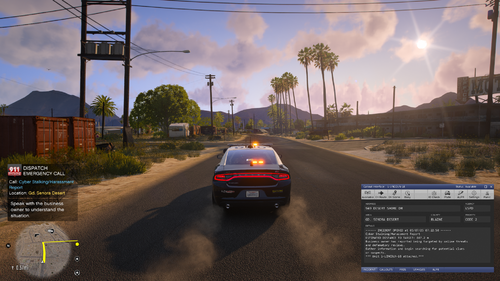
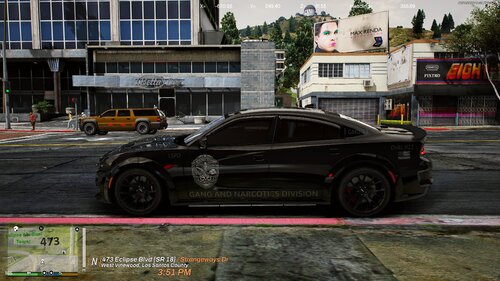
8 Screenshots

Welcome To ExternalPoliceComputer

  • Thank you for downloading ExternalPoliceComputer

  • EPC allows you to use any device in your home network (e.g. a laptop, your mobile or just the same device you're playing LSPDFR on) as a modern MDT

  • Important notices: STP is no longer supported as PolicingRedefined is the new standard (you can still use STP, it just doesn't sync like PR does); Your old configuration files will no longer work - remove them; Node.js is no longer required because the server is now integrated into the LSPDFR plugin


Features

  • New desktop like experience with modern UI and live in-game data

  • Ped and vehicle lookup

  • In-depth report system (more to come :))

  • Simple court system

  • Seamless integration and synchronization with PolicingRedefined and Callout Interface

  • In-depth customization and localization options


Requirements


Installation

  • Move all files and folders from the ZIP file into your GTA main directory


Setup

  • When going on duty using LSPDFR, ExternalPoliceComputer will display notifications in-game containing the addresses, used to access EPC

  • If you missed them, ExternalPoliceComputer also generates a file including the addresses: GTAV/EPC/ipAddresses.txt

  • You can access EPC using any browser of your choice (however I recommend a Chromium based browser, e.g. Chrome, Brave, etc.) by entering one of the addresses (if one doesn't work, try the other)

  • For more information on usage, check out the GitHub README

Setup using Steam

  • In Steam go to Steam → Settings → In Game

  • Make sure Enable the Steam Overlay while in-game is enabled

  • Set Overlay shortcut key(s) to whatever key you want to use to open ExternalPoliceComputer

  • Set Web browser home page to http://127.0.0.1:8080 (or the url provided by EPC)


Customization

  • You can customize your config.json, language.json, arrestOptions.json and citationOptions.json; all located in the EPC folder of your GTA main directory

  • The config can be customized on the customization page to avoid having to reload LSPDFR

  • Check out the GitHub README to learn more about Plugins for EPC

  • I highly recommend installing these arrest and citations charges by @unitedOrange66


Issues And Enhancements

  • Join The Discord Server for support, suggestion, and upcoming versions: https://discord.gg/RW9uy3spVb

  • This is my first LSDPFR Plugin or C# project for that matter; So please don't be too hard on me if you find out that my code is shit


Source Code

  • The code can be found on GitHub

  • Do not upload the code anywhere else and claim it as your own


Video by @Armouredivision


Edited by HeyPalu

What's New in Version 2.0.1.0

Released

2.0.1.0

Minor Changes:

  • Bug fix: game crashing if server couldn't start

  • Bug fix: date and time parsing in reports still didn't work sometimes

  • Minor styles changes on court page

Major Changes:

  • Addition of plugins and the customization page


Spoiler

2.0.0.6

Minor Changes:

  • Bug fix: URL ACL adding wasn't working for usernames with spaces

  • Bug fix: date parsing in reports didn't work for some locales

2.0.0.5

Major Changes:

  • Entire rework of ExternalPoliceComputer 


Short Description

ExternalPoliceComputer is the first Plugin for LSPDFR turning any device in your home network into a Police Computer.

AI disclosure

The author has disclosed that AI tools were used in creating the following aspects of this file:

  • Mod and Mod Content (Minor)

I use GitHub Copilot's inline suggestions for VS and VS Code (mostly for repetitive code snippets). AI also helped upgrading the arrest and citation options from 1.x to 2.x. The plugin was not created by AI, AI merely improved the workflow.

User Feedback

Recommended Comments

SuperMD2018

Members

How do I open External computer? What key do I press? 

irishtimezones

Members

On 10/14/2025 at 12:42 AM, SuperMD2018 said:

How do I open External computer? What key do I press? 

Its called "External" for a reason, read the description and follow their steps

SuperMD2018

Members

13 hours ago, irishtimezones said:

Its called "External" for a reason, read the description and follow their steps

I did it and I can't open it. I'm going to stick with computer lite instead. 

I have followed the online armored division video and the correct installation method, but I still cannot access the generated link

HeyPalu

Members Author

2 hours ago, Officer LinChina said:

I have followed the online armored division video and the correct installation method, but I still cannot access the generated link

You watched what video?

VRDog

Members

Is there ever a point in time in which I need to clear/cleanup the Court History? I notice that my list is HUGE haha. Just a thought that popped up.

HeyPalu

Members Author

21 hours ago, VRDog said:

Is there ever a point in time in which I need to clear/cleanup the Court History? I notice that my list is HUGE haha. Just a thought that popped up.

Yes, I forgot to implement an auto delete or something similar. For now, you can delete it manually in GTAV/EPC/data/court.json.

max703862

Members

Is it possible to autofill ped names or licence plates?

On 10/19/2025 at 12:15 AM, HeyPalu said:

You watched what video?

this

JoeDirte

Members

(edited)

Would it be possible to have the ID or DL pop up when you request ID like ReportsPlus? That way you dont have to pause the game & look under  notifications if you happen to forget the peds name, its really immersive breaking.

Edited by Dauntless95

HeyPalu

Members Author

On 11/3/2025 at 5:58 AM, Dauntless95 said:

Would it be possible to have the ID or DL pop up when you request ID like ReportsPlus? That way you dont have to pause the game & look under  notifications if you happen to forget the peds name, its really immersive breaking.

It is planned. 

Although I can use it now, for some reason, when I'm saving the report, the game freezes and crashes.

9 hours ago, Officer LinChina said:

Although I can use it now, for some reason, when I'm saving the report, the game freezes and crashes.

shoundlt be  happening, try reinstalling reports plus or rebooting. If all else fails, downgrade ur RP Desktop or ensure you have ur JVM up to  date as RP uses java

1 minute ago, 2 Girls 1 Cop Police GTA said:

shoundlt be  happening, try reinstalling reports plus or rebooting. If all else fails, downgrade ur RP Desktop or ensure you have ur JVM up to  date as RP uses java

I apologize ur using EPC, enusre node js is repaired or reinstalled

HeyPalu

Members Author

On 11/5/2025 at 3:19 AM, 2 Girls 1 Cop Police GTA said:

I apologize ur using EPC, enusre node js is repaired or reinstalled

EPC is no longer using NodeJS. 


On 11/4/2025 at 5:35 PM, Officer LinChina said:

Although I can use it now, for some reason, when I'm saving the report, the game freezes and crashes.

Please join the Discord for support

Noyzex

Members

(edited)

good!

Edited by Noyzex

STG45

Members

running start.bat and opens game fine,when i use forceduty,the game crashes

HeyPalu

Members Author

On 11/12/2025 at 8:46 PM, STG45 said:

running start.bat and opens game fine,when i use forceduty,the game crashes

Please join the Discord for support

Is it possible for me to add my own device so I can access the external police computer?

HeyPalu

Members Author

On 12/19/2025 at 11:33 PM, Jeremiahisapro7890 said:

Is it possible for me to add my own device so I can access the external police computer?

You can access EPC on any device in your local network.

I dont understand how this works at all

the game and EPC are not sync? how do i fix it?

djtiamme

Members

I really like it except i notice that it always crashes my game, whenever i go on duty, i have policing redifined but its not that only after i have made my backup before installing this after 1 day it starts crashing my game can someone help pleaz

HeyPalu

Members Author

12 hours ago, djtiamme said:

I really like it except i notice that it always crashes my game, whenever i go on duty, i have policing redifined but its not that only after i have made my backup before installing this after 1 day it starts crashing my game can someone help pleaz

Please join the Discord server for support.

Tony Buffet

Members

can you make it for stp? pr sucks

Create an account or sign in to comment

Account

Navigation

Search

Search

Configure browser push notifications

Chrome (Android)
  1. Tap the lock icon next to the address bar.
  2. Tap Permissions → Notifications.
  3. Adjust your preference.
Chrome (Desktop)
  1. Click the padlock icon in the address bar.
  2. Select Site settings.
  3. Find Notifications and adjust your preference.