


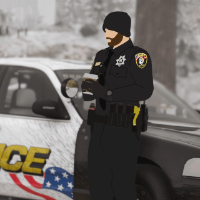


This is a texture pack replacing the majority of the current park clothing in the EUP (NOT game warden nor US Park Service). It includes clothing for both males and females such as:
Hats (5)
- Campaign
- Cowboy
- Forwards cap
- Backwards cap
- Dirt bike helmet
Shirts (8)
- Uniform Short Sleeve
- Uniform Long Sleeve
- Uniform Long Sleeve Tie
- Uniform Lots of Logos Short Sleeve
- Uniform Lots of Logos Long Sleeve
- Combat Shirt Tucked
- Combat Shirt Untucked
- Polo
Jackets (2)
- Normal Jacket
- Heavy (Winter) Jacket
Vests (3)
- High Vis (Hunting/Traffic) Vest
- Life Vest
- Light Bullet Proof Vest
Pants (2)
- Normal Uniform Pants
- Combat Pants
Badge (1)
- FWC Officer Badge / Name Plate
I included FiveM and LSPDFR install guides.
(No models are included or changed in this pack, only textures. YOU NEED EUP DOWNLOADED)
Due to being my first pack, there are most likely errors. Please contact me if you find any.
Thanks for checking out my file, enjoy!
EUP required to put textures on-
Short Description
Alex_Ashfold



.thumb.png.5919dc9dd354252d0c596d9817ce3469.png)
![BMW M4 Glasslight [FiveM Ready] (GL Customs)](http://s3-screenshots.int-cdn.lcpdfrusercontent.com/monthly_2026_06/7eeaf64a-932e-4ed4-a82b-4980024b5f24.thumb.png.3f0edd4a9eec04c052396aaf801297cd.png)
.thumb.png.da5c7eee82d68f346aa6969a885f9573.png)








.thumb.png.00b47e3fbc1a84f800b0da788a29270a.png)
Recommended Comments
Create an account or sign in to comment