Skip to content
View in the app

A better way to browse. Learn more.

LCPDFR.com

A full-screen app on your home screen with push notifications, badges and more.

To install this app on iOS and iPadOS
  1. Tap the Share icon in Safari
  2. Scroll the menu and tap Add to Home Screen.
  3. Tap Add in the top-right corner.
To install this app on Android
  1. Tap the 3-dot menu (⋮) in the top-right corner of the browser.
  2. Tap Add to Home screen or Install app.
  3. Confirm by tapping Install.

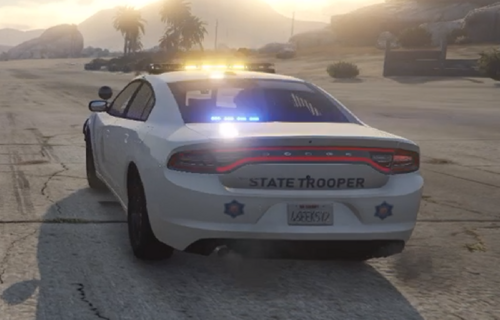
BCSO Livery Pack 1.0

(0 reviews)

1 Screenshot

This pack was made by a member of the Oryn Development team, 
DrO#0001


It contains template for the following 
2014 Charger 2014 Tahoe 2016 Explorer 2018 Charger 2018 Ford F-150 2018 Silverado 2018 Tahoe 2016 Ram Harley Impala
and should fit most vehicle packs!


For more, join our discord!
https://discord.gg/VdGqERbrQd

Edited by Oryn Development
Wrongful Description


Short Description

Livery Pack For BCSO, with a Unique Twist!

User Feedback

Recommended Comments

inspectior

Members

(edited)

So we would have to buy the car pack?

Edited by inspectior

Oryn Development

Members Author

1 minute ago, inspectior said:

That looks cool, I will look in open IV Now!!!!


Thank you! hope you enjoy the pack and feel free to drop any errors you find! always looking to improve here!

5 minutes ago, inspectior said:

So we would have to buy the car pack?

No these are just templates, they SHOULD fit on most vehicle packs!

inspectior

Members

ok

BumbleBee4218

Members

could i use this in a vehicle pack i am making?

Oryn Development

Members Author

17 hours ago, Volatus said:

could i use this in a vehicle pack i am making?

How do you mean? 

If you plan on rereleasing or reselling the skins, please contact us at https://discord.gg/VdGqERbrQd

If you just want to compile it with a group of other skins, make sure you credit and link us fully

Create an account or sign in to comment

Account

Navigation

Search

Search

Configure browser push notifications

Chrome (Android)
  1. Tap the lock icon next to the address bar.
  2. Tap Permissions → Notifications.
  3. Adjust your preference.
Chrome (Desktop)
  1. Click the padlock icon in the address bar.
  2. Select Site settings.
  3. Find Notifications and adjust your preference.