


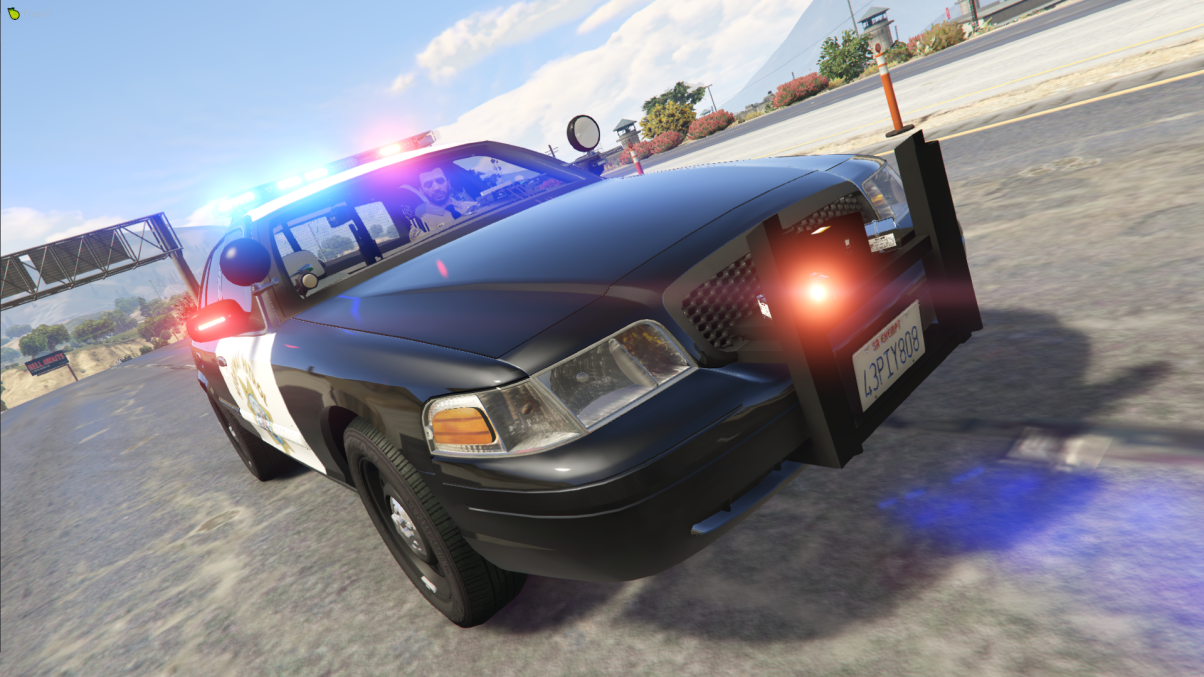

This is an ELS version of this pack I also made:
Outdated and will not be updated!!
Discord: https://discord.gg/4Md2V6W
Add-On: https://drive.google.com/drive/folders/1FOzbXZbx4j7rUqLBaeTZ4FdsM9thIaKF
FAQ:
Q: Why aren't my lights bright?
A: Install a visual mod.
Q: Where is (insert any vehicle here)?
A: I've added the main vehicles but I didn't have a good F250 base.
Q: Can you help me fix the lights?
A: No.
Q: Will you send me parts?
A: No.
Q: Can I video it for LSPDFR?
A: Sure! Just give credit where it is due. Please, by all means, feel free to post your video in the comments section!
Q: Can I make skins for this Pack?
A: Sure, don't upload the model itself though.
Q: Why did you release this pack?
A: Cuz leakers are stupid.
That should be it, comes with lore and non lore skins.
Enjoy! 🙂
Edited by DriFtRagnarok
What's New in Version 1.0.1
Released
Added the Slicktop 2018 Tahoe
Short Description
- Vehicles:
2018 Charger
- Original vehicle model is 2015 Dodge Charger from Forza, edited into the 2018 Dodge Charger Pursuit by Matt with parts from FH3 and Gamemodels
- Seats, center mirror, shifter and dash edits modeled and done by Kane104 - commissioned by Ranger Rick
- Major help from EVI for digital dial information and help to get the dials working and his patience to help me
- Rear bumper diffuser modeled by Patrol 31 Normal edits by Steinberg
- AWD/Charger badge modeled by iansonwheels Converted to V by Matt
- AWD Steelies/Hubcap modeled by iansonwheels Converted to V by Matt
- Big thanks to Cj24 for beta testing the model and help with spec maps and normal maps and his overall knowledge of gta materials
- Interior dial textures made by NeonLazer
- Interior button textures made by Slendis
- Rims from Gamemodels.ru Centercap edited by Matt
- Dome Light modeled by Matt
- A big thanks to Cj24, Kane104, EVI, Patrol 31, Steinberg , Desmond , NeOnLaZeR, Izick, Rekram, HDgamerzPC, and a big thanks to Ranger Rick who bought 3D parts so that i wouldn't give up on this project and bought me a Zmodeler license so that i can keep working on this project Thank you Rick.
- Thank you to everyone who supported me and the project...
- Another big thanks to iansonwheels who had the time to make the AWD steelies and AWD package stuff....
2011 Crown Victoria
- 2011 Forza CVPI Base Extracted by DMN
- Optimized, Converted, Textured and stuff by Thehurk
- Realisim Edits and more optimization by Lundy
- Major support with screenshots, feedback, IRL pictures, etc by Steinberg, Lundy, Problematic, and Taylor Swift
- Steelies and tires by Carper
- Hubcaps and tires by Carper
2018 Tahoe
- 2015 Suburban by Carface converted to a 2019-2020 Tahoe PPV by Dan with da van
- Countless Textures and parts redone and remodeled by Dan with da Van
- Most included parts modeled and textured by Dan with da van
- Door sticker redone by Billy J.
- Thanks to Bigams for providing high quality pictures of a real Tahoe
- Major edits by Dan with da Van
- ENV from some lspdfr post oof
- Templated and normals redone by Dan with da van
- A huge thanks to everyone below for helping make this project as good as it is.
- Krul, TickleMyElmo, Blaster, HP Deskjet, Bigams, INSAN1TY, Billy J and Maurice97
2013 Expedition
- Model from from Hum3d
- Heavily Edited and Reworked by 0taku
- Converted for use in V by 0taku
- Texutered by 0taku
- Cabin scatched made by 0taku
- assorted parts from DSF/Forza
- 6 spoke alloy made and Texutered by 0taku
- SSV rim made by McGarrte, tweaked and texterted my 0taku
- Tire textured by 0taku.
- Resse towbar hitch Made and texutered by Wolfrunner86
- other asorted parts by Rockgames
- Assorted bump maps from Forza
2013 FPIU
- Medic909 forgot the credits oof
2016 FPIU
- Ford explorer Base model purchased by Thehurk, GTAxB0SS, Requiem and Windows446
- Poly Crunched, Textured, Converted by Thehurk.
- Interior purchased by TrentMU and FRGamer
- Textures by Taylor Swift, Thehurk, & OfficerUnderwood
- Heavily edited this piece of shit into a polished piece of shit by OfficerUnderwood
- Rims by BxBugs123, Centercap by Carper
- Interceptor Hood text by GTAxB0SS
2009 Charger
- Original Dodge Charger Model by EVERMOTION. Model Optimized, UV-Mapped, Templated & Converted to GTA
V by PSource.
- Body L2 & L3 from Forza 4 SRT8 2010 Charger. Textured and Templated by PSource
- Body Polyfilling from Original GTA V Models and Forza 4, Fitted by PSource. Door Jambs Modeled by PSource.
- 2009-2010 Taillights & Reverse Lights from NFS MW 2012 Charger. Fitted and Texture Editing by PSource .
- Dials and Dial Emissive Textures by PSource.
- Door Trim, Gear Lever, Interior Mounted Mirror and Steering Wheel from Forza. Converted, Fitted and
Textured by PSource.
- Driver & Passenger Front Seats from Simraceway. Converted by PSource.
- Tire Tread from Original GTA V Models. Fitted by PSource.
2013 Tahoe
- 2013 Chevy Tahoe scratch modeled by ShadyDK13
- Converted and textured by Thehurk
- Steeringwheel and Seats from the crew, textured and converted by Thehurk
- Dials from OfficerUnderwood's Tahoe release
2013 Harley Davidson
- Harley Davidson Electraglide Purchased by beautiful bastards at Code Zero Gaming
- Bike poly Crunched by Thehurk
- Converted to GTA V by Thehurk
- Templated by Windows446 and Thehurk
- Released by Polecat324 & BayAreaBuggs for community enjoyment 1-3-17
2014 BMW R1200RT
- Harley Davidson Electraglide Purchased by beautiful bastards at Code Zero Gaming
- Bike poly Crunched by Thehurk
- Converted to GTA V by Thehurk
- Templated by Windows446 and Thehurk
- Released by Polecat324 & BayAreaBuggs for community enjoyment 1-3-17
- Lighting
- Generic Dashlight Package by Bueno Emissive textures edited by DriFt Ragnarok
- Whelen Liberty modeled by RoegonTV edited to CHP Spec by DriFt Ragnarok
- 3D Creation by TraumaPak
- Textured/Converted/ELS'd by VooDoo
- Whelen Dominator by tomcat8492 edited to CHP Specs by DriFt Ragnarok
- Whelen ION modelled and textured by CEO.
- Vison, Vison SL and 3 vector versions Scratch Made and textured by 0taku
- Parts
- Fedsig AS124 made by thehurk
- Federal Signal TS100 Speaker modeled and textured by HDgamerzPC
- iForce made by an unknown person
- Kustom Signal Radars Modelled And Textured By Jakub
- Top Watchguard Controller thing made by Dan with da Van i think
- WatchGuard 4RE HD Mini Zoom Camera scratch modeled, textured, and converted to GTA V by HDgamerzPC
- Setina Prisoner Partition Modeled, Textured by Cap'n Crunch. Textures by Cap'n Crunch. Converted to V by VooDoo
- Guns bought on Turbosquid and converted by DriFt Ragnarok
Assembly by DriFt Ragnarok


















Recommended Comments
Create an account or sign in to comment