


Features
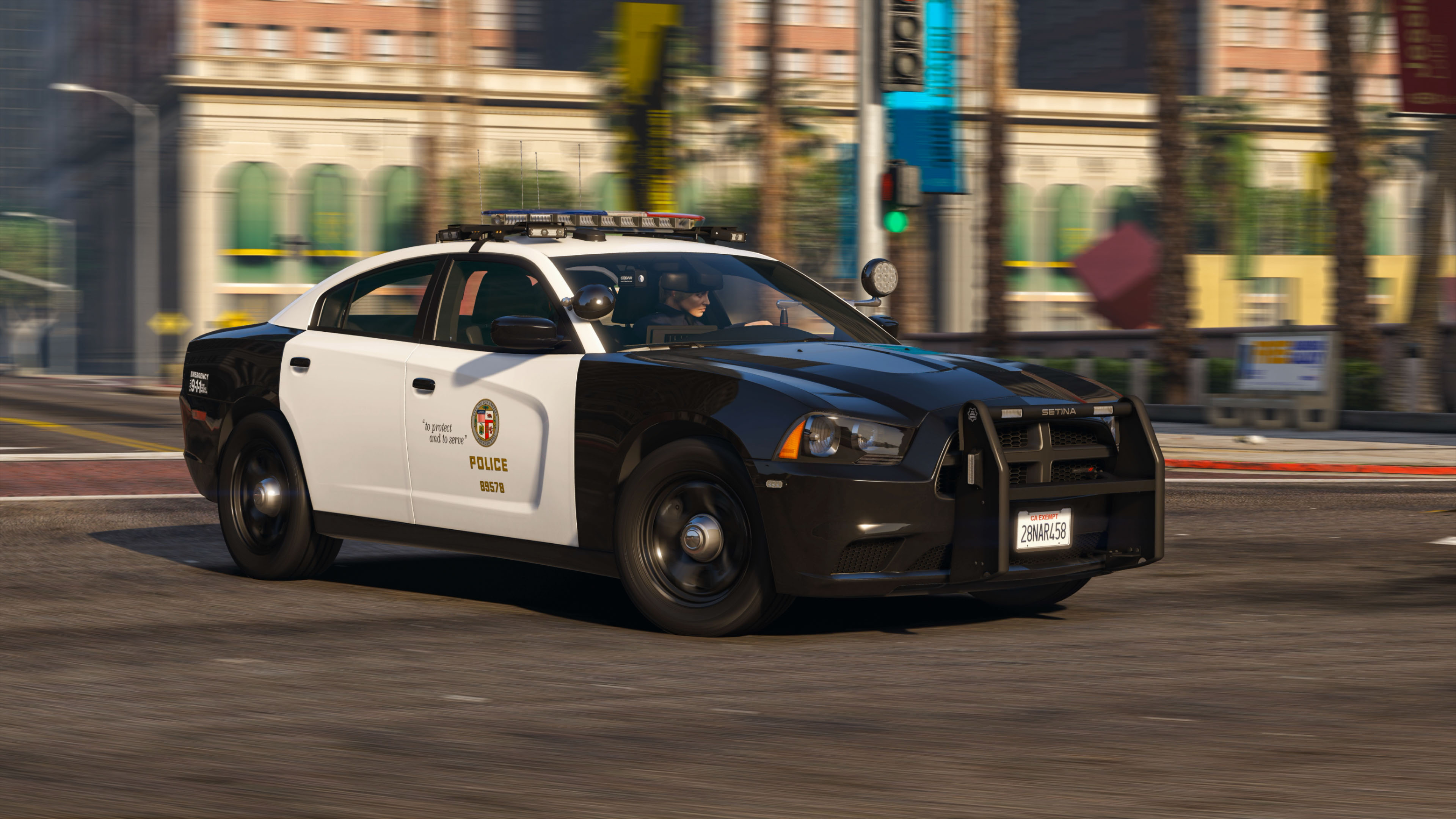
- Updated base model with improved exterior, completely remapped and retextured interior, and heavily optimized LODs.
- Replicates real LAPD lighting patterns.
- Digital speed display in the instrument cluster.
- Breaking glass, working dials, pushbar collision, and bullet resistant windshield.
- ELS Takedown with spotlight.
- Authentic LAPD livery.
- Accurate and beautiful environmental lighting with each light module featuring its own corona.
Optional Equipment
- Pushbar (extra 10)
- LoJack system (extra 12)
PLEASE NOTE that this is a ELS/non-ELS hybrid vehicle which means it requires custom carcols/carvariations for the lights to work properly. For ease of installation I've provided a DLC pack for replacing the police2 slot. The included vehicles.meta is also mandatory install for correct dashboard and extra spawning behavior.
You're welcome to follow my WIP gallery where I'll be posting updates as I work on the vehicle.
That should be it. Hope you guys enjoy the car as much as I did making it!
Acknowledgements
- See credits tab for base/parts used.
- PNWParksFan for his Live Lights plugin which makes customizing and debugging siren settings actually fun.
- LMS for his DevHelper (part of LML), which makes developing vehicles immeasurably easier (countless of hours saved).
- vladimir850 for his excellent LAPD graphics template.
Permissions
- You MAY NOT upload this mod to other websites or redistribute via other channels without my permission.
- You MAY NOT, in any circumstances, use this model for your financial gain in any way, shape or form.
Edited by KLE0
What's New in Version 1.2.1
Released
- Tweaked wheel scale
- Better bumper collisions
- Further improvements of dirtmapping
- Made the red lights in the lightbar slightly less orange
- Made the taillight slightly less orange
Recent Updates
Quotev1.2 - Oct 17, 2020
- Added Remington Model 870 Shotgun
- Improved interior buttons so they are more accurate
- Improved ELS corona location so they sync up with the mesh
- Adjusted door and bumper area collisions
- Fixed a bug where the reversing lights will stay on for L2
- Fixed a seam in dirtmapping in the front bumper area
- Fixed material order for the partition glass
- Improved the wheels so they are more true to real life
v1.1 - Oct 10, 2020
- Added partition and rear molded transport seats
- Added LoJack controller (optional, extra)
- Added high beam wig-wag
- Further model & texture optimizations
- Better dirt mapping
- Fixed floating ELS takedown corona
- Fixed rear seating positions
- Added lightbar glass breaking
- Other bug fixes and improvements throughout
v1.0 - Oct 3, 2020
Initial release
Short Description
- 2013 Charger SRT8 from Forza Horizon
- Converted and textured by Thehurk
- Converted to PPV by Thehurk
- Templated by Thehurk
- Taillight textures by Five0
- Dodge Charger Steelie by Matt/Peralta
- L4 model by BxBugs123
- Further edits and overhaul by KLE0, including improved headlights, taillights, marker lights, new dirtmap, dials, buttons, remapped and smoothed dash, seats and floor, and more.
- Other bug fixes and optimizations by KLE0.
Cj24
- Dome light modeled and textured by Cj24.
- Federal Signal siren controller modeled and textured by Cj24.
- Motorola antennas modeled and textured by Cj24.
- Console modeled and textured by Cj24.
- FS Impaxx lights modeled and textured by Cj24.
- FS MicroPulse modeled and textured by Cj24.
- Whelen LED spotlight modeled and textured by Cj24.
RobertTM
- Federal Signal Arjent S2 modeled and textured by RobertTM, emissives by Cj24. Edited by KLE0.
- Goodyear Eagle RS-A Textures by Robert; Original tire model by Matt; Tire remapping and wisdom from Cj24; Special thanks to GeorgieMoon, Matt and Cartres for their help
Dan with da van
- Motorola APX 6500 Modeled, textured and UV-mapped by Dan with da van. Edited by KLE0.
- Havis TSD keyboard modeled, UV-mapped and textured by Dan with da van. Edited by KLE0.
- Coban EDGE Modeled, textured and UV-mapped by Dan with da van.
Billy Johnsson
- LoJack by Billy Johnsson. Edited and retextured by KLE0.
- Remington 870 shotgun by Billy Johnsson. Retextured by KLE0.
- Antenna Pack by Billy Johnsson.
- FedSig laptop light by Billy Johnsson.
- MPH900 & Pips lightbar mounted ALPR by Billy Johnsson.
- 2018 Dodge Charger molded seating by Billy Johnsson.
Twurtleee
- Setina pack by Twurtleee. Textures by CEO. Edited, optimized, and remapped by KLE0.



![[EUP] Met Custody SGT Softshell fleece](http://s3-screenshots.int-cdn.lcpdfrusercontent.com/resize/500/-/monthly_2026_05/metsoftshell.thumb.png.e4097f75eb2b1152517ba60a3dd3c088.png)
![[ELS][REPLACE] Škoda Kodiaq 2018 Czech Police Pack - 3 Variations](http://s3-screenshots.int-cdn.lcpdfrusercontent.com/resize/500/-/monthly_2026_05/20260502191956_1.thumb.jpg.e3466489ca866b63ffeeb7c0dc576069.jpg)





![[EUP] COLP](http://s3-screenshots.int-cdn.lcpdfrusercontent.com/resize/500/-/monthly_2026_05/COL_2.thumb.png.8f6eb8191867522992ea01416d182a80.png)
![[EUP] CBRN](http://s3-screenshots.int-cdn.lcpdfrusercontent.com/resize/500/-/monthly_2026_05/CBRN_2.thumb.png.f03f06680f58ccff02223a2fe99e473b.png)

.thumb.png.bd195e42a078bb7c7f3a1182f03e9694.png)



![[Non-ELS/DLSv2] Generic BMW R1200RT-P [Addon/FiveM]](http://s3-screenshots.int-cdn.lcpdfrusercontent.com/resize/500/-/monthly_2026_05/1.Thumbnail.thumb.png.1755ddcc24711022d8951345c49501b7.png)
Recommended Comments
Create an account or sign in to comment