Skip to content
View in the app

A better way to browse. Learn more.

LCPDFR.com

A full-screen app on your home screen with push notifications, badges and more.

To install this app on iOS and iPadOS
  1. Tap the Share icon in Safari
  2. Scroll the menu and tap Add to Home Screen.
  3. Tap Add in the top-right corner.
To install this app on Android
  1. Tap the 3-dot menu (⋮) in the top-right corner of the browser.
  2. Tap Add to Home screen or Install app.
  3. Confirm by tapping Install.

[ELS] ESU Addon Pack 1.2

(0 reviews)

17 Screenshots

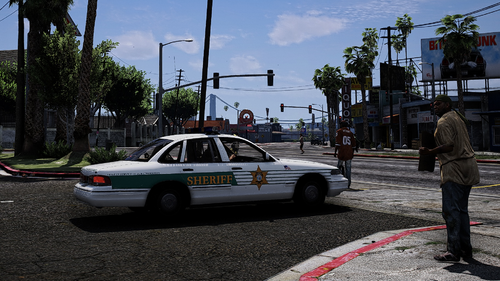
After weeks of tweaking and finalizing its finally here. Here we have a pack of 8 vehicles and 2 boats. The livery is based around NYPD, but the vehicles themselves are based out of vehicles in the North East. Featuring all blue lighting and Maine inspired license plates, these vehicles are sure to stand out.


THESE ARE MEANT TO BE USED FOR ROLE PLAYING RATHER THAN EVERYDAY PATROLS!!

Why do I say that? Many of these vehicles are high poly. Attempting to use them as replacement vehicles will cause game crashes. That being said, you can spawn all of them at the same time together if you choose to do so with out any game crashes.


Big note: The Defender series boat (Huge shoutout to @SkylineGTRFreak and @PNWParksFan for making this model available as a DEV) does not detach from the trailer. It was designed with role playing in mind. To use the boat you need to spawn it from your trainer.


Heres a video showing how the slide outs on the Mobile Command Center works.


Installation instructions and full credits can be found in the Readme PDF


Known issues:

You can enter and wander around the MCC but its a pain to exit.

Partners are unable to enter the boat with you. All they do is swim next to it. Hopefully the creators of the DEV boat will chime in with a fix.


What's New in Version 1.2

Released

Version 1.0.1 includes the ELS files.


Version 1.1


Fixes an issue with the boat. You can now enter the boat like a normal vehicle

Updates the readme

Cleans up the inside of MCC a little bit. Makes it easier to walk around in the MCC.

Fixes an LOD issue with the Hazmat truck


Thank you to @Odolwa for bringing some issues and solutions to my attention.

Makes changes to some internal files

Fixes the Tahoe not being recognized as a Law Enforcement vehicle

User Feedback

Recommended Comments

can do it

Members

Cool


al1234.luk

Members

Very nice, but where are the Els Files?

GTOMO98

Members

1 hour ago, al1234.luk said:

Very nice, but where are the Els Files?

you can use any


frostysnowman18

Members

1 hour ago, GTOMO98 said:

you can use any


what do you mean i can use any


blacktrails

Members Author

He means you can use any ELS XML and rename it to the vehicle came and it will work. But I am uploading a revised file now.

agent rogers

Members

it crashes my game the game wont load once i put it my mod folder?

irishman

Members

the pack isn't showing up in game for me at all. i had done the installation like it says in the read me and nothing at all.

agent rogers

Members

17 minutes ago, irishman said:

the pack isn't showing up in game for me at all. i had done the installation like it says in the read me and nothing at all.

have to spawn it by name or a trainer like all addons i can't even add it without it crashing the game

irishman

Members

(edited)

i did try to spawn them outside of the trainer and nothing happened. this is not the first addon pack i have put in the game and nothing was working at all. Not trying to be rude. I know that when people type things out it doesn't always come out the way they really want it to. 


Edited by irishman

blacktrails

Members Author

48 minutes ago, irishman said:

i did try to spawn them outside of the trainer and nothing happened. this is not the first addon pack i have put in the game and nothing was working at all. Not trying to be rude. I know that when people type things out it doesn't always come out the way they really want it to. 


You can try using “\” instead of “/“ in the dlclist.xml. I’ve had that work for addon packs. 
 

As for game crashes, it’s possible your PC adjust can’t handle it. Many of the vehicles are larger than your normal addons. 

agent rogers

Members

51 minutes ago, blacktrails said:

You can try using “\” instead of “/“ in the dlclist.xml. I’ve had that work for addon packs. 
 

As for game crashes, it’s possible your PC adjust can’t handle it. Many of the vehicles are larger than your normal addons. 

wouldn't make sense never had an issue  I've made many addons and never had any issue


Doctor420

Members

would be cool if you could make a red and blue lights version, Also would love to see some LAPD skins for these cars


agent rogers

Members

1 hour ago, blacktrails said:

You can try using “\” instead of “/“ in the dlclist.xml. I’ve had that work for addon packs. 
 

As for game crashes, it’s possible your PC adjust can’t handle it. Many of the vehicles are larger than your normal addons. 

got it it was my gameconfig file

blacktrails

Members Author

49 minutes ago, Doctor420 said:

would be cool if you could make a red and blue lights version, Also would love to see some LAPD skins for these cars


You can edit the light textures yourself if you’d like. But it might not work due to the way I mapped the lights. But you can try. There are plenty of tutorials showing how. As for skins, all the templates are there, feel free to make your own 

Renegade44

Members

2 hours ago, agent rogers said:

got it it was my gameconfig file

what did you change in yours because I am having the same issue you were having?


Jeffdadawg

Members

Wow.

irishman

Members

18 hours ago, blacktrails said:

You can try using “\” instead of “/“ in the dlclist.xml. I’ve had that work for addon packs. 
 

As for game crashes, it’s possible your PC adjust can’t handle it. Many of the vehicles are larger than your normal addons. 

I had tried what you had suggested and it didn't work at all. I do have other add on packs in game and those do work also have a gameconfig in as well that way i can use the other vehicles as well.

Hewitt911

Members

hey man great job, love these, just wondered if there would be any chance you could include Red/Blue please?

Soltan

Members

where do install the .xml files , its not minsioned in the readme file

blacktrails

Members Author

56 minutes ago, Soltan said:

where do install the .xml files , its not minsioned in the readme file

Same place all ELS files go. GTAV>ELS>pack_default

Soltan

Members

(edited)

icant find them in the trainer or spawn them by the names u provided in the readme file . idid the install as u said in the readme file step by step

Edited by Soltan

blacktrails

Members Author

21 hours ago, Soltan said:

icant find them in the trainer or spawn them by the names u provided in the readme file . idid the install as u said in the readme file step by step

Do you have a custom gameconfig file?

Soltan

Members

no how to get it

greetex2

Members

hi, do you have a template for the hazmat box?

Create an account or sign in to comment

Latest Mods

Account

Navigation

Search

Search

Configure browser push notifications

Chrome (Android)
  1. Tap the lock icon next to the address bar.
  2. Tap Permissions → Notifications.
  3. Adjust your preference.
Chrome (Desktop)
  1. Click the padlock icon in the address bar.
  2. Select Site settings.
  3. Find Notifications and adjust your preference.