
Skip to content
View in the app

A better way to browse. Learn more.

LCPDFR.com

A full-screen app on your home screen with push notifications, badges and more.

To install this app on iOS and iPadOS
  1. Tap the Share icon in Safari
  2. Scroll the menu and tap Add to Home Screen.
  3. Tap Add in the top-right corner.
To install this app on Android
  1. Tap the 3-dot menu (⋮) in the top-right corner of the browser.
  2. Tap Add to Home screen or Install app.
  3. Confirm by tapping Install.

LSPD Mega Pack 1.7.5

(2 reviews)

20 Screenshots

LSPD Mega Pack

I created this texture off of Othrin's BCSO Sheriff Pack. Will also be working on a State pack to pair with these textures as well. Please let me know what you think in the comments below! If you like the pack, don't forget to like it!!!! Thank you for over 1000 Downloads! Video Thanks to @OfficerBenzo!!!(BenzoEffect)


Textures Included:


2011 CVPI has Police, Task Force, Traffic Unit, and Community Outreach Team

2013 F350 San Andreas Medical Examiner (Coroner)

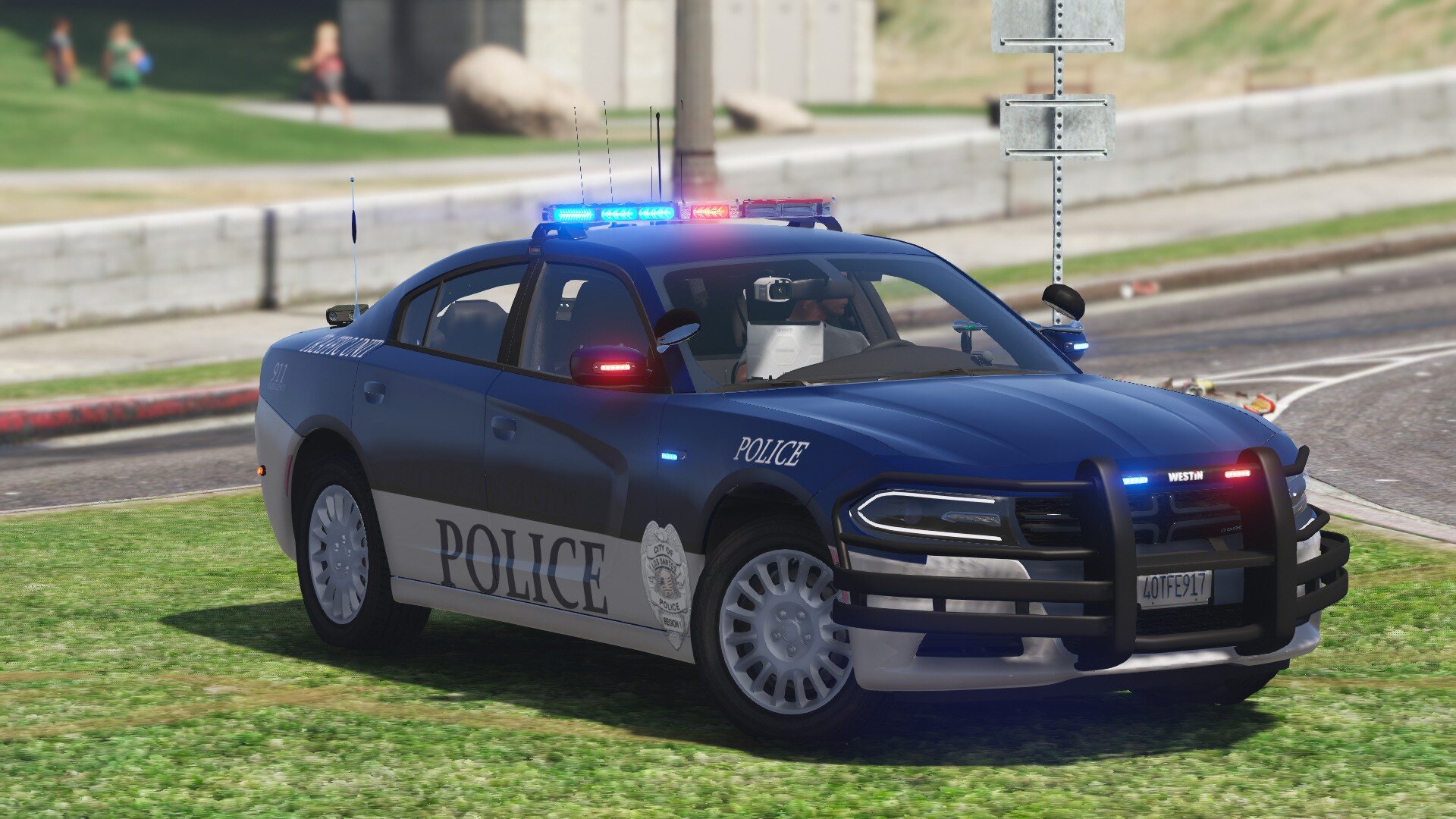
2014 Charger has Police and Traffic Unit Textures, more coming soon

2016 Express has prisoner transport texture

2016 FPIU has Police, Traffic Unit, Task Force, and K9

2018 charger has a Police and Traffic Unit Texture, more coming soon

2018 Tahoe has Police, Traffic Unit, Task Force and Supervisor textures, K9 coming soon

2020 Silverado has a sergeant, K9, Task force, police textures

2020 FPIU has a Traffic unit, K9, Task Force, Police textures

2021 Tahoe has a Police Texture, more coming soon


Install Instructions can be found in the read me text along with credits. If I forgot anyone please let me know


DO NOT CLAIM AS YOUR OWN WORK, MODIFY, REDISTRIBUTE, OR USE FOR ANY FORM OF COMMERCIAL, FINANCIAL, OR PERSONAL GAIN. I AM NOT OR ANY CONTRIBUTORS TO THIS FILE WILL NOT BE HELD RESPONSIBLE FOR ANY DAMAGE CAUSED TO YOUR GAME, OR THE SYSTEM ON WHICH YOU STORE THIS FILE ON. 


vehicles used


Edited by Dtailed Designs
Vehicle File not available anymore

What's New in Version 1.7.5

Released

Fixed the texture issues with the CVPI, 16FPIU, 20FPIU


Short Description

Los Santos Police Department Mega Pack

User Feedback

Recommended Comments

bosSdIng035

Members

the medical examiner looks so amazing on the f150, keep up the amazing work.

20200917154015_1.jpg

20200917154019_1.jpg

20200917154023_1.jpg

Dtailed Designs

Members Author

11 hours ago, bosSdIng035 said:

the medical examiner looks so amazing on the f150, keep up the amazing work.

20200917154015_1.jpg

20200917154019_1.jpg

20200917154023_1.jpg

Thank you!! Glad you like it! More to come so stay tuned!

Dtailed Designs

Members Author

Just now, Kollin M. said:

amazing looking pack man, keep up the great work

Thank you!! Few updates left, 3 vehicles I would like to see left to put in, any others users would like to see will be completed as well. Feel free to use in screenshots and videos as long as I am credited. Enjoy!

Dtailed Designs

Members Author

2 hours ago, sledge5557 said:

like i promise a few pictures !!!! more to come.

GTA5 2020-09-21 17-29-36-660.jpg

GTA5 2020-09-21 17-30-29-629.jpg

Looks good! glad you're enjoying the pack! Keep the pics coming!

Darkdemon57682

Members

Amazing pack dude as soon as I saw this I almost spit out my drink 

bjackson1991

Members

guessing my pack was used for the 2020 FPIU that doesn't have pics yet?

Dtailed Designs

Members Author

1 hour ago, bjackson1991 said:

guessing my pack was used for the 2020 FPIU that doesn't have pics yet?

I had the pics just hadn't posted yet because I was still working on some textures. and then going to take the pics all together. The pics of your 2020 FPIU is now posted and the Main pic on the file because I like the way the 2020 FPIU came out with the Textures. Hope you enjoy the pack!

InsaneFERFER

Members

Couple things...


1. Some textures (I think the CVIC, 16FPIU, and now the 20FPIU) are in the wrong format. I noticed they didn't work until I went into paint.net and converted them to DTX5. No problem for me, but others may not be aware of the issue as to why these textures might not be working for them.


2. Any way you can create a 20FPIU texture for a '20 FPIU model that utilizes stage 1 lights (yellow/amber lights)? I like using the SEC lights but this model doesn't have them.


Other than that, these textures are great and I really like the vehicle models you used.


Thanks,

Dtailed Designs

Members Author

(edited)

Thank you! Can't wait to see the video!

On 11/4/2020 at 1:18 PM, InsaneFERFER said:

Couple things...


1. Some textures (I think the CVIC, 16FPIU, and now the 20FPIU) are in the wrong format. I noticed they didn't work until I went into paint.net and converted them to DTX5. No problem for me, but others may not be aware of the issue as to why these textures might not be working for them.


2. Any way you can create a 20FPIU texture for a '20 FPIU model that utilizes stage 1 lights (yellow/amber lights)? I like using the SEC lights but this model doesn't have them.


Other than that, these textures are great and I really like the vehicle models you used.


Thanks,

You should be able to find a 2020 FPIU with sec lights that fight this Texture. I only created the texture not the vehicle model, sorry. As far as the DXT5 I will have to recompress them and re-upload them so they work correctly, sorry about that

Edited by DTailedKill3er

BlueLine Vibes

Members

On 11/4/2020 at 2:18 PM, InsaneFERFER said:

Couple things...


1. Some textures (I think the CVIC, 16FPIU, and now the 20FPIU) are in the wrong format. I noticed they didn't work until I went into paint.net and converted them to DTX5. No problem for me, but others may not be aware of the issue as to why these textures might not be working for them.


2. Any way you can create a 20FPIU texture for a '20 FPIU model that utilizes stage 1 lights (yellow/amber lights)? I like using the SEC lights but this model doesn't have them.


Other than that, these textures are great and I really like the vehicle models you used.


Thanks,


Ya noticed the CVPI dds file was not replacing the file correctly.  Anyone else have an idea which program to convert the cvpi_sign_I.dds file?  I do not have access to paint.net 

InsaneFERFER

Members

@DTailedKill3er yeah I realized I could do that right after I posted that. I ended up finding one easily.


@OfficerBenzo I'm pretty sure @DTailedKill3er updated those textures so you shouldn't have to worry about reformatting them yourself; just redownload his file.


Windmaster1001

Members

Did you make a tutorial yet on how to install it?


Dtailed Designs

Members Author

22 hours ago, Windmaster1001 said:

Did you make a tutorial yet on how to install it?


I did not, but it is not that hard. Install your vehicle of choice. Install my pack, drag the selected vehicle skin to your desktop. Find the YTD file and open it in openIV. Locate the search bar, search for the sign E.x (Chgr_sign_1) and click it. In the top right hand corner there will be a replace option, click that. it will give you the option to find the file you wish to replace the texture with. Select the file(s) you chose to drag to your desktop and click okay, It should load my skins into openIV and replace the old texture. Do this for all vehicles and if there is multiple textures replace all of them one by one with my textures and liveries. Its the way I do it. 

Create an account or sign in to comment

Latest Mods

Account

Navigation

Search

Search

Configure browser push notifications

Chrome (Android)
  1. Tap the lock icon next to the address bar.
  2. Tap Permissions → Notifications.
  3. Adjust your preference.
Chrome (Desktop)
  1. Click the padlock icon in the address bar.
  2. Select Site settings.
  3. Find Notifications and adjust your preference.










