
Skip to content
View in the app

A better way to browse. Learn more.

LCPDFR.com

A full-screen app on your home screen with push notifications, badges and more.

To install this app on iOS and iPadOS
  1. Tap the Share icon in Safari
  2. Scroll the menu and tap Add to Home Screen.
  3. Tap Add in the top-right corner.
To install this app on Android
  1. Tap the 3-dot menu (⋮) in the top-right corner of the browser.
  2. Tap Add to Home screen or Install app.
  3. Confirm by tapping Install.

Dynamic Lighting System 2.0.0.2

(20 reviews)

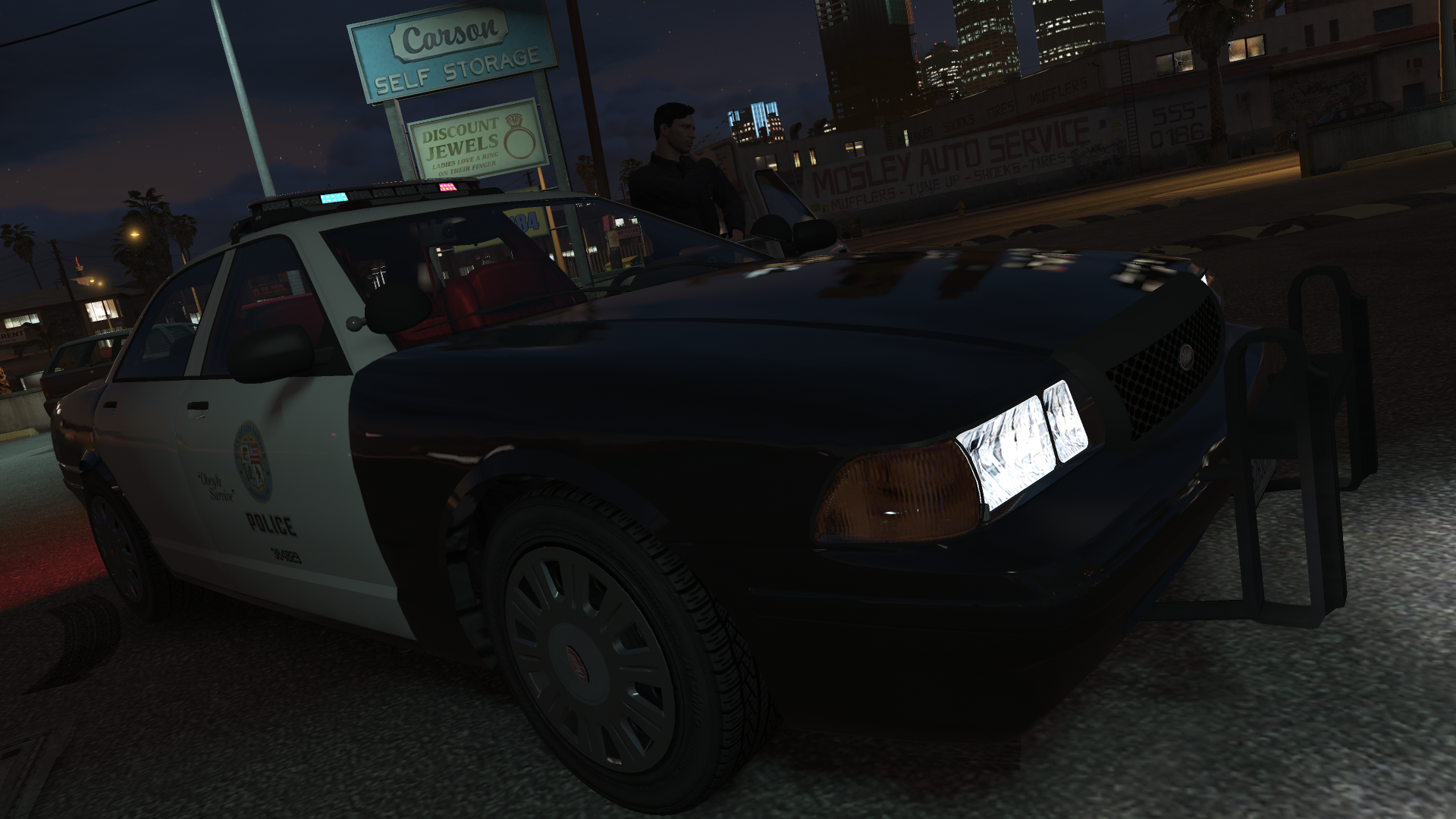
5 Screenshots

Dynamic Lighting System v2.0.0
 

Discord Server for pre-release versions, bug reporting, and other ways to talk with people interested in DLS!
GitHub Repository for access to DLS's source code.
Youtube Playlist to check some stuff that was done with DLS.
 

Welcome to Dynamic Lighting System, a full-fledged light control system that allows for in-depth control of the vehicle's lighting system.
 

REQUIREMENTS


OVERVIEW OF FEATURES

  • Multiple custom stages for non-ELS vehicles without taking up the vehicle's extras;
  • Fully setup and customizable siren control with configurable and add-on sirens;
  • Ability to create numerous additional features like SCAN, Blackout, Steady Burn...;
  • Easy to set up for new vehicles (without changes to the model itself or the default .meta files);
  • A lot more...


DO YOU HAVE PROBLEMS WITH DLS?

  • Read all documentation included with DLS and verify any custom XMLs you made to make sure you haven't made a mistake while editing/creating configurations.
  • If still giving errors, post it there or on my Discord Server or as an issue on the GitHub repository.

    
DLS IS OPEN-SOURCE!

  • DLS is and will always be an open-source project and nothing around it will be behind a paywall.
  • If you're someone with C# experience or programming experience in general and feel like contributing to DLS the help would be surely appreciated.

    
IMPORTANT INFORMATION

  • DLS is not compatible with ELS as of release and there are no plans to support them.
  • All vehicle configuration is set up in an external .xml file and allows for vehicle developers to still share the vehicle as functional non-ELS vehicles with all regular features.
  • DLS is still in active development and future features are already planned.
  • Do not post questions as Reviews as I'll not be able to answer it properly that way.

    
CREDITS

  • @PNWParksFan, w.. [w/#7263] and @Lieutenant Dan for helping immensely in the development process.
  • @cp702 for developing the amazing SirenSetting Limit Adjuster which will enable plenty of different carcols for numerous vehicles in GTA V.
  • AlexanderLB for designing a siren controller that inspired the one used in DLS.

Edited by TheMaybeast

What's New in Version 2.0.0.2

Released

Fixed various compatibility issues from the December 2024 GTA V update

For more information, check the included documentation.

THIS VERSION IS INCOMPATIBLE WITH DLSv1 CONFIGS


Short Description

Fully fledged light and siren control for non-ELS vehicles.

User Feedback

Recommended Comments

Horton

Members

Thanks for your help, I'll try to set it up ... 🤨

Horton

Members

I don't want to be annoying, but it's not true what is written in the description of this mode: "Easily configurable (and customizable) Traffic Advisory System;
Easy to set up for new vehicles (without changes to the model itself or the default .meta files);
!! Seriously?

There are about a million things I have to do in the instructions on how to set up DLS !!!
I'm using a great addon: 1993 Vapid Stanier Emergency Pack [Add-On] 1.0 and it doesn't work for this addon.

Example:
TEMPLATE VEHICLE CONFIGURATION FILES
The Vehicle Configuration Files in the "TEMPLATE VEHICLE CONFIGS" are not ready for in-game use! They are a basic ways to have your vehicles
use custom siren sounds (like the SAHP motorcycle siren, ambulance sirens, FBI sirens ...).

To use them:
1) Copy the file to your "Plugins / DLS" folder.
2) Rename it to the vehicle model name you want to use with.
3) Copy that vehicle's sirensetting entry (might be found packed with the download for that vehicle or on your game files with OpenIV.
4) Paste the sirensetting entry (without the <Item> tags) into the <Stage3> tag in the .xml file you created.
5) Verify if there are no errors in the XML with: https://codebeautify.org/xmlvalidator
6) Done!
 Or:
DLS - Dynamic Lighting System
v1.4.1 (DECEMBER 19 2020)
Made by TheMaybeast

DLS allows for an extreme amount of customization in a vehicle configuration file. Here I'll list all features and explain how they can be implemented.

PRESET SIREN ON LEAVE VEHICLE (<PresetSirenOnLeaveVehicle>)
* Allows you to define a pattern that will be toggled to if lights are on and you leave the vehicle (it'll return to the previous one upon entering).

WAIL SETUP (<WailSetup>)
* Allows you to define a light stage (<WailLightStage>) for the vehicle to turn to when on a specific siren tone (<WailSirenTone>).

STEADY BURN (<SteadyBurn>)
* Allows you to allocate a few sirens (<Sirens>) to utilize as a steady burn with a custom pattern (<Pattern>) or the default one.

SOUND SETTINGS (<SoundSettings>)
* <Tone 1> - Allows you to change sound string for Tone 1. If you either keep the field empty or just remove the entry as a whole it'll be disabled.
* <Tone 2> - Allows you to change sound string for Tone 2. If you either keep the field empty or just remove the entry as a whole it'll be disabled.
* <Tone 3> - Allows you to change sound string for Tone 3. If you either keep the field empty or just remove the entry as a whole it'll be disabled.
* <Tone 4> - Allows you to change sound string for Tone 4. If you either keep the field empty or just remove the entry as a whole it'll be disabled.
* <Horn> - Allows you to change sound string for Horn. If you either keep the field empty or just remove the entry as a whole it'll be disabled.

AIR HORN INTERRUPTS SIREN (<AirHornInterruptsSiren>)
* Allows you to define whether utilizing the Air Horn interrupts the main siren.

SIREN KILL OVERRIDE (<SirenKillOverride>)
* Allows you to override the SirenKill entry on the ini.
* Siren Kill is a feature in which the sirens automatically turn off if you leave the vehicle while it's on.

TRAFFIC ADVISORY (<TrafficAdvisory>)
* <Type> - Defines how many sirens will be allocated for the Traffic Advisory
* <DivergeOnly> - Defines whether the Traffic Advisory will only have Diverge mode enabled.
* <AutoEnableStages> - Defines in what stages the Traffic Advisory will enable automatically.
* <DefaultEnabledDirection> - Defines what direction the Traffic Advisory will turn to when enabled automatically.
* <AutoDisableStages> - Defines in what stages the Traffic Advisory will disable automatically.
* <TAgroup> - Defines the TA Group for the vehicle.
* <DefaultTApattern> - Defines the default TA Pattern for the vehicle, it can be changed in-game.
* <EnvColor> - Environment Color for the TA. (Usage with the Dual LEDs only).
* <Sirens> - Sirens used for the TA from left to right.
?????????
Why do you write "Easy to set up for new vehicles (without changes to the model itself or the default .meta files);" ????
It's much more complicated than the classic ELS !!!

I don't want to disparage your work, but the instructions are extremely demanding! Every GTA 5 player is not a pc programmer!🧐😕😟

Deactivated Member

Deactivated

5 minutes ago, Horton said:

I don't want to be annoying, but it's not true what is written in the description of this mode: "Easily configurable (and customizable) Traffic Advisory System;
Easy to set up for new vehicles (without changes to the model itself or the default .meta files);
!! Seriously?

There are about a million things I have to do in the instructions on how to set up DLS !!!
I'm using a great addon: 1993 Vapid Stanier Emergency Pack [Add-On] 1.0 and it doesn't work for this addon.

Example:
TEMPLATE VEHICLE CONFIGURATION FILES
The Vehicle Configuration Files in the "TEMPLATE VEHICLE CONFIGS" are not ready for in-game use! They are a basic ways to have your vehicles
use custom siren sounds (like the SAHP motorcycle siren, ambulance sirens, FBI sirens ...).

To use them:
1) Copy the file to your "Plugins / DLS" folder.
2) Rename it to the vehicle model name you want to use with.
3) Copy that vehicle's sirensetting entry (might be found packed with the download for that vehicle or on your game files with OpenIV.
4) Paste the sirensetting entry (without the <Item> tags) into the <Stage3> tag in the .xml file you created.
5) Verify if there are no errors in the XML with: https://codebeautify.org/xmlvalidator
6) Done!
 Or:
DLS - Dynamic Lighting System
v1.4.1 (DECEMBER 19 2020)
Made by TheMaybeast

DLS allows for an extreme amount of customization in a vehicle configuration file. Here I'll list all features and explain how they can be implemented.

PRESET SIREN ON LEAVE VEHICLE (<PresetSirenOnLeaveVehicle>)
* Allows you to define a pattern that will be toggled to if lights are on and you leave the vehicle (it'll return to the previous one upon entering).

WAIL SETUP (<WailSetup>)
* Allows you to define a light stage (<WailLightStage>) for the vehicle to turn to when on a specific siren tone (<WailSirenTone>).

STEADY BURN (<SteadyBurn>)
* Allows you to allocate a few sirens (<Sirens>) to utilize as a steady burn with a custom pattern (<Pattern>) or the default one.

SOUND SETTINGS (<SoundSettings>)
* <Tone 1> - Allows you to change sound string for Tone 1. If you either keep the field empty or just remove the entry as a whole it'll be disabled.
* <Tone 2> - Allows you to change sound string for Tone 2. If you either keep the field empty or just remove the entry as a whole it'll be disabled.
* <Tone 3> - Allows you to change sound string for Tone 3. If you either keep the field empty or just remove the entry as a whole it'll be disabled.
* <Tone 4> - Allows you to change sound string for Tone 4. If you either keep the field empty or just remove the entry as a whole it'll be disabled.
* <Horn> - Allows you to change sound string for Horn. If you either keep the field empty or just remove the entry as a whole it'll be disabled.

AIR HORN INTERRUPTS SIREN (<AirHornInterruptsSiren>)
* Allows you to define whether utilizing the Air Horn interrupts the main siren.

SIREN KILL OVERRIDE (<SirenKillOverride>)
* Allows you to override the SirenKill entry on the ini.
* Siren Kill is a feature in which the sirens automatically turn off if you leave the vehicle while it's on.

TRAFFIC ADVISORY (<TrafficAdvisory>)
* <Type> - Defines how many sirens will be allocated for the Traffic Advisory
* <DivergeOnly> - Defines whether the Traffic Advisory will only have Diverge mode enabled.
* <AutoEnableStages> - Defines in what stages the Traffic Advisory will enable automatically.
* <DefaultEnabledDirection> - Defines what direction the Traffic Advisory will turn to when enabled automatically.
* <AutoDisableStages> - Defines in what stages the Traffic Advisory will disable automatically.
* <TAgroup> - Defines the TA Group for the vehicle.
* <DefaultTApattern> - Defines the default TA Pattern for the vehicle, it can be changed in-game.
* <EnvColor> - Environment Color for the TA. (Usage with the Dual LEDs only).
* <Sirens> - Sirens used for the TA from left to right.
?????????
Why do you write "Easy to set up for new vehicles (without changes to the model itself or the default .meta files);" ????
It's much more complicated than the classic ELS !!!

I don't want to disparage your work, but the instructions are extremely demanding! Every GTA 5 player is not a pc programmer!🧐😕😟

All it takes is some time in the livelights plugin, which is linked in one of the files, and some time copy-pasting to the right sections.
And yes, this is more complicated than the work done on the user end of ELS, it requires you actually set up your light patterns. It is much easier than the developer end though. If you don't want to set up your own configs try this https://www.gta5-mods.com/misc/dls-lore-friendly-vehicle-config-megapack-v1-0

Horton

Members

Thank you for your help, I will try to solve it according to that mode "https://www.gta5-mods.com/misc/dls-lore-friendly-vehicle-config-megapack-v1-0" thanks 🤔

Horton

Members

That mod "https://www.gta5-mods.com/misc/dls-lore-friendly-vehicle-config-megapack-v1-0" helped, now it works !!!! 🤩
But not for the 1993 Vapid Stanier Emergency Pack [Add-On] 1.0 😟, maybe next time🥺 . Thanks for the help Mud!🤗

OfficerKobey

Members

Great idea! Any plans to make this not require ragehook and maybe be compatible with fivem? 

It's a stretch but still figured I'd ask!

Deactivated Member

Deactivated

9 hours ago, OfficerKobey said:

Great idea! Any plans to make this not require ragehook and maybe be compatible with fivem? 

It's a stretch but still figured I'd ask!

As far as I'm aware a FiveM version would require compatibility by CFX so it syncs properly, I don't think that will happen anytime in the near future

MrSir

Members

Is there anyway to customize controller keybinds ?

KnightRider02

Members

is it possible to have it for a fivem server??

michelin15

Members

On 11/13/2020 at 7:14 AM, michelin15 said:

I'm sure I'm missing something, but can anyone tell me how to customize the AI Yield to Vehicle per stage setting (Issue #17 in the change log) for DLS? On half my cars, AI yields to everything, including cruise lights. On the other half, they only yield to stage 3

Bumping my question again as I still have not figured this out...


I also get a slight hiccup in frames every time I hit my lights, is this just me? 

Is this controller friendly like ELS? I don't see any controller bindings in the .ini

MDC2005VIPER

Members

So I'm just getting back into LSPDFR and saw this DLS thing, will I be able to use ELS and DLS vehicles in game or it just sorta a choose DLS or choose ELS, cause I got vehicles on both sides I like but I'm not to sure if putting both in game would work or not?

Deactivated Member

Deactivated

16 minutes ago, MDC2005VIPER said:

So I'm just getting back into LSPDFR and saw this DLS thing, will I be able to use ELS and DLS vehicles in game or it just sorta a choose DLS or choose ELS, cause I got vehicles on both sides I like but I'm not to sure if putting both in game would work or not?

In the ini set "SirenControlNonDLS=true" to false and it won't conflict with ELS as long as one car doesn't have a config in each system

Oscar499

Members

Even having only used a single car pack this does appear to be a vast improvement over ELS.


Are the plans to add wig-wags to this or am I an idiot and there's already a way to enable them?

ThiccHamboy

Members

Hi, I like this plugin a lot but I'm pretty computer stupid. I don't know how to configure anything and the "How To" docs are not helpful whatsoever. I use this plugin with the default vehicles and it works for every vehicle but POLICE3. With POLICE3 I just get a messed up light pattern on every stage. I would appreciate some in depth help on this one.

Midge

Members

is there a pack of DLS configs for all default vehicles?

Maverick91169

Members

I would love to see a video of someone taking a non-els vehicle and setting up the DLS. I've searched everywhere. I'm looking at you benzo LOL 😆 

Sky2061

Members

Hey I have some problems with DLS. When I press "J" to turn on the lightbar it also turns on the default sirens and I can't turn off them. When I press 1 or 2,3 to turn off that default siren it just turns on both siren and default siren doesn't go off. Does anyone know how to fix this?? 

Deactivated Member

Deactivated

8 hours ago, Sky2061 said:

Hey I have some problems with DLS. When I press "J" to turn on the lightbar it also turns on the default sirens and I can't turn off them. When I press 1 or 2,3 to turn off that default siren it just turns on both siren and default siren doesn't go off. Does anyone know how to fix this?? 

Make sure DLS is not loading before LSPDFR, otherwise it will be overridden by LSPDFR siren controls.

DontShoot

Members

On 8/1/2021 at 10:58 AM, Sky2061 said:

Hey I have some problems with DLS. When I press "J" to turn on the lightbar it also turns on the default sirens and I can't turn off them. When I press 1 or 2,3 to turn off that default siren it just turns on both siren and default siren doesn't go off. Does anyone know how to fix this?? 

You need to clear the LSPDFR siren keybinding.


It's registering both the LSPDFR "J" for siren toggling and the DLS "J" for light toggling.

mainis

Members

one question, does this work with fiveM?


ShiftinSmiles

Members

5 hours ago, mainis said:

one question, does this work with fiveM?


Currently, there is no FiveM Compatible Version. However, I think Maybeast is open to people creating FiveM Compatible Versions.

STG45

Members

I need help guys,after installing this,i no longer have the siren + lights activated with leftthump on my xbox controller and no longer can i initiate traffic stop with button A.

How can i get that back?!?!

pxlion

Members

question: how do I get the bots to use the DLS as well? whenever I call for backup I can hear their active siren but their lights are all off

Deactivated Member

Deactivated

5 hours ago, pxlion said:

question: how do I get the bots to use the DLS as well? whenever I call for backup I can hear their active siren but their lights are all off

Their lights being off is a bug with DLS, they are trying to use it but cannot properly.
Go into DLS.ini and set "AILightsControl" to false and they will work like normal again.

Create an account or sign in to comment

Account

Navigation

Search

Search

Configure browser push notifications

Chrome (Android)
  1. Tap the lock icon next to the address bar.
  2. Tap Permissions → Notifications.
  3. Adjust your preference.
Chrome (Desktop)
  1. Click the padlock icon in the address bar.
  2. Select Site settings.
  3. Find Notifications and adjust your preference.


















