


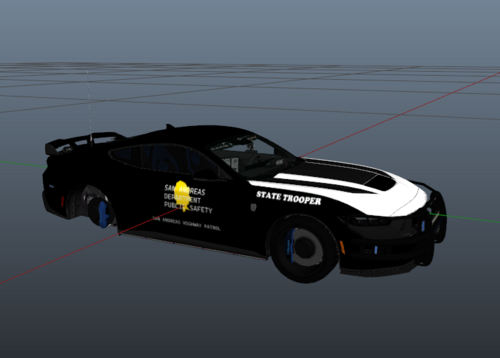
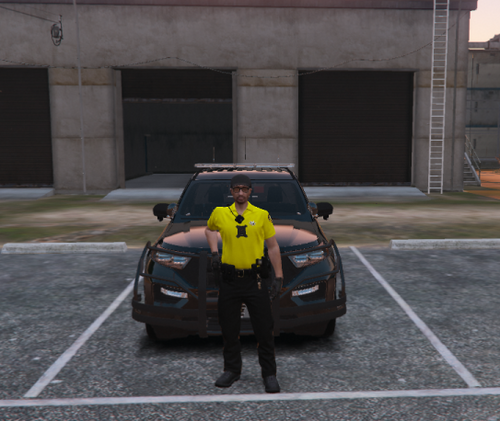
Well Howdy Folks! I bring yall a 2018 LSPD Charger.
Di-Wæ of the OUPC Discord asked what would a Charger look like the the Singapore Traffic Police Skin. I obliged.
<<<Important>>>: Only known issue is that the Reflective Livery randomly turns Brown. I dont know why.
Join my Discord!: https://discord.gg/wTuE3p3
Everything you Need is in the File!
Base Model:
- Original vehicle model is 2015 Dodge Charger from Forza, edited into the 2018 Dodge Charger Pursuit by Matt with parts from FH3 and Gamemodels
- Seats, center mirror, shifter and dash edits modeled and done by Kane104 - commissioned by Ranger Rick
- Major help from EVI for digital dial information and help to get the dials working and his patience to help me
- Rear bumper diffuser modeled by Patrol 31 Normal edits by Steinberg
- AWD/Charger badge modeled by iansonwheels Converted to V by Matt
- AWD Steelies/Hubcap modeled by iansonwheels Converted to V by Matt
- Big thanks to Cj24 for beta testing the model and help with spec maps and normal maps and his overall knowledge of gta materials
- Interior dial textures made by NeonLazer
- Interior button textures made by Slendis
- Rims from Gamemodels.ru Centercap edited by Matt
- Dome Light modeled by Matt
- A big thanks to Cj24, Kane104, EVI, Patrol 31, Steinberg , Desmond , NeOnLaZeR, Izick, Rekram, HDgamerzPC, and a big thanks to Ranger Rick who bought 3D parts so that i wouldn't give up on this project and bought me a Zmodeler license so that i can keep working on this project Thank you Rick.
- Thank you to everyone who supported me and the project...
- Another big thanks to iansonwheels who had the time to make the AWD steelies and AWD package stuff....
Interior Equipment:
Dashcam:
-Coban EDGE Modeled,Textured and UV mapped by Dan with da van
Radio:
-Motorola APX 6500 Modeled, Textured and UV mapped by Dan with da van
Siren Controller:
-Made by YesAviation
-Textures by YesAviation
-Whelen Labels by Whelen
Console/Stand/Computher:
-Laptop Stand by Twurtleee
-Cap'n Crunch, JBD [Computer]
-Centre Console Models - Jakub
-Textures - Jakub & Walters
Partition:
-Textures by Walters
-Scratch modelled by eknjack
Exterior Equipment:
Rambar:
- GoRhino 2015 Charger Wraparound by Carper, Textures by Carper
Rims:
- 2006-14 Dodge Charger Mopar PPV Hubcaps by Fartknockr | Converted to IV by Bxbugs123 | Converted to V by Fartknockr
- Mopar PPV Rim made by GerryStudio, Edited & converted for GTA IV by Bxbugs123 | Converted to V by Fartknockr
- Rim & Hubcap textures by Bxbugs123 | Color Editing for V by Fartknockr
Antenna:
-Billy J modifications
Spotlight:
- Spotlight Created By Turn10Studios; Converted And Edited By Shmurda
- Soundoff PAR46 LED Insert Created By Shmurda
- Spotlight Mounting Bracket From GameModels.RU
- Textures By Shmurda
Lighting:
Lightbar:
-RoegenTTV for the original bar.
-CEO for textures.
-Five0 for textures and for the Feet and clips.
-Otaku for metal modules behind the emissive and the textures.
'TA' Bar:
- Code 3 Wingman made by krul
Other Credits:
Di-Wæ of the OUPC Discord
Singapore Police
BMW
Spotify
Dylan/Florida Man
FiveM
Notepad++
R*
ZMoodeler
And Vint Cerf & Bob Kahn
- Original vehicle model is 2015 Dodge Charger from Forza, edited into the 2018 Dodge Charger Pursuit by Matt with parts from FH3 and Gamemodels
- Seats, center mirror, shifter and dash edits modeled and done by Kane104 - commissioned by Ranger Rick
- Major help from EVI for digital dial information and help to get the dials working and his patience to help me
- Rear bumper diffuser modeled by Patrol 31 Normal edits by Steinberg
- AWD/Charger badge modeled by iansonwheels Converted to V by Matt
- AWD Steelies/Hubcap modeled by iansonwheels Converted to V by Matt
- Big thanks to Cj24 for beta testing the model and help with spec maps and normal maps and his overall knowledge of gta materials
- Interior dial textures made by NeonLazer
- Interior button textures made by Slendis
- Rims from Gamemodels.ru Centercap edited by Matt
- Dome Light modeled by Matt
- A big thanks to Cj24, Kane104, EVI, Patrol 31, Steinberg , Desmond , NeOnLaZeR, Izick, Rekram, HDgamerzPC, and a big thanks to Ranger Rick who bought 3D parts so that i wouldn't give up on this project and bought me a Zmodeler license so that i can keep working on this project Thank you Rick.
- Thank you to everyone who supported me and the project...
- Another big thanks to iansonwheels who had the time to make the AWD steelies and AWD package stuff....
Interior Equipment:
Dashcam:
-Coban EDGE Modeled,Textured and UV mapped by Dan with da van
Radio:
-Motorola APX 6500 Modeled, Textured and UV mapped by Dan with da van
Siren Controller:
-Made by YesAviation
-Textures by YesAviation
-Whelen Labels by Whelen
Console/Stand/Computher:
-Laptop Stand by Twurtleee
-Cap'n Crunch, JBD [Computer]
-Centre Console Models - Jakub
-Textures - Jakub & Walters
Partition:
-Textures by Walters
-Scratch modelled by eknjack
Exterior Equipment:
Rambar:
- GoRhino 2015 Charger Wraparound by Carper, Textures by Carper
Rims:
- 2006-14 Dodge Charger Mopar PPV Hubcaps by Fartknockr | Converted to IV by Bxbugs123 | Converted to V by Fartknockr
- Mopar PPV Rim made by GerryStudio, Edited & converted for GTA IV by Bxbugs123 | Converted to V by Fartknockr
- Rim & Hubcap textures by Bxbugs123 | Color Editing for V by Fartknockr
Antenna:
-Billy J modifications
Spotlight:
- Spotlight Created By Turn10Studios; Converted And Edited By Shmurda
- Soundoff PAR46 LED Insert Created By Shmurda
- Spotlight Mounting Bracket From GameModels.RU
- Textures By Shmurda
Lighting:
Lightbar:
-RoegenTTV for the original bar.
-CEO for textures.
-Five0 for textures and for the Feet and clips.
-Otaku for metal modules behind the emissive and the textures.
'TA' Bar:
- Code 3 Wingman made by krul
Other Credits:
Di-Wæ of the OUPC Discord
Singapore Police
BMW
Spotify
Dylan/Florida Man
FiveM
Notepad++
R*
ZMoodeler
And Vint Cerf & Bob Kahn








.thumb.png.c63a78958ccc503b417cca7b9fe2b856.png)


Recommended Comments
Create an account or sign in to comment