Skip to content
View in the app

A better way to browse. Learn more.

LCPDFR.com

A full-screen app on your home screen with push notifications, badges and more.
To install this app on iOS and iPadOS
  1. Tap the Share icon in Safari
  2. Scroll the menu and tap Add to Home Screen.
  3. Tap Add in the top-right corner.
To install this app on Android
  1. Tap the 3-dot menu (⋮) in the top-right corner of the browser.
  2. Tap Add to Home screen or Install app.
  3. Confirm by tapping Install.

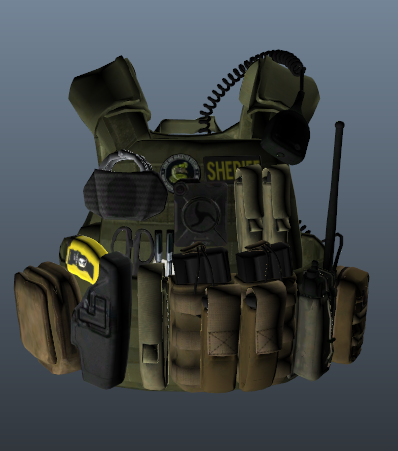
EUP Tac-Vest Sheriff6 1.0.0

(0 reviews)

2 Screenshots

K-9 Unit Vest for Sheriff

Read the read me for how to install also doing custom orders

installation: same installation of all my vest 


What's New in Version 1.0.0

Released

added installation video.


User Feedback

Recommended Comments

bzisniper

Members

wish people would put a vest like this on a ped, I love tac vests with lots of equipment on it, but I use peds for my FiveM server

Jersedevl

Members

(edited)

Man you did a better job than some of these other guys at giving instructions on how to install your vest and I applaud you for that.


However you may want in the future to include in the readme how to just add your texture as a variant to whatever skin the vest is supposed to replace so that if anyone likes that skin they can keep both and just switch to whatever they want. Right now it just says replace for 3 or 4 (tac vest entries) and for those who aren't veterans at modding they'll be scratching their head as to what happened to the police skin that was there before your texture replaced it.

Edited by Jersedevl

Deactivated Member

Deactivated

On 3/14/2020 at 3:38 PM, Jersedevl said:

Man you did a better job than some of these other guys at giving instructions on how to install your vest and I applaud you for that.


However you may want in the future to include in the readme how to just add your texture as a variant to whatever skin the vest is supposed to replace so that if anyone likes that skin they can keep both and just switch to whatever they want. Right now it just says replace for 3 or 4 (tac vest entries) and for those who aren't veterans at modding they'll be scratching their head as to what happened to the police skin that was there before your texture replaced it.

May I ask how you do that exactly, or if you could link me something to learn? I've been trying to switch liveries for the Park Ranger truck, among other things, and I'm lost haha.  

Shawn Edge

Members

Could this be FiveM version or do you have one cause if you don't I'd pay you to convert it for me.

aleijahgamer14

Members

I don't see a mp_m_freemode_01_mp_m_vinewood in the files

OfficerJoseph

Members

1 hour ago, aleijahgamer14 said:

I don't see a mp_m_freemode_01_mp_m_vinewood in the files

Me neither, have you figured it out?

OfficerJoseph

Members

1 hour ago, aleijahgamer14 said:

I don't see a mp_m_freemode_01_mp_m_vinewood in the files

It's in one of the files that's from Hanako, download his vest and go into his files and drag n drop it from there.

Jersedevl

Members

On 3/16/2020 at 2:13 PM, SirJamz said:

May I ask how you do that exactly, or if you could link me something to learn? I've been trying to switch liveries for the Park Ranger truck, among other things, and I'm lost haha.  

Changing liveries/textures in vehicles or uniforms is quite time consuming. You need to have tools such as Photoshop or Paint.net do modify and change the textures you're gonna be working with either ones you made yourself or you downloaded, these are image files PNG mostly. You gotta make sure that such texture matches the template of the 3D model object you're interested in whether that's a vehicle or a tactical vest. OpenIV is crucial in this since it will let you open files and check those models. So in the end is quite a project that can take anywhere between 5min to an hour depending on how much work needs to be done. If you don't want to screw up I highly suggest watching a video of someone installing new liveries on cars so you can learn the process.

DamnitKvvin

Members

I need help, In my folder, I don't have the vinewood file. I have no idea why.

undeadXpotato

Members Author

install 


TheRedDevils75

Members

(edited)

On 4/14/2020 at 8:07 PM, undeadXpotato said:

install 


the vest this texture is for is not in this pack by hanako 


EDIT: just realized which one it is

Edited by TheRedDevils75

TheRedDevils75

Members

(edited)

If you're having trouble finding which vest it is in hanako's "EUP VEST & EARPIECE" this texture will fit vest1 setup 4 that is in hanako's vest download pack

Edited by TheRedDevils75

Create an account or sign in to comment

Latest Mods

Account

Navigation

Search

Search

Configure browser push notifications

Chrome (Android)
  1. Tap the lock icon next to the address bar.
  2. Tap Permissions → Notifications.
  3. Adjust your preference.
Chrome (Desktop)
  1. Click the padlock icon in the address bar.
  2. Select Site settings.
  3. Find Notifications and adjust your preference.










