Skip to content
View in the app

A better way to browse. Learn more.

LCPDFR.com

A full-screen app on your home screen with push notifications, badges and more.

To install this app on iOS and iPadOS
  1. Tap the Share icon in Safari
  2. Scroll the menu and tap Add to Home Screen.
  3. Tap Add in the top-right corner.
To install this app on Android
  1. Tap the 3-dot menu (⋮) in the top-right corner of the browser.
  2. Tap Add to Home screen or Install app.
  3. Confirm by tapping Install.

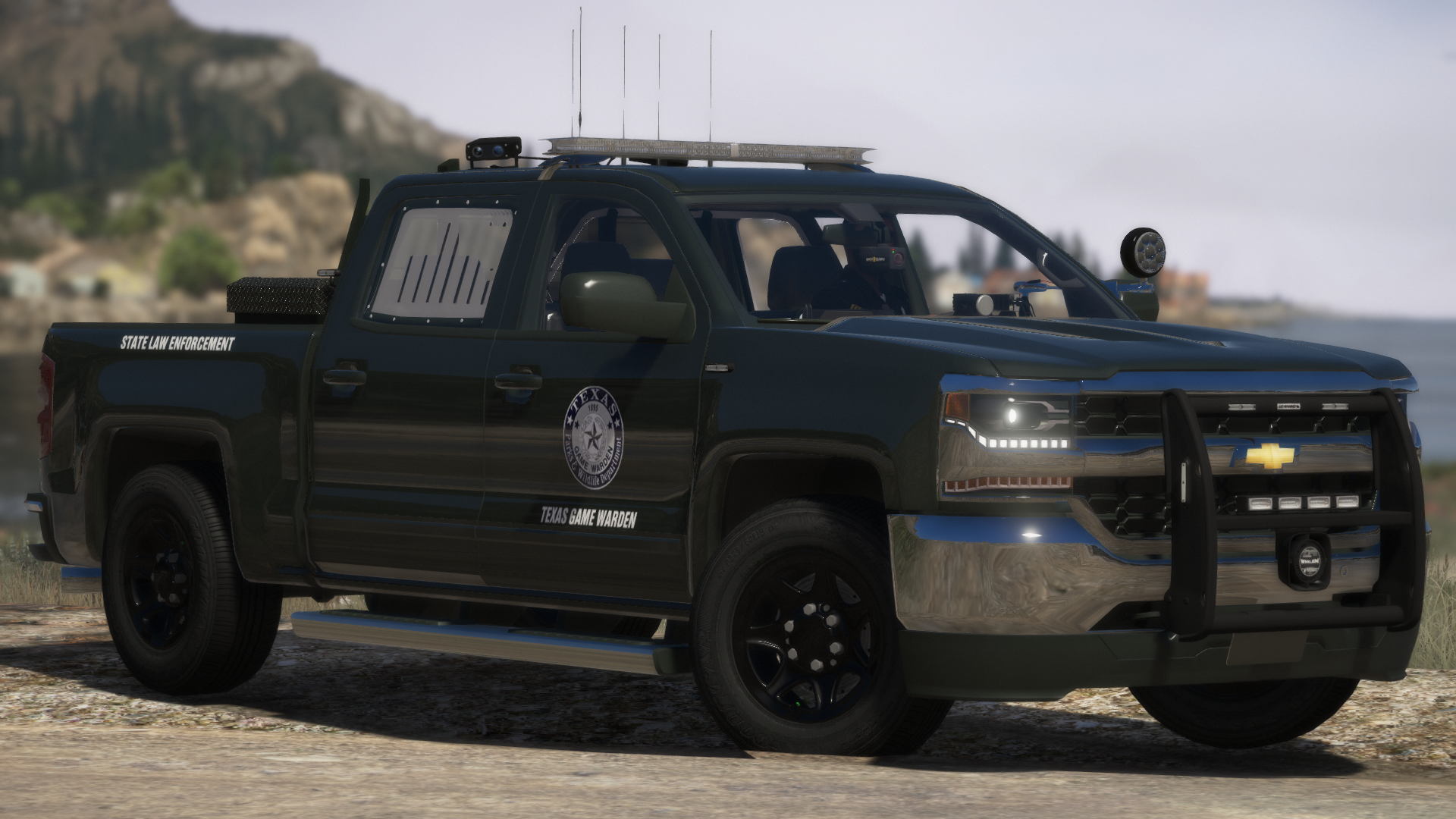
Texas Game Warden Livery Pack [LORE FRIENDLY INCLUDED] 1.1.0

(0 reviews)

16 Screenshots

Texas Game Warden Pack

By: Nikel Gaming


Finally, I bring to you the Texas Game Warden pack! Nothing too special with this one, but modern vehicles for the year 2020.

Thank you for choosing this TGW pack!

Vehicles Included:

2020 Explorer

2020 Silverado(NEW)

2019 Silverado

2019 F250(NEW)

2019 Tahoe

2018 Expedition

2018 RAM

2017 Silverado

2016 Explorer


LINKS:

19 F250, 20 Silverado Ripple (Branson Duck)
https://www.lcpdfr.com/downloads/gta5mods/vehiclemodels/26470-els-san-andreas-state-parks-mini-pack/


Ripple 2016 Explorer, 2019 Silverado, 2019 Tahoe, 2020 Explorer:


TickleMyElmo 2017 Silverado, 2019 Tahoe, 2016 Explorer, 2018 RAM:


medic4523 2018 Expedition:

https://modification-universe.com/forums/index.php?/files/file/116-els-2018-ford-expedition-ssv-pack/

Edited by nikelgaming
added YouTube video

What's New in Version 1.1.0

Released

1.1.0 Update Changelog


Improvements

  • Added Lore Friendly Textures
  • Made small improvements to seal
  • Changed font that closely resembles the real deal
  • Added bonus grey textures(because I cannot pinpoint the correct green they really use)


New Vehicles

  • 2020 Silverado
  • 2019 F250

Short Description

Texas Game Warden livery pack

User Feedback

Recommended Comments

Vampyre

Members

(edited)

@nikelgaming Overall looks good, but font and logo aren't accurate for the newer design. These below are more accurate, there are some things that are slightly off but only someone really looking will know what's wrong. (There's embedded Text in the image but it's white so you can't see it until saved or opened in new tab.)


TGW_logos.thumb.png.76d50509ecfcd9f4808c402bbe0169b4.png

Edited by Vampyre

BeastlyGaming

Members

Lore friendly would be nice.

nikelgaming

Members Author

On 3/10/2020 at 11:58 AM, Vampyre said:

@nikelgaming Overall looks good, but font and logo aren't accurate for the newer design. These below are more accurate, there are some things that are slightly off but only someone really looking will know what's wrong. (There's embedded Text in the image but it's white so you can't see it until saved or opened in new tab.)


TGW_logos.thumb.png.76d50509ecfcd9f4808c402bbe0169b4.png

Thanks but none of my textures are exactly like the real ones. My DPD textures do not have the same font, same colors,  same positioning, and the same cars. My DPS textures do not have the same font, and the Texas clipart is not the same size nor is the tiny star on it in the exact position. My Marshal and DFW textures have a different font than the real ones. My Fire and Rescue have different fonts and color. I'm not here to make exact perfect replicas and I'm not going to change my work for tiny things that hardly anyone will notice, especially if I'm creating all of this work for free. Many say my packs look great and there are some other packs on here that are not accurate, but they also look good. Also, your seal is inaccurate.

On 3/10/2020 at 8:20 PM, BeastlyGaming said:

Lore friendly would be nice.

Please read "About This File" section for this pack

JoeJoeIII

Members

(edited)

nvm


Edited by JoeJoeIII

Create an account or sign in to comment

Latest Mods

Account

Navigation

Search

Search

Configure browser push notifications

Chrome (Android)
  1. Tap the lock icon next to the address bar.
  2. Tap Permissions → Notifications.
  3. Adjust your preference.
Chrome (Desktop)
  1. Click the padlock icon in the address bar.
  2. Select Site settings.
  3. Find Notifications and adjust your preference.




