


Los Santos Police Pack by SCPDUnit23.
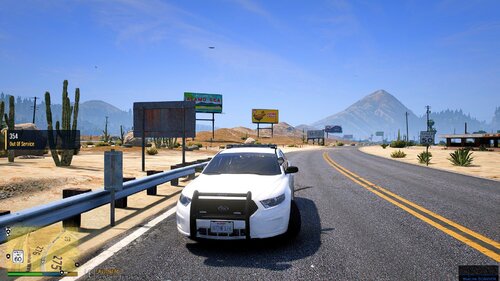
This pack contains about two decades worth of police car generations, from the 2003 Impala
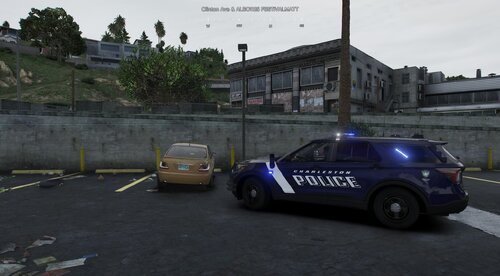
to the 2008 CrownVic to now the newest generation of the 2020 Explorer!
Pack includes:
-[BETA] 2020 Ford Explorer
-2016 Ford Explorer
-2014 Dodge Charger
-2010 Mitsubishi Evo X
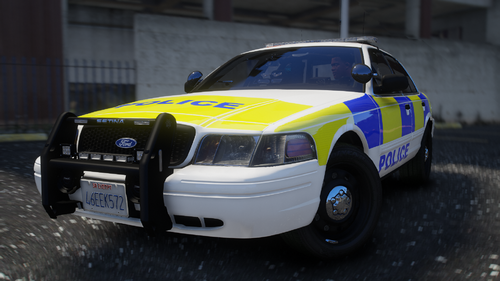
-2008 Ford CrownVic
-2003 Chevrolet Impala
-[BONUS] 2020 Chevrolet Corvette C8 Stingray
-[BONUS] 1968 Chevrolet King Stepvan
Templates has been provided if you want to create your own liveries.
Disclaimer:
Please do not redistribute and reupload this pack to any website or any other sources, including models,
screnshots, and liveries without explicit written permission. FiveM and other multiplayer server use is allowed
although not recommended with 2020 Explorer (except GTA Online).
Installation:
1. Use OpenIV and install the car mods to mods\update\x64\dlcpacks\patchday18ng\dlc.rpf\x64\levels\gta5\vehicles.rpf
-The Chevrolet Impala should be installed in sheriff/police slot if you have a vanilla carvariation.meta.
If you plan on installing in a different slot, you must set its sirensettings to 13 in carvariation.meta.
An optional carvariation entry has been included in case if you plan on copy and pasting.
-The Chevrolet King StepVan should be installed in policet slot if you have a vanilla carvariation.meta.
If you plan on installing in a different slot, you must set its sirensettings to 5 in carvariation.meta.
An optional carvariation entry has been included in case if you plan on copy and pasting.
2. Install the VCF ELS files under Grand Theft Auto V\ELS\pack_default
3. If the lights does not seem to be flashing, set the diffuse tint value to
<diffuseTint value="0x00FFFFFF" /> in whatever car slot you replaced in vehicles.meta file.
Please note the 2020 Explorer is still in beta. You may expect some bugs. Please report any bugs if spotted. Thanks!
What's New in Version 1.1.2
Released
1.1.2
-Misspelled "IMMATE" on transport van. Fixed to to "INMATE". Thanks to @BoMFuuNk for catching the error!
1.1.1
-Added optional carvariation entry for Step-Van
1.1.0
-Two new vehicles added: 2020 Chevrolet Corvette C8 Stingray and 1968 Chevrolet King Stepvan. Available as bonus vehicles.
1.0.1
-Split the pack into 3 parts due to large file size
-Part 1: All the sedans
-Part 2: Ford Explorers
-Part 3: Screenshots and Templates
-Edited 16 Explorer livery to have the "Patrol" decal
-Renamed 16 Explorer to "police3" as its optimized for that slot. If you want to put it back in SHERIFF2 you will need to tweak vehicles.meta so it doesn't flip over.
2003 Chevrolet Impala:
-Original model from Cadnav: http://www.cadnav.com/3d-models/model-35898.html
-Converted max to obj by SoCal Thero
-Converted to GTA V by SCPDUnit23
-Template by SCPDUnit23
-Wheels by DeezNutties123
2014 Dodge Charger Pursuit:
-Converted from Forza Horizon
-Converted and textured by Thehurk
-Converted to PPV by Thehurk
-Templated by Thehurk
-Taillight textures by Five0
2010 Mitsubishi Lancer Evolution X:
-Model by Novoka, converted by zQrba
-Templated by SCPDUnit23
2008 Ford CrownVictoria:
-Murphy - Lead developer, part modifications, custom modeled components, testing, UV mapping, features & fixes
-Original Light - CVPI expertise, modeling contributions, BETA tester
-Lundy - Door handles, CVPI expertise, CVPI parts from his models, mod tester
-Yard1 - Encouragement, support, and modding techniques
-Netman - Encouragement & support
-Cj24 - Publisher of the original model for IV & template, including headlight modifications & misc changes from F5544's release
-KevinDV - Work on the original model & grille
-Ubisoft - Driver: San Francisco Ford Crown Victoria parts, including base model & first person interior
-BxBugs123 - Headlight textures & expertise
-OfficerUnderwood - CVPI parts from his DEV resource, mainly the headlights, grille, dash
-F5544 - Initial GTA IV conversion
-Schaefft - Some interior components and initial seat model that was modified into 2011 variant
2016 Ford Explorer PI Utility:
-Ford explorer Base model purchased by Thehurk, GTAxB0SS, Requiem and Windows446
-Poly Crunched by Thehurk
-Textured and Converted by Thehurk
-Textures by Taylor Swift and Thehurk
-Rims by GTAxB0SS
-Interceptor Hood text by GTAxB0SS
-Interior purchased by TrentMU and FRGamer
-Ecoboost and Rear Police interceptor text by Jasonct203
-Converted to Police interceptor by Thehurk
-Templated by Thehurk
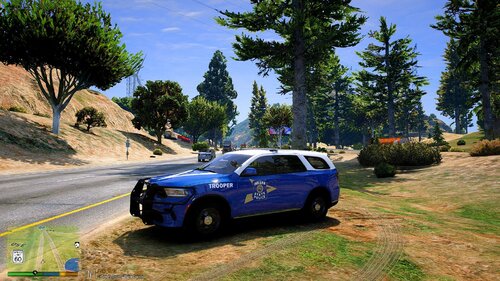
2020 Ford Police Interceptor Utility
-Base model by HP Deskjet, Dan with the Van, Huskybaud (RIP)
-Skellytone - Template, Dirt mapping, misc edits
-Bug fixes by SCPDUnit23
1968 Chevrolet King Step-van:
-Bought from Turbosquid. Created by AG4T.
-Converted to GTA V by SCPDUnit23
2020 Chevrolet Corvette C8
-Base model from CSR2 by .CSB
-Converted to GTA V by BlueGhost
Lights:
-Federal Signal Integrity by Twurtleee, textures made by Peralta, Matt, NYDelta
-Whelen Tir3 scratch modeled by Five0/OfficerFive0, converted to gta 5 by Five0/OfficerFive0
-Generic Dashlight Package by Bueno
-Raptor Visor Bar & Virtue8 TA:
-Scratch Modeled by BlueGhost
-STL Texture: BlueGhost
-LINZ6 Lights Modules and Texture by Five0
-Whelen Dominator™ Plus LINZ6™ Super-LED® Series scratch modeled, textured, and converted to GTA V by HDgamerzPC
-Light textures provided by OfficerFive0
-Federal Signal Streethawk by Solo
Parts:
-Setina pack:
-Setina by Twurtleee
-Setina textured by Twurtleee
-Textures provided by Matt
-Setina PB-200 by 0taku
-Partitions by Twurtleee
-Console by Twurtleee
-Laptop Stand by Twurtleee
-Panasonic Toughbook CF-51 by OfficerUnderwood
-Remington m870 Tactical Shotgun:
-Modeled By WarHead3D on TurboSquid,
-Textured By WarHead3D,
-Purchased By Walters,
-Converted To GTA V By Walters.
-ALPR:
-Converted and textured by MrPotato
-Textures by bxbugs
-Gun mount by Black Jesus
-Watchguard 4RE HD Dashcam by HDgamerzPC
-Decatur Genesis I scratch modeled, textured, and converted to GTA V by HDgamerzPC
-Decatur Genesis II Select scratch modeled, textured, and converted to GTA V by HDgamerzPC
-Decatur Dash Mounted Radar scratch modeled, textured, and converted to GTA V by HDgamerzPC
-Motorola APX85000 by 0taku
-Federal Signal PathFinder by Officer Underwood for base and buttons(from smart controller), Gump for making it into pathfinder
Misc:
-License plate texture by TheBlackGamer4Real
Others:
-Special thanks to panos_zaf, DaveD, HP Deskjet, and FirstThirtyMinutes for beta testing.
-Special thanks to DaveD for screenshots.






![Civ Country Outfit [FiveM Ready]](http://s3-screenshots.int-cdn.lcpdfrusercontent.com/resize/500/-/monthly_2026_07/ProductRender.thumb.png.cc96d42af8e65a2524d9c2a8479244c8.png)

![[ELS] [REPLACE] SAHP 2023 Dodge Charger [Florida Highway Patrol Based]](http://s3-screenshots.int-cdn.lcpdfrusercontent.com/resize/500/-/monthly_2026_07/Skrmbild2026-07-12200938.thumb.png.62e3858c9d4865c517577fa2c059a2eb.png)
Recommended Comments
Create an account or sign in to comment