Skip to content
View in the app

A better way to browse. Learn more.

LCPDFR.com

A full-screen app on your home screen with push notifications, badges and more.

To install this app on iOS and iPadOS
  1. Tap the Share icon in Safari
  2. Scroll the menu and tap Add to Home Screen.
  3. Tap Add in the top-right corner.
To install this app on Android
  1. Tap the 3-dot menu (⋮) in the top-right corner of the browser.
  2. Tap Add to Home screen or Install app.
  3. Confirm by tapping Install.

EUPFR Basic Configurations 1.0.8

(20 reviews)

12 Screenshots


Features

These files will allow to use some of the EUP Outifts for your character but also for NPCs (ambient spawns and backup)

The files only cover the basics for now, so you'll the main agencies like LSPD, LSSD, SAHP, FIB, NOOSE, SASP, DOA, NYSP, SASPA and etc.
These configs doesn't includes RHPD, DPPD, BCSO and such, which means these configs only relies on EUP packs and nothing else. You don't need any particular car slots.
Although I am planning something else for the future, which will enhance your LSPDFR experience with more customisations, agencies, cars ans stations.

How to install:
Drag and frop the folder ''custom into: Grand Theft Auto V\lspdfr\data


Requirements

This mod is optimized to work with these vehicles pack.

Since EUP doesn't have it's own car pack to go with the uniforms yet, these files relies on different car pack made by the modding community, if you don't want to use these car slots and prefer either vanilla or custom setup, get the file without the addon vehicles. If you are car modder and you are interested in collaborating with other creators to make a Lore-friendly Car park tailored for EUP. Contact me on Discord.

1. @11john11 LSPD Pack:

Capture23.PNG.56cb92c2f7c9d652166cc3b4ef61cc15.PNG

dl.PNG.372f44723ddda2b18bc68d0659851136.PNG


2. @11john11 LSSD Pack:

Capture22.PNG.6ae88fc60498f36c1898eee9fb986b7f.PNG

dl.PNG.372f44723ddda2b18bc68d0659851136.PNG


2. @Jacobmaate SAHP Pack:

sahpJM.thumb.png.c5e7b653104227ee15fc60c548e6e102.png

dl.PNG.372f44723ddda2b18bc68d0659851136.PNG


3. @Jacobmaate NOOSE Pack

capture18.thumb.png.ecf9183aad54e6b217950135eb5e65bc.png

dl.PNG.372f44723ddda2b18bc68d0659851136.PNG


4. @Jacobmaate FIB Police Pack

capture17.thumb.png.612ff907fb3c86bdd0e68f1f6e55278c.png

dl.PNG.372f44723ddda2b18bc68d0659851136.PNG


5. @Dusty Flop USAF Pack

capture16.thumb.png.58e0d9daab2e30deac8a423f4630cbe1.png

dl.PNG.372f44723ddda2b18bc68d0659851136.PNG


7. @monkeypolice188 LSFD Pack
capture15.thumb.png.fb7071c4fa3d49b685cc06266a751abc.png

dl.PNG.372f44723ddda2b18bc68d0659851136.PNG


8. @monkeypolice188 LSFD Pack
LSFDtruk.thumb.png.af942596a069699b6487c2537add0cb1.png

dl.PNG.372f44723ddda2b18bc68d0659851136.PNG


9. @AllenKennedy BCFD Pack
Capture14.PNG.c634f2bbab8ddaa3f43410faefc1143d.PNG

dl.PNG.372f44723ddda2b18bc68d0659851136.PNG


10. Bravo One Charlie' SASP Pack:
Capture21.PNG.271801aca7f12ba6d0ef5f6ff863cdba.PNG

dl.PNG.372f44723ddda2b18bc68d0659851136.PNG


11. @TheF3nt0n's Improved Park Ranger
Capture19.PNG.0b3143d143bbe1566548e2d504ed8df2.PNG

dl.PNG.372f44723ddda2b18bc68d0659851136.PNG


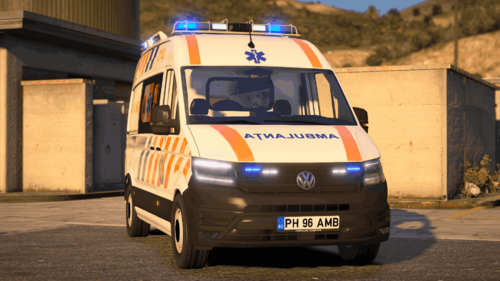
12. @Lt.Caine EMS Vehicle Pack


For General discussions, beta registration, support, image contests and more follow this link to our Discord Server:EUP Discord

Edited by Alex_Ashfold
Updated the title of the mod

What's New in Version 1.0.8

Released

- Updated for EUP 9.3 and 1.5 of Serve & Rescue


Short Description

These files will allow to use some of the EUP Outifts for your character but also for NPCs (ambient spawns and backup)

User Feedback

Recommended Comments

Citizen844

Members

I dragged and dropped as instructed....but how do I set the AI police uniforms??

MrMook

Members

any way for me to add in a Del Perro PD patrol area myself? 

PvPParasite

Members

Does this work with EUP 8.1?

xXcarlos117Xx2

Members

I don't know why but Windbreaker is broken, it shows a showman outfit, and motorcycle uniforms too with a bmx helmet etc

antiboy6

Members

Does this fix weird pants issue?

Alex0365

Members

Alex_Ashfold Hi, Alex. This is great mod, but paramedicks spawn without uniform, how I can  fix it?  

TreadRed

Members

10 hours ago, Alex0365 said:

Alex_Ashfold Hi, Alex. This is great mod, but paramedicks spawn without uniform, how I can  fix it?  

You can fix them paramedicks by downloading Emergency Uniforms Pack for Search and Rescue

Mr White

Members

(edited)

I think it is nice, but how i can fix this. I have installed it clearly 2 times. Sometimes there is working peds but for usually, it looks like this. I think this is broken.
 9aeb7e9ca1380484d252ad864616a353.png

Edited by Chief Sheriff

Ailarian

Members

(edited)

Outfits look crazy after installing this. Strange helmets and clothes with crazy patterns and colors.

Edited by Ailarian

XTREMEHEAT

Members

Does this work with the latest LSPDFR 0.4.6 considering that the new fire department EMS was added to the backup menu?

ciaranhogg1

Members

Did this get broken by 0.4.6, or EUP 8.1?

My officers all have invisible legs or jeans

Quainooxela

Members

Can you add the riot uniforms to the config sections of LSPD, LSSD and BSCO

admpln

Members

I am also having issues since LSPDFR 0.4.6... EMS shows up wearing brown sweaters, the rank chevrons on character selections won't appear, and half the backup officers show up in white t-shirts and jeans...

supergrunt

Members

(edited)

this problem still not fixed ?  i just got back in to LSPDFR after some time being away  and seem to be having the same problem...


(LSPDFR 0.4.6 and EUP 8.1) 

Edited by supergrunt

FelipeG

Members

when i ask police support the game crashes :c


TCGGames

Members

So every time I install this pack the female ambulance driver has on high heels and jeans as her uniform. It also corrupts my Fire Department File that it no longer responds and states in game that is it corrupt.

SimonKsh

Members

(edited)

@Alex_Ashfold I currently have installed EUP Law and Order, EUP Serve and Rescue and this file (EUP Config) . But when I load into the game, Other officers will have some messed up outfits on. I need help, please can you help me?!   btw, when I delete the content of this folder from LSPDFR>data>custom then it will work. But I really like this Plugin And I need to have it.

Edited by SimonKsh

PenOkOh

Members

(edited)

3 minutes ago, SimonKsh said:

@Alex_Ashfold I currently have installed EUP Law and Order, EUP Serve and Rescue and this file (EUP Config) . But when I load into the game. Other officers will have some messed up outfits on. I need help, please can you help me?!

Never mind, google borked and messed up. I think you might need this;


Edited by DotsV2

SimonKsh

Members

@DotsV2 I'll try that, thank you!

PenOkOh

Members

2 minutes ago, SimonKsh said:

@DotsV2 I'll try that, thank you!

Actually I take that back, apparently this file is the new one. I wonder what's wrong though. hang on until someone with better knowledge can help!

SimonKsh

Members

(edited)

Hey is there anyone who can help me? I currently have EUP Law and Order, EUP Serve and Rescue and I have tried to install and use this EUP Config file, but it did not work. So I have installed mkalash's  EUP Outfit settings but it still shows this on the officers. Please help me I really want an EUP Outfit settings config.      Btw, it works without any EUP Config plugin.

20200215195228_1.jpg

20200215195215_1.jpg

Edited by SimonKsh

Joeybradford

Members

fire backup outfit not working

LoneWolfMcGinty

Members

Needs updating fast because the majority of units are wearing uniforms with the wrong patches and it looks hideous like some noob tried creating their first plugin which ends up being very messed up.

xVeKk

Members

It worked for police suits, but for those of SUP no, EMS appear with BUG clothes. Someone help me?


Create an account or sign in to comment

Account

Navigation

Search

Search

Configure browser push notifications

Chrome (Android)
  1. Tap the lock icon next to the address bar.
  2. Tap Permissions → Notifications.
  3. Adjust your preference.
Chrome (Desktop)
  1. Click the padlock icon in the address bar.
  2. Select Site settings.
  3. Find Notifications and adjust your preference.