Skip to content
View in the app

A better way to browse. Learn more.

LCPDFR.com

A full-screen app on your home screen with push notifications, badges and more.

To install this app on iOS and iPadOS
  1. Tap the Share icon in Safari
  2. Scroll the menu and tap Add to Home Screen.
  3. Tap Add in the top-right corner.
To install this app on Android
  1. Tap the 3-dot menu (⋮) in the top-right corner of the browser.
  2. Tap Add to Home screen or Install app.
  3. Confirm by tapping Install.

MULTIPLE DEPARTMENTS 1.0.0

(1 review)

1 Screenshot

Heya, this is one of my first releases here on LSPDFR, definitely my first on the coding side of things. Well, this release here is a modified version of the base LSPDFR 0.4 data files. In which you are able to go active as the following departments from any listed station.


- Los Santos Police Department

- Los Santos County Sheriff's Department

- Vespucci Beach Police Department

- Blaine County Sheriff's Office

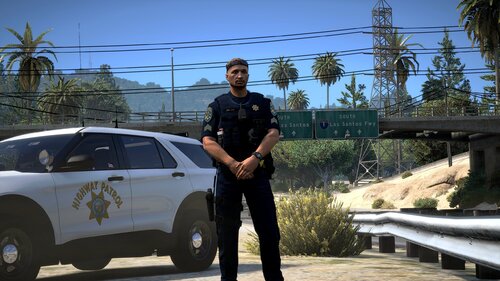
- San Andreas Highway Patrol

- Paleto Bay Police Department

I have also modified the outfits.xml file of the LSCSD & Highway Patrol. (I am not finished working on this currently) These departments will use the official EUP uniforms from Law & Order. (Vespucci Beach & Paleto Bay will use their parent departments uniforms)


P.S I also recommend modifying the vehicles listed in agency.xml on the lines that read the following otherwise LSPDFR will not work for you and will constantly crash before loading.


I will try my best to provide assistance to this release but I will definitely be keeping it updated once I have finished the rest of the uniforms
 

Quote

<Vehicles>
                <Vehicle>lscso</Vehicle>
            </Vehicles>


User Feedback

Recommended Comments

EliteCobraTyler

Members

Is there a discord server I can speak to you about how to install this and making to where it doesn't crash. I am still learning about 0.4 and its kinda a tough road

Sekkei

Members Author

2 hours ago, EliteCobraTyler said:

Is there a discord server I can speak to you about how to install this and making to where it doesn't crash. I am still learning about 0.4 and its kinda a tough road

Yeah I should be able to assist with that, my discord is Sekkei#0001

  • Management Team

You really shouldn't edit the default files that come with LSPDFR and instead use the custom folder: 


Think of it like using the mods folder instead of changing the default game assets.


patchadams69

Members

On 2/26/2019 at 11:05 AM, willpv23 said:

You really shouldn't edit the default files that come with LSPDFR and instead use the custom folder: 


Think of it like using the mods folder instead of changing the default game assets.


Does downloading these files and putting these into your custom folder work?

  • Management Team
Just now, patchadams69 said:

Does downloading these files and putting these into your custom folder work?


That should be fine so long as you add something to the name (so, agency_modded.xml or something like that). The only issue I could see is the mod being confused about certain duplicate ScriptNames.

patchadams69

Members

Just now, willpv23 said:


That should be fine so long as you add something to the name (so, agency_modded.xml or something like that). The only issue I could see is the mod being confused about certain duplicate ScriptNames.

Alright 🙂 i'm looking for a tutorial about messing with these new custom folders but have only read the Wikipedia stuff so I'm excited to get an idea on how to really make everything to my liking but I don't want to deal with breaking stuff either lol.


TreadRed

Members

28 minutes ago, patchadams69 said:

Alright 🙂 i'm looking for a tutorial about messing with these new custom folders but have only read the Wikipedia stuff so I'm excited to get an idea on how to really make everything to my liking but I don't want to deal with breaking stuff either lol.


Heres a basic tutorial

https://www.youtube.com/watch?v=oSixHj3_hp0&t=147s


I was planning on doing this, are you going to be adding more agencies for every city that has a police department area? Because if so I will leave it to you, as Im not great with customizing peds at all, I focus on vehicles. @Sekkei

Sekkei

Members Author

45 minutes ago, TreadRed said:


Heres a basic tutorial

https://www.youtube.com/watch?v=oSixHj3_hp0&t=147s


I was planning on doing this, are you going to be adding more agencies for every city that has a police department area? Because if so I will leave it to you, as Im not great with customizing peds at all, I focus on vehicles. @Sekkei

Yeah, the plan is to add more departments into the current files, fix the uniforms up some more, and set the stations to work with the agencies correctly

TreadRed

Members

7 minutes ago, Sekkei said:

Yeah, the plan is to add more departments into the current files, fix the uniforms up some more, and set the stations to work with the agencies correctly


Ok I just found out that there is no specific uniform badges made for other areas, are you making those or using what you got? Like what does Paleto Bay and Vespucci using their parent uniforms mean? lssd and lspd?

Sekkei

Members Author

Just now, TreadRed said:


Ok I just found out that there is no specific uniform badges made for other areas, are you making those or using what you got? Like what does Paleto Bay and Vespucci using their parent uniforms mean? lssd and lspd?

Currently, Vespucci is using the LSPD uniform and I believe Paleto Bay is using the same at this time. I haven't finished working on those yet so I'm hoping to be able to incorporate some EUP packs for those departments etc

TreadRed

Members

I was just speaking with EUP author and there is nothing specific for those departments, which is a little disheartening lol. With being able to have an agency for any area we want, we need some custom badges.

KnightHawkOne

Members

On the vehicles can one use the vehicle guides in computer plus with the quote you have above?

Create an account or sign in to comment

Latest Mods

Account

Navigation

Search

Search

Configure browser push notifications

Chrome (Android)
  1. Tap the lock icon next to the address bar.
  2. Tap Permissions → Notifications.
  3. Adjust your preference.
Chrome (Desktop)
  1. Click the padlock icon in the address bar.
  2. Select Site settings.
  3. Find Notifications and adjust your preference.