Skip to content
View in the app

A better way to browse. Learn more.

LCPDFR.com

A full-screen app on your home screen with push notifications, badges and more.

To install this app on iOS and iPadOS
  1. Tap the Share icon in Safari
  2. Scroll the menu and tap Add to Home Screen.
  3. Tap Add in the top-right corner.
To install this app on Android
  1. Tap the 3-dot menu (⋮) in the top-right corner of the browser.
  2. Tap Add to Home screen or Install app.
  3. Confirm by tapping Install.

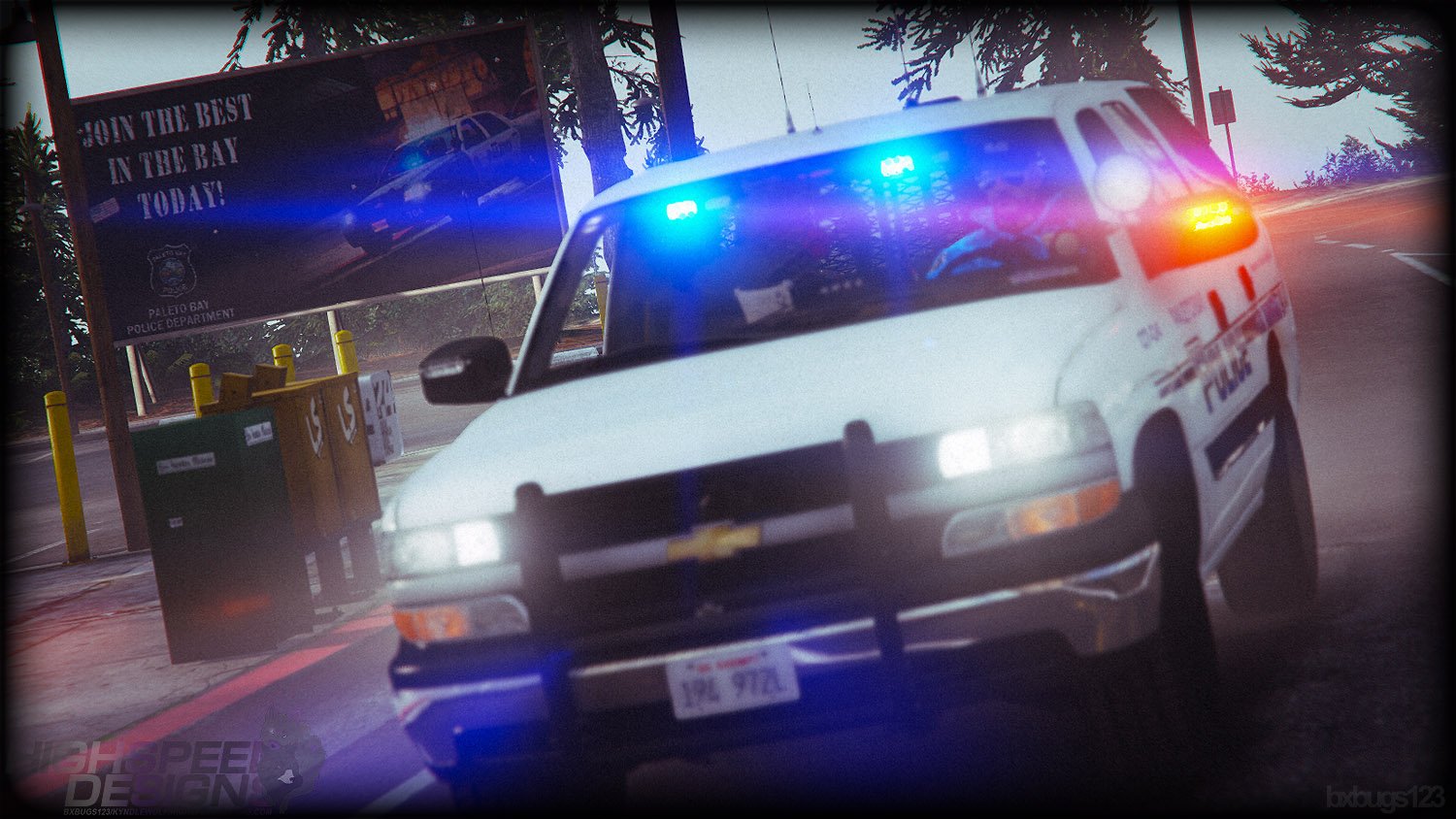
2006 CHEVROLET TAHOE Z56 PPV 1.6

(36 reviews)

17 Screenshots

eh8Lr3D.png

88x31.png

This work is licensed under a

Creative Commons Attribution-NonCommercial-NoDerivatives 4.0 International License.


By downloading this file you agree to the TERMS OF USE AND DISTRIBUTION, If you can not abide by those terms then do not download this file.

What's New in Version 1.6

Released

* Added gameconfig.xml file to the installer.

* Removed gameconfig.xml file from the installer, use a 3rd party game config for your GTA V version.

User Feedback

Recommended Comments

JayTaylor

Members

Plan on releasing the body kits for the cvpi/charger aswell?

Schecter004

Members

Nice to see some high quality models on LCPDFR

Deactivated Member

Deactivated

my games now crashing on loading it.

does it require a gameconfig.xml file or something?

trogan997

Members

Same here as well as the wheel pack 

brandonwilson7

Members

29 minutes ago, Niedosik said:

my games now crashing on loading it.

does it require a gameconfig.xml file or something?


2 minutes ago, trogan997 said:

Same here as well as the wheel pack 

I am also crashing with the wheel pack after about 3 minutes.

THE YOUTUBE GUY

Members

Just Wondering Is BXBugs123 The Youtuber BayAreaBuggs?

acepilot2k7

Members

18 minutes ago, THE YOUTUBE GUY said:

Just Wondering Is BXBugs123 The Youtuber BayAreaBuggs?

No they are two different people @THE YOUTUBE GUY


thank you @Bxbugs123 for releasing an awesome mod for us. Looking forward to trying it out. 

Kilyin

Members

This will overwrite your visualsettings.dat if you run the OIV installer, so you may want to make a backup prior and then replace it after the install.

Tanner1000

Members

2 hours ago, THE YOUTUBE GUY said:

Just Wondering Is BXBugs123 The Youtuber BayAreaBuggs?

Nope.

Tactical Potato

Members

Crashes for me but when i take certain mods out of the modkit it works IDK please help  

Thomas199920

Members

It's also crashing for me. I hope someone can find a fix.

Vision7124

Members

1 hour ago, Kilyin said:

This will overwrite your visualsettings.dat if you run the OIV installer, so you may want to make a backup prior and then replace it after the install.

So , could this be causing any issues, like a game crash? Or is this just a recommendation?

Kilyin

Members

14 minutes ago, ViSion7124 said:

So , could this be causing any issues, like a game crash? Or is this just a recommendation?


Nah, just if you've got a customized visualsettings.dat (which I do and I'd assume most others do as well) it will overwrite it. If your game is crashing you probably need a gameconfig since this is an addon.

Tactical Potato

Members

11 minutes ago, Kilyin said:


Nah, just if you've got a customized visualsettings.dat (which I do and I'd assume most others do as well) it will overwrite it. If your game is crashing you probably need a gameconfig since this is an addon.

Thank you works fine now i installed a gameconfig from gta5 mods 

Bxbugs123

Members Author

(edited)

5 hours ago, Niedosik said:

my games now crashing on loading it.

does it require a gameconfig.xml file or something?


You, Sir, could be correct, I have added a custom gameconfig.xml below if this fixes the issue I will add it to the installer.

Guessing it has to do with the fact everything within this is an add-on to the game and every update the developers only increase the pool size ever so slightly for the updated content they have added only, so adding more then the game can handle will cause it to crash.

Install the file below into your mods/update/update.rpf/common/data.

gameconfig.xml


Do report back if this fixed the problem.

Edited by Bxbugs123

ovilexfan

Members

(edited)

The game config.xml sadly did not work for me. It might be on my end.


Edited by ovilexfan

Thomas199920

Members

49 minutes ago, Bxbugs123 said:

Do report back if this fixed the problem.

It's working for me now, Thank you 😄

Bxbugs123

Members Author

37 minutes ago, ovilexfan said:

The game config.xml sadly did not work for me. It might be on my end.


May have something to do with the game version, if you could also post the game version you are using?

Deactivated Member

Deactivated

1 hour ago, Bxbugs123 said:


You, Sir, could be correct, I have added a custom gameconfig.xml below if this fixes the issue I will add it to the installer.

Guessing it has to do with the fact everything within this is an add-on to the game and every update the developers only increase the pool size ever so slightly for the updated content they have added only, so adding more then the game can handle will cause it to crash.

Install the file below into your mods/update/update.rpf/common/data.

gameconfig.xml


Do report back if this fixed the problem.

I installed my own gameconfig.xml prior to your reply, and it fixed it.

My assumption, taking into consideration others experiences, a custom gameconfig seems to fix it- thanks!

saharmel984

Members

This model is amazing. I wish you would only make an ELS model!

Ashley92

Members

Just now, saharmel984 said:

This model is amazing. I wish you would only make an ELS model!

Yeah, same want an ELS release. But for the time being, you can use this. It won't allow custom flash patterns. But will allow you to use the normal siren control you are a used to in ELS. 


Create an account or sign in to comment

Latest Mods

Account

Navigation

Search

Search

Configure browser push notifications

Chrome (Android)
  1. Tap the lock icon next to the address bar.
  2. Tap Permissions → Notifications.
  3. Adjust your preference.
Chrome (Desktop)
  1. Click the padlock icon in the address bar.
  2. Select Site settings.
  3. Find Notifications and adjust your preference.









