


Retro RCMP Ford CrownVictoria Pack by SCPDUnit23.
This pack contains two RCMP CrownVics both based on the Retro RCMP liveries and setups, including the rare black and
white gumball version (and yes this car is real and I am not blind. Below is a photo of the black and white RCMP car as part of its 135 anniversary).
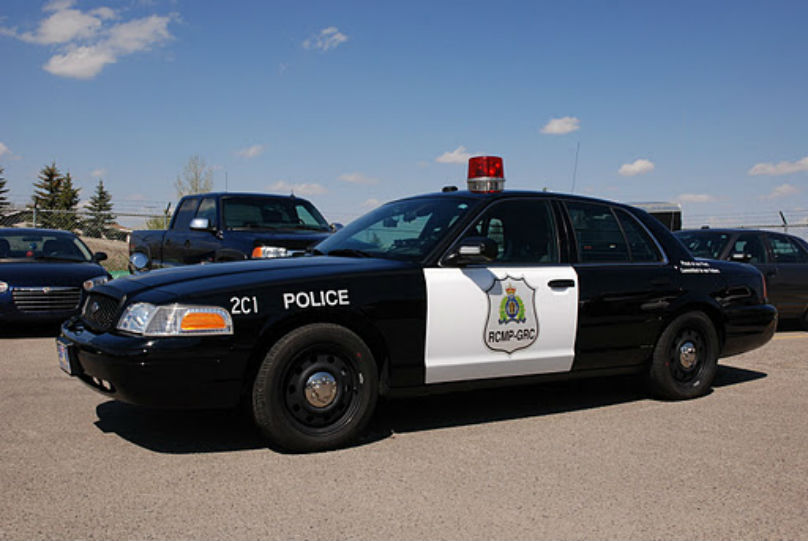

Disclaimer:
Please do not redistribute and reupload this pack to any website or any other sources, including models,
screenshots, and liveries without explicit written permission. You are free to use this for FiveM or any other multiplayer servers
(except GTA Online).
Installation:
1. Use OpenIV and install the car mods to mods\update\x64\dlcpacks\patchday18ng\dlc.rpf\x64\levels\gta5\vehicles.rpf
2. Install the VCF ELS files under Grand Theft Auto V\ELS\pack_default
If bugs are found please report them as soon as possible.
Notes:
-Lore-friendly liveries included as the San Andreas State Patrol because.... San Andreas...
Credits:
Thanks to Giordano for screenshooting and beta testing!
2011 Ford CrownVictoria:
-Converted from Forza Horizon 3 by TheHurk and Lundy
Lights:
-Generic Lightpack by Raptor2000
-Whelen Edge 9000 by solo
-LED Gumball by 0taku
-Whelen 500 TIR6 Modeled by VooDoo, Textured by VooDoo. Textures by VooDoo. Converted to V by VooDoo
Parts:
-Watchguard 4RE HD Dashcam by HDgamerzPC
-Turtle Console by Twurtleee
-Setina Proguard Cargo and Prisoner Partition by Vertex3D
-Decatur Genesis I scratch modeled, textured, and converted to GTA V by HDgamerzPC
-Decatur Genesis II Select scratch modeled, textured, and converted to GTA V by HDgamerzPC
-Decatur Dash Mounted Radar scratch modeled, textured, and converted to GTA V by HDgamerzPC
-Antennas by Raptor2000
-Panasonic Toughbook Modeled, Textured by Cap'n Crunch. Textures by Cap'n Crunch. Converted to V by VooDoo
-Motorola APX8500 by 0taku
If I forgot to credit someone please DM me!
Thanks to Giordano for screenshooting and beta testing!
2011 Ford CrownVictoria:
-Converted from Forza Horizon 3 by TheHurk and Lundy
Lights:
-Generic Lightpack by Raptor2000
-Whelen Edge 9000 by solo
-LED Gumball by 0taku
-Whelen 500 TIR6 Modeled by VooDoo, Textured by VooDoo. Textures by VooDoo. Converted to V by VooDoo
Parts:
-Watchguard 4RE HD Dashcam by HDgamerzPC
-Turtle Console by Twurtleee
-Setina Proguard Cargo and Prisoner Partition by Vertex3D
-Decatur Genesis I scratch modeled, textured, and converted to GTA V by HDgamerzPC
-Decatur Genesis II Select scratch modeled, textured, and converted to GTA V by HDgamerzPC
-Decatur Dash Mounted Radar scratch modeled, textured, and converted to GTA V by HDgamerzPC
-Antennas by Raptor2000
-Panasonic Toughbook Modeled, Textured by Cap'n Crunch. Textures by Cap'n Crunch. Converted to V by VooDoo
-Motorola APX8500 by 0taku





![[ELS][REPLACE] 2020 Skoda Octavia Městská policie Praha (New design)](http://s3-screenshots.int-cdn.lcpdfrusercontent.com/resize/500/-/monthly_2026_05/20260514222354_1.thumb.jpg.dedd1cd5cdf14716666af6abfa71508d.jpg)


.thumb.png.a0f80464539c2dd42ee2519c1bda91f2.png)

![Generic Whelen 2023 F150 B/B [FiveM & Single Player]](http://s3-screenshots.int-cdn.lcpdfrusercontent.com/monthly_2026_05/enb2026_5_13_15_23_48_06.thumb.png.ecbdfb941234f496e3fd959033f602d4.png)






Recommended Comments
Create an account or sign in to comment