Skip to content
View in the app

A better way to browse. Learn more.

LCPDFR.com

A full-screen app on your home screen with push notifications, badges and more.

To install this app on iOS and iPadOS
  1. Tap the Share icon in Safari
  2. Scroll the menu and tap Add to Home Screen.
  3. Tap Add in the top-right corner.
To install this app on Android
  1. Tap the 3-dot menu (⋮) in the top-right corner of the browser.
  2. Tap Add to Home screen or Install app.
  3. Confirm by tapping Install.

XScanner v3.23.44.3460

(51 reviews)

1 Screenshot

XScanner is an LSPDFR Scanner replacement/addon.


Features:


  • Full XAudio2 support.
  • Multiple output device support, play background scanner on one device and police scanner on another.
  • Multiple audio emitters to choose from; player, player vehicle, police vehicles.
  • Customizable distortion effects for the police scanner.
  • LSPDFR relay.
  • Broadcast quick selection.
  • Broadcast presets; Top50, Newest Streams, Official Streams, Manual stream input, search for streams.
  • Supports all known audio formats, and then some.
  • Police Scanner playback (frontend and 3d).
  • Background Scanner playback (frontend and 3d) (local files or stream).
  • Preferred audio folder; for dispatch replacements.
  • Audio redirects; for dispatch replacements.
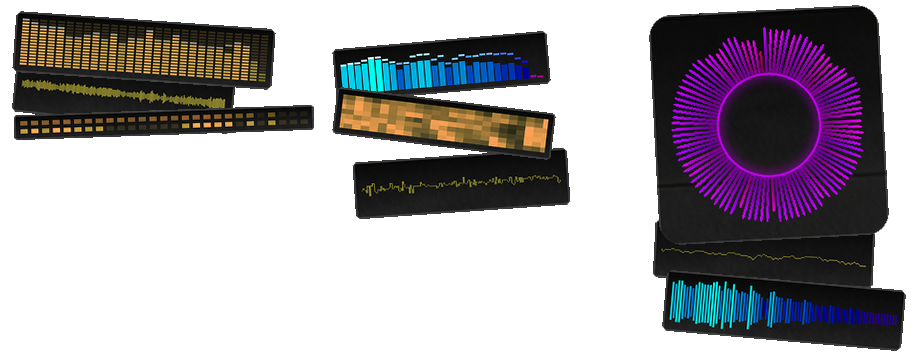
  • The prettiest animated menu around with theming support.


There is the possibility of editing the ini manually, but I do not recommend it due to the complexity of this plugin.
Everything can be changed through the menu (default: F8)
If you already have something bound to F8 you can either:


  • change the menu key through the consolecommand
    SetXScannerMenuKey
  • manually open the menu through the consolecommand and change the menu key from within the menu.
    OpenXScannerMenu


Installation: Place files from the "Grand Theft Auto V" folder into your game installation folder.


⚠️  Known Issues ⚠️ 
None


⚠️ DISCLAIMER ⚠️

Not providing support in the comments anymore.

Support can be found on my Discord or on the ULSS Discord.


Could contain: text, screenshot, graphic design, poster, graphics, art, font


Edited by khorio
change description

What's New in Version v3.23.44.3460

Released

Fix:

  • updated hook scanner
  • fixed streams 403-ing due to changes on broadcastify's end and showing up as down.
  • fixed landmarks not properly being used


Changes:

  • Folders under GTAV\LSPDFR\SCANNER are no longer selectable as the Preferred Audio Folder from the menu,
    as this folder is generally a bigger mess than your grandmothers random trash drawer.
    Use folders in GTAV\PLUGINS\LSPDFR\XSCANNER\Audio instead, which will still show up in the menu.
    You can still set the folder to GTAV\LSPDFR\SCANNER itself however.
    This will NOT break any dispatch replacements.
  • changed normalization divider to 32768 instead of 32767


Add:

  • Added "Vinegar Enjoyer" flag to Settings->Global Flags to disable holiday effects
  • Added aborts and criticals to ScannerAPIFlags
  • Added critical scannerblocks


Spoiler

v3.2.359.3421

Additions

  • Added HUD (off by default, Menu->Extras->HUD, HUD can be moved/scaled while the menu is open, hover your mouse over it for instructions.)

Fixes


  • Updated hooks for LSPDFR v0.49.9110.3411
  • Updated RNUI
  • Removed support for older versions.
  • Fixed a bug which would lock up the local background playback after playing a few files due to the stream not being fully consumed by the voice
  • Fixed a bug which would cause manual stream id input to bug out after an invalid input/cancellation
  • Removed strictness of XCHATTR file loading
  • Fixed missing scannerblock status updates
  • Added fading
  • Reduced playback latency
  • Added global watch to stop audio pause from triggering stalled playback
  • Various fixes I forgot to write down
  • Changed AudioRedirects to allow multiple files, now in the config/Redirects folder


v3.2.316.3079

Additions

  • Added controller support for keybinds
  • Added internal squelch sounds to intro\outro options
  • Updated Common to v2.5.316.517
  • Added missing hint for PoliceScannerMenu::Preferred Audio Path
  • Probably more stuff I forgot
     

Fixes

  • Menu fixes for PreferredAudioFolder and Intro\Outro not working properly
  • Changing keybinds would destroy the eventhandlers until reload
  • Several API fixes
  • Fixed background buffering overflow
  • Removed silentbuffer spamming log
  • Sound not pausing\muting on window focus\game pause
  • stream updates firing too regularly
  • *K1895 Near\Over\On not working properly due to a distancesqr check always returning 0
     

Boring Stuff

  • Added new listeners to each engine increasing the channels to 2*64
  • More additions to the debug menu
  • Voices not being properly released from the xaudio2 graph


v3.1.312.2973

  • Bugfix *K1892: VoiceManager throwing an error on Voice::Destroy
  • Bugfix *K1893: IniManager::Purge throwing a possible error
  • Common update v2.5.312.450

v3.0.311.2962

Additions

  • Added missing keybind implementation (background +/-/mute) (policescanner +/-/mute)
  • Added keybinds menu (no messing with ini, just do it in here) (for all that's holy don't touch the ini)
  • Added GlobalFlags to the settings menu
    - Disable Normalization (normalization got rewritten so it might not cause you issues anymore, see fixes below)
    - Disable volume keybinds
  • Lowered volume step for better finetuning of the volume
  • Added BackgroundScanner:UseDucking Flag
    when During Pursuit/Callout is enabled you can set a volume ducking percentage instead of it going full mute whenever the PoliceScanner is active.
  • Added bottom slider for the PoliceScanner:EnableEffects flag
  • Added volume control for the PoliceScanner:WhiteNoise flag 
  • Increased stream buffer throughput (should be quite a bit faster now)


Fixes

  • Fixed playback trying to start before load finished
  • Fixed stream merge acting up resulting in the policescanner shitting itself on rare occasions
  • Fixed menu visualization to only act on the stream output, instead of the device output
  • Fixed menu visualization to use RMS values instead of peak
  • Rewrote custom normalization implement using DMO
  • Fixed a few values not saving from the menu (spamthreshold, emitterfallback)
  • Fixed a bunch of debuglogging
  • Fixed voices not properly destroying after usage
  • Fixed menu status changes not triggering properly
  • Generic API fixes


Boring stuff

  • Added audio header detection
  • Added Settings.DebugInfo menu (for nerds)
  • Updated Common to v2.5.308.447
     

v3.0.308.2625

Additions

  • Added missing spam threshold implementation
  • Added SkipAds flag for the backgroundscanner streaming option
  • Added ChannelMapping (Beta) to the Settings menu to remap sound playback to surround. (Optional, off by default, results may vary)


Boring stuff

  • Fixed hotswapping of modes
  • Fixed engine restarts getting stuck due to bad token cancellation
  • More aggressive cleanup of voices
  • Fixed assert for XAudio2 listener overflow
  • Removed consecutive duplicates from LSPDFR internal relays (double intro\outro)
  • Removed duplicate calls from LSPDFR internal relays
  • Rewrote the SoundEffects API to be more robust and less shit.


v3.0.305.2414

  • Added wrapper to log more coherent exceptions
  • Added PoliceScanner Flag to toggle the whitenoise
  • Added missing import of external chatter
  • Added BackgroundScanner Flag to disable the builtin chatter
    will require external chatter for the local chatter to still function (files starting with "xchattr_"))
  • Small fix to not query the cachemanager before it finished loading
  • Fixed an event not being raised
     

v3.0.305.2401

  • Fixed potential crash in the menu
  • Fixed COM exception
  • Fixed spatial audio for the background emitter
  • Fixed LPF filter
  • Fixed invalid MP3 bytes error (please stop using mp3 files, they're garbage)
  • Fixed failed searches still getting queued in the police scanner
  • Fixed AudioRedirects example file


  • Added CurveDistanceScalerMulti (available in the settings menu) to increase the spatial distance for 3d playback
  • Added Only In Vehicle flag for the backgroundscanner (available as a flag in the backgroundscanner menu) to fully mute the sound when not in vehicle (when the emitter is set to a vehicle)


v3.0.303.2266

  • Fixed an issue with invalid audiodevices throwing a com error and crashing the game (thx deejaymaxx, nemesisx101, blackagent, for testing)
  • Fixed a possible crash due to missing folders
  • Fixed handling of broken audio files


Short Description

Now with Broadcastify support

User Feedback

Recommended Comments

249Xeno

Members

13 minutes ago, khorio said:

It means the sound files didn't get installed properly

I only did the drag-and-drop.

khorio

Members Author

1 minute ago, Parzival.Zio said:

I only did the drag-and-drop.

Did you also download the required audio

249Xeno

Members

(edited)

was there one? I assumed that everything was in one winrar... or did I miss something out of that?

also, I do not see the audio link

Edited by Parzival.Zio

khorio

Members Author

20 minutes ago, Parzival.Zio said:

was there one? I assumed that everything was in one winrar... or did I miss something out of that?

also, I do not see the audio link

image.png.2241a7e9e3b37ba718b6dff123ccfeb8.png
Yes 😄

249Xeno

Members

19 minutes ago, khorio said:

image.png.2241a7e9e3b37ba718b6dff123ccfeb8.png
Yes 😄

Man.. all files should be together, not separate.

khorio

Members Author

5 minutes ago, Parzival.Zio said:

Man.. all files should be together, not separate.

That would mean each time I push an update people have to re-download 150mb of data they already have

249Xeno

Members

that would be the case, but remember... a lot of vehicle packs download a big file too. It will prevent any issues later down the road, that unless you want someone that comes to you and asks the same thing I asked you.

I would add all in one and let them download everything at one time rather than twice. It makes things much less complicated.

MythicalMonkey

Members

Loving the new version of the plugin. One suggestion would be the ability to select channels, i.e have a selection of Broadcastify feeds to choose from. For instance, previously I used to use feeds for LAPD, LASD, CHP, etc depending on which part of the map I was playing in.

0xShelby

Members

(edited)

Is anybody familiar with how to set this up with Broadcastify? I would absolutely love to set that up with such.


Edit: Never mind, I didn't see the Broadcastify settings in the configuration file when I looked, I see it now!

Edited by 0xKlepto

Paladin Ranger

Members

When I set Broadcastify to my local agency, I'm getting this loud feedback before and after each transmission. It wasn't doing this with the default Broadcastify, and my local agency doesn't sound like this directly from Broadcastify.

khorio

Members Author

30 minutes ago, Paladin Ranger said:

When I set Broadcastify to my local agency, I'm getting this loud feedback before and after each transmission. It wasn't doing this with the default Broadcastify, and my local agency doesn't sound like this directly from Broadcastify.

A few broadcastify streams use some shifty mp3 instead of a pcm stream that causes clipping when streaming through the soundengine, I'm aware of the issue but have not figured a way around it yet.

Welsh Hazard

Members

Hello - Great mod btw!!


Question- How do i change the intro to a different noise? 


Are there a selection? 

khorio

Members Author

4 hours ago, Welsh Hazard said:

Hello - Great mod btw!!


Question- How do i change the intro to a different noise? 


Are there a selection? 

You can change it to whatever you like
 

Section: [General]

IntroSound					This is the squelch before each call on the scanner, change this to whichever sound you want it to play
OutroSound					Same but at the end of each call

There are more in 
 

Grand Theft Auto V\lspdfr\audio\scanner\RESIDENT


khorio

Members Author

17 hours ago, MythicalMonkey said:

Loving the new version of the plugin. One suggestion would be the ability to select channels, i.e have a selection of Broadcastify feeds to choose from. For instance, previously I used to use feeds for LAPD, LASD, CHP, etc depending on which part of the map I was playing in.

You can already change the stream ingame by using the console command, I could add some menu in the future.

Welsh Hazard

Members

4 hours ago, khorio said:

You can change it to whatever you like
 

Section: [General]

IntroSound					This is the squelch before each call on the scanner, change this to whichever sound you want it to play
OutroSound					Same but at the end of each call

There are more in 
 

Grand Theft Auto V\lspdfr\audio\scanner\RESIDENT


A menu would be a perfect idea. A bit like grammar police- where you can adjust the settings simply. 


When i am looking through the file to select a new tone its hard to get an idea of what it would sound like because the preview is mega fast if you get me.  


If we had a menu where we can just scroll through and it gives the example when you select that would be brilliant, especially for those that arnt amazing at file modifications etc 🙂


Thanks for the reply man, good luck with the future updates 🙂

Sagx

Members

what a good mod one of the best immersive mods for this plugin!!! 

michael 628

Members

So I'm having a little trouble getting this mod to work I've downloaded the updated file as well as the full file with the required audio. I've dragged and dropped everything from the updated file and dragged and dropped just the audio from the other file and I don't hear anything in game no crashes and everything loads up fine did I miss anything? or did I installed it incorrectly?  

khorio

Members Author

4 hours ago, michael 628 said:

So I'm having a little trouble getting this mod to work I've downloaded the updated file as well as the full file with the required audio. I've dragged and dropped everything from the updated file and dragged and dropped just the audio from the other file and I don't hear anything in game no crashes and everything loads up fine did I miss anything? or did I installed it incorrectly?  

Can you upload your ragepluginhook.log ? Alternatively you can come ask for help in #gta_support on the rph discord

michael 628

Members

5 hours ago, khorio said:

Can you upload your ragepluginhook.log ? Alternatively you can come ask for help in #gta_support on the rph discord


RagePluginHook.log

khorio

Members Author

(edited)

1 hour ago, michael 628 said:

You probably want to change your broadcastifyid in the ini to a more active broadcast like 32602 or disable broadcastify if you want to use the local files.

Edited by khorio

michael 628

Members

1 hour ago, khorio said:

You probably want to change your broadcastifyid in the ini to a more active broadcast like 32602 or disable broadcastify if you want to use the local files.

hmm that's the thing I don't have broadcastify on its set to false. the only change I made was set EnableBackgroundScannerOnPlayer=True and EnableBackgroundScannerDuringPursuits=True both set to true. 

khorio

Members Author

34 minutes ago, michael 628 said:

hmm that's the thing I don't have broadcastify on its set to false. the only change I made was set EnableBackgroundScannerOnPlayer=True and EnableBackgroundScannerDuringPursuits=True both set to true. 

Think you have to double check the ini, this is from your log
image.png.3bb0eab34e3f90271ba7345cf810e35e.png

michael 628

Members

31 minutes ago, khorio said:

Think you have to double check the ini, this is from your log
image.png.3bb0eab34e3f90271ba7345cf810e35e.png

Thank you! I thought "BackgroundScannerRegionSpecificBroadcast=False" was the broadcastify it works now sorry for the trouble! love your plugin always have!

khorio

Members Author

1 hour ago, michael 628 said:

Thank you! I thought "BackgroundScannerRegionSpecificBroadcast=False" was the broadcastify it works now sorry for the trouble! love your plugin always have!

No worries.

MythicalMonkey

Members

On 11/3/2023 at 6:53 AM, khorio said:

You can already change the stream ingame by using the console command, I could add some menu in the future.


I see the latest update has incorporated this, great work. I did see the console command in the config but the region function is much better. A menu is a nice idea too, that would save some key bind assignments for volume as well.

Create an account or sign in to comment

Account

Navigation

Search

Search

Configure browser push notifications

Chrome (Android)
  1. Tap the lock icon next to the address bar.
  2. Tap Permissions → Notifications.
  3. Adjust your preference.
Chrome (Desktop)
  1. Click the padlock icon in the address bar.
  2. Select Site settings.
  3. Find Notifications and adjust your preference.