
Skip to content
View in the app

A better way to browse. Learn more.

LCPDFR.com

A full-screen app on your home screen with push notifications, badges and more.

To install this app on iOS and iPadOS
  1. Tap the Share icon in Safari
  2. Scroll the menu and tap Add to Home Screen.
  3. Tap Add in the top-right corner.
To install this app on Android
  1. Tap the 3-dot menu (⋮) in the top-right corner of the browser.
  2. Tap Add to Home screen or Install app.
  3. Confirm by tapping Install.

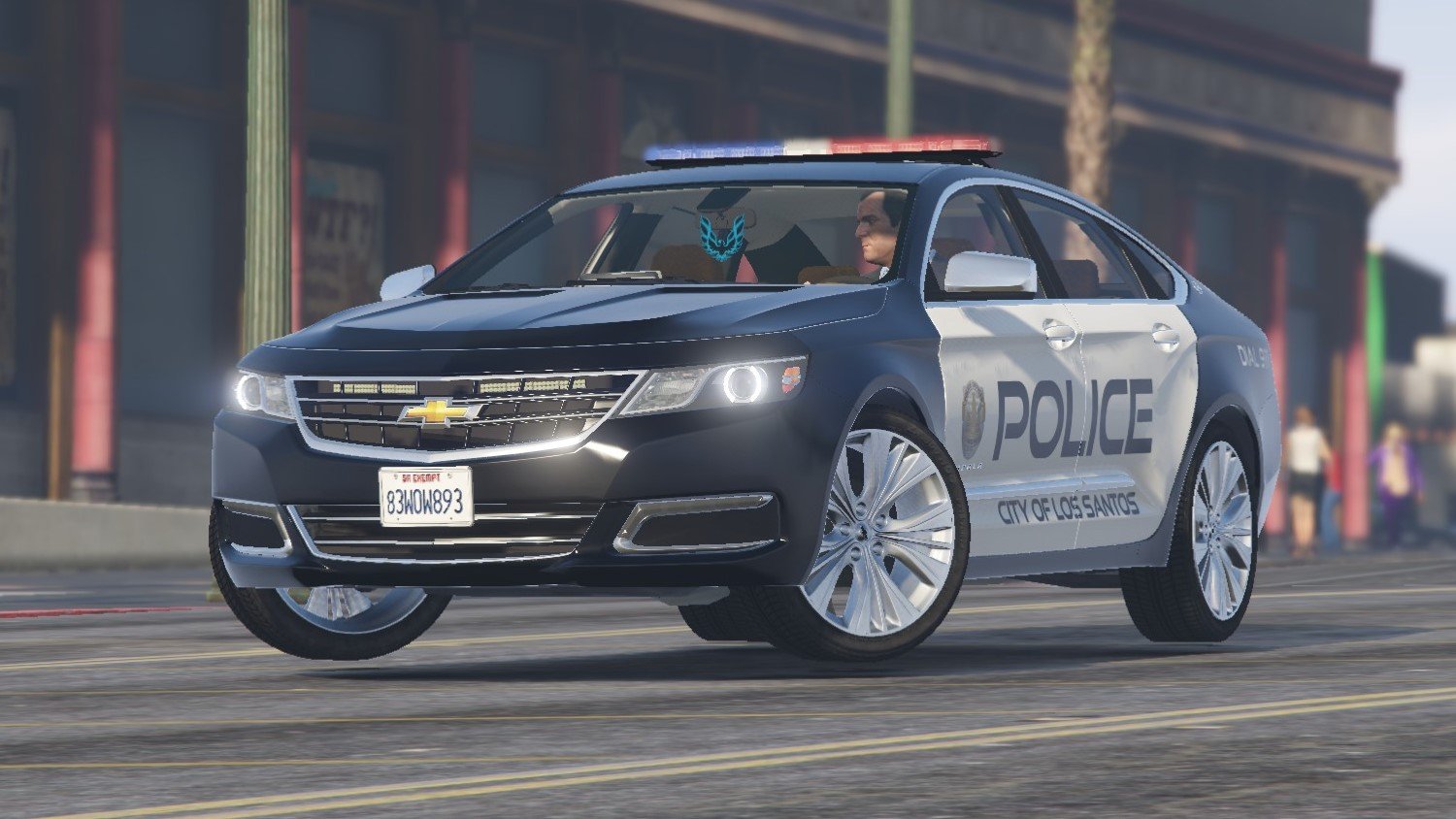
[ELS] 2016 Chevrolet Impala LTZ 2.0

(7 reviews)

12 Screenshots

The market for unorthodox police vehicles has been cornered YET AGAIN! I bring you an Impala that hasn't quite made the rounds to LCPDFR. The LTZ offers a level of class and luxury that the previous generation simply could not. Boasting an aggressive facelift, this Impala will ensure you finish your shift comfortably, swiftly, and safely! Simplicity is the name of the game. No smorgasbord of lights, no abundance of equipment. Just barebones simplicity.


CHANGES YOU MUST MAKE:
Change the handling to POLICE3


CHANGES YOU SHOULD MAKE (Optional):
Change the audio hash to SCHWARZER


Please download and leave a review!


YOU MAY USE THIS VEHICLE ON YOUR FIVEM SERVER


Join my Discord for giveaways and updates!

https://discord.gg/3np9Me3


Credits:

Model: Jrem7315
Whelen Inner Edge: OfficerFive0
Whelen Lower Edge: MajorPaine2015
Whelen Justice: GTAxB0SS
Firebird Air Freshener: Scratch modeled by BlueGhost
DRL Lights UV Mapped by BlueGhost
Template and liveries by BlueGhost
Dell Latitude: OfficerUnderwood
Laptop Stand: HDgamerzPC


Special Thanks to the following!

Jrem7315 for allowing me to purchase this model and outfit it with police equipment


Known Bugs:

None


If you enjoy this model, please consider donating! It helps me pay for ZModeler3, models, and keeps my motivation up!

https://paypal.me/blankghost


THIS MODEL IS OPTIMIZED FOR POLICE & POLICE3.

MAKE A BACKUP OF YOUR GAME FILES FIRST! I WILL NOT BE HELD RESPONSIBLE FOR ANY DAMAGES CAUSED TO YOUR GAME OR COMPUTER.

DO NOT RE-UPLOAD THIS FILE TO ANY SITE.


FAQ:

Q: Can you make this for me?

A: Sorry, no.

Q: Can you help me with ?

A: If it's a bug, then yes. If it's anything else, then please make a comment stating whatever else you need help with.

Q: Can you add more lights?

A: Sorry, no.

What's New in Version 2.0

Released

Added template

Added external lightbar version

Added UV mapped DRL emergency lights 

User Feedback

Recommended Comments

BlueGhost

Members Author

1 minute ago, xGemini said:

Time to test this in game!

Let me know how she works! Remember to change the handling to FUGITIVE!

Colevanman

Members

Just from the screenshots it looks amazing. Can't wait to put it in game and replace my old unmarked with this bad boy. 10/10. Non-ELS would have been cool to but I have heard the struggles of making non els cars. But really cool car.


BlueGhost

Members Author

3 minutes ago, Colevanman said:

Just from the screenshots it looks amazing. Can't wait to put it in game and replace my old unmarked with this bad boy. 10/10. Non-ELS would have been cool to but I have heard the struggles of making non els cars. But really cool car.


Thank you! I can’t wait to hear how it works for you!

xGemini

Members

(edited)

I thought maybe just a computer could be added to go along with the radar that is currently sitting alone inside it. Other than that, I see no issues. Good work brother keep making cars like these!

Edited by xGemini

XTREMEHEAT

Members

Do I need a YTD file for this or simply install the YFT to the latest patchday (patchday18) folder? Thanks.

Tactical Donut

Members

Where's the texture dictionary?

BlueGhost

Members Author

(edited)

40 minutes ago, XTREMEHEAT said:

Do I need a YTD file for this or simply install the YFT to the latest patchday (patchday18) folder? Thanks.


38 minutes ago, Tactical Donut said:

Where's the texture dictionary?

Sorry about that!!!! I forgot to copy paste the YTD!!!! It's fixed now!!!

Edited by Blank Ghost

Mick16

Members

I now want to marry your roadmap, OH MY GOD!!!!

BlueGhost

Members Author

7 hours ago, HoldenandHSVS97 said:

I now want to marry your roadmap, OH MY GOD!!!!

You may now kiss the bride 🚓

Mick16

Members

Just now, Blank Ghost said:

You may now kiss the bride 🚓

Thank you to Blank Ghost for hooking me and roadmap up, Thank you Blank Ghost, Thank You.

getting texture loss. but it might be cause of all my high poly count vehicles and this one is to.

BlueGhost

Members Author

1 hour ago, homie cat confirmed said:

getting texture loss. but it might be cause of all my high poly count vehicles and this one is to.

I tested this car rigorously, I get no texture loss. What’re your specs?

BlueGhost

Members Author

3 minutes ago, TheFrostBible said:

Any fix for the bright interior lights? Love it otherwise.

You can use a photo editing software to lower the brightness of the emissive textures. I used to do that for some of the vehicles I have in my game.

TheFrostBible

Members

4 minutes ago, Blank Ghost said:

You can use a photo editing software to lower the brightness of the emissive textures. I used to do that for some of the vehicles I have in my game.

I've modified the Garmin emissive but I'm uncertain on what emissive textures are used for the remainder of the dash, is it a shared texture?

BlueGhost

Members Author

(edited)


4 minutes ago, TheFrostBible said:

I've modified the Garmin emissive but I'm uncertain on what emissive textures are used for the remainder of the dash, is it a shared texture?

I believe it is. It'll just take a little bit of searching. I don't know the name right off the top of my head, but  you'll know it when you see it!


Edited by Blank Ghost

TheFrostBible

Members

5 minutes ago, Blank Ghost said:


I believe it is. It'll just take a little bit of searching. I don't know the name right off the top of my head, but  you'll know it when you see it!


Alright, thanks for the help!

Jackpw2001

Members

i need help with changing the handling to FUGITIVE because when i go into the file i cant seem to see where the handling bit is

BlueGhost

Members Author

Click search, type FBI, scroll down just a little bit. It'll say <handlingID>.

15 minutes ago, Jackpw2001 said:

i need help with changing the handling to FUGITIVE because when i go into the file i cant seem to see where the handling bit is

Click search, type FBI, scroll down just a little bit. It'll say <handlingID>.

Jackpw2001

Members

2 hours ago, Blank Ghost said:

Click search, type FBI, scroll down just a little bit. It'll say <handlingID>.

Click search, type FBI, scroll down just a little bit. It'll say <handlingID>.

what program do you use to edit it because i dont think im using the right program to edit


image.thumb.png.ec5790a77677a2c784aedb1321286fe1.png

BlueGhost

Members Author

20 minutes ago, Jackpw2001 said:

what program do you use to edit it because i dont think im using the right program to edit


image.thumb.png.ec5790a77677a2c784aedb1321286fe1.png

You're not editing the correct file. You're editing the VCF. You need to edit the Vehicles.meta. 


mods/update/update.rpf/common/data/levels/gta5/vehicles.meta

Pumpk1in

Members

Nice car !

But... how to reduce A LOT, the white lights on the bumper ? x) I didn't found the texture.


Thanks :)

BlueGhost

Members Author

8 minutes ago, Pumpk1in said:

Nice car !

But... how to reduce A LOT, the white lights on the bumper ? x) I didn't found the texture.


Thanks 🙂

I don't know if they can be dimmed, unfortunately! I can't find the texture either 😕

On 7/9/2018 at 2:14 PM, Blank Ghost said:

I tested this car rigorously, I get no texture loss. What’re your specs?

gtx 1060 amd ryzen 5 qaud core cpu. 16 gigs of ram.

Create an account or sign in to comment

Account

Navigation

Search

Search

Configure browser push notifications

Chrome (Android)
  1. Tap the lock icon next to the address bar.
  2. Tap Permissions → Notifications.
  3. Adjust your preference.
Chrome (Desktop)
  1. Click the padlock icon in the address bar.
  2. Select Site settings.
  3. Find Notifications and adjust your preference.















