Skip to content
View in the app

A better way to browse. Learn more.

LCPDFR.com

A full-screen app on your home screen with push notifications, badges and more.

To install this app on iOS and iPadOS
  1. Tap the Share icon in Safari
  2. Scroll the menu and tap Add to Home Screen.
  3. Tap Add in the top-right corner.
To install this app on Android
  1. Tap the 3-dot menu (⋮) in the top-right corner of the browser.
  2. Tap Add to Home screen or Install app.
  3. Confirm by tapping Install.

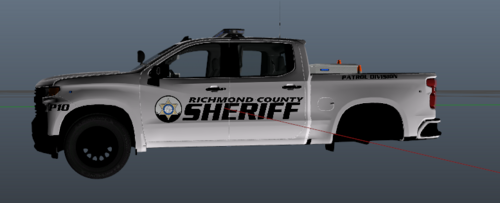
Dodge Charger Atherton Police Skin 1.0.0

(0 reviews)

7 Screenshots

Hello, This is my first skin. 

This is based on the Atherton PD Cars.


PLEASE DO NOT REUPLOAD THIS FILE!
User Feedback

Recommended Comments

Providence Law

Members

Since I can't find any real-life pictures to judge by, I can't judge this on accuracy to its real-life counterpart, however....


It's not a bad skin, everything looks well placed and I'd drive a car looking like this. Just one minor thing, where it says "ATHERTON" by the license plate, the license plate is colliding with it. Hopefully you can move that elsewhere and then you've got a pretty good skin. 


If you ever look into making more skins in the future, (especially more complex ones) you may want to get yourself a more sophisticated font selection to more accurately represent what you're skinning. Some typical ones they use are Eurostile/Microgramma Bold Italic, Serpentine Bold, and in California, Helvetica Neue bold and Brush Script. 


I'll stop ranting now, but nevertheless, good job and, if you can make those improvements, it's got a 5-star from me.


Prov

Nicholas8588

Members Author

Thanks! Here is a real-life photo.

(Please keep in mind I did purposely make it all white and added the POLICE lettering on the side!)

279cd15d1b6892e00810f313976c34841-678x381.jpg

ProvidenceLaw

Members

(edited)

13 minutes ago, Hardcoregamer9873 said:

Thanks! Here is a real-life photo.

(Please keep in mind I did purposely make it all white and added the POLICE lettering on the side!)

279cd15d1b6892e00810f313976c34841-678x381.jpg

Ahh, I see. No wonder I couldn't find the all white version. I like that you added your own touch and it looks fine to me. Again, with the exception of that text in the back. It would be cool to see a black and white version like that as well, I think it looks really nice, especially if you did a lore-friendly version (made it Los Santos Police instead of Atherton) you might get it more attention. Good work again.

Edited by ProvidenceLaw

Nicholas8588

Members Author

Thanks Again

Create an account or sign in to comment

Account

Navigation

Search

Search

Configure browser push notifications

Chrome (Android)
  1. Tap the lock icon next to the address bar.
  2. Tap Permissions → Notifications.
  3. Adjust your preference.
Chrome (Desktop)
  1. Click the padlock icon in the address bar.
  2. Select Site settings.
  3. Find Notifications and adjust your preference.







