Skip to content
View in the app

A better way to browse. Learn more.

LCPDFR.com

A full-screen app on your home screen with push notifications, badges and more.

To install this app on iOS and iPadOS
  1. Tap the Share icon in Safari
  2. Scroll the menu and tap Add to Home Screen.
  3. Tap Add in the top-right corner.
To install this app on Android
  1. Tap the 3-dot menu (⋮) in the top-right corner of the browser.
  2. Tap Add to Home screen or Install app.
  3. Confirm by tapping Install.

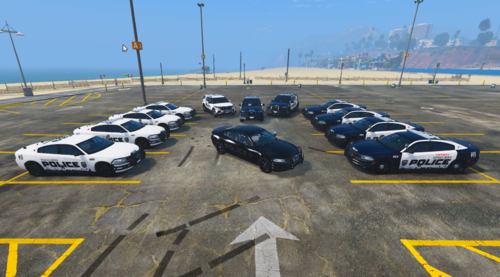
Los Santos Vinewood HP UNIT 1.0.0

(3 reviews)

1 Screenshot

This file is my very first. I just make them and don't have gta v so could one of you download it and send me a screenshot to the email: captainplayzmcpe@gmail.com please? Or add me on discord @: Deputy Abs✓ᵛᵉʳᶦᶠᶦᵉᵈ#9681  feel free to copy that and add me. I will get back to you within an hour and love you. Than you guys so much for the support! Tell me how you like it!!!

User Feedback

Recommended Comments

Hullian111

Members

How do you manage to forget the other side?!

MCP

Members

At least one person has downloaded this according to the stats listed above....

WZNGT

Members

(edited)

Why will you make a skin when you don't even have a copy of GTA5??? Instead of bring this stuff up, why not just stay back and watch those videos on Y2B.

Edited by WZNGT

brysonblandford

Members

On 12/3/2017 at 4:10 PM, Hullian111 said:

How do you manage to forget the other side?!

He forgot to walk around to the other side.

Jesus That just makes me throw up.


1 minute ago, Fedora Legend said:

Jesus That just makes me throw up.


Im sorry if that offended you but that texture offended all of the CHP content creators


Create an account or sign in to comment

Latest Mods

Account

Navigation

Search

Search

Configure browser push notifications

Chrome (Android)
  1. Tap the lock icon next to the address bar.
  2. Tap Permissions → Notifications.
  3. Adjust your preference.
Chrome (Desktop)
  1. Click the padlock icon in the address bar.
  2. Select Site settings.
  3. Find Notifications and adjust your preference.