Skip to content
View in the app

A better way to browse. Learn more.

LCPDFR.com

A full-screen app on your home screen with push notifications, badges and more.

To install this app on iOS and iPadOS
  1. Tap the Share icon in Safari
  2. Scroll the menu and tap Add to Home Screen.
  3. Tap Add in the top-right corner.
To install this app on Android
  1. Tap the 3-dot menu (⋮) in the top-right corner of the browser.
  2. Tap Add to Home screen or Install app.
  3. Confirm by tapping Install.

LSPDFR1033 1.0.4

(9 reviews)

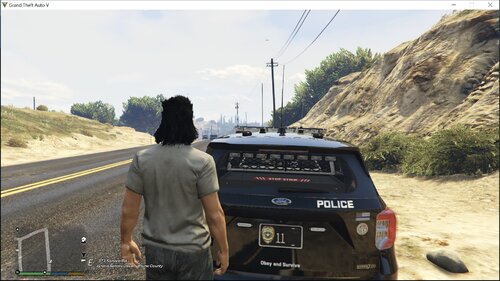
1 Screenshot

This Plugin from the makers of ClearTheWayV comes as a whole new immersion into the game bridging real life police dispatch and LSPDFR dispatch closer together

anyone who has ever listened to police dispatch radio knows the priority marker tone that this mod uses to make it more realistic including voice over's played over LSPDFR's dispatch radio saying "Attention All Units 10-33 Traffic" and after the "coast" is "clear" dispatch comes back over the LSPDFR radio and says "Attention All Units 10-66 10-33 Traffic" This mod makes playing LSPDFR like never before! since it activates itself when you start a LSPDFR callout or a LSPDFR pursuit making it more realistic by playing the priority marker tone every few seconds just like in real life making this the most "realistic" as you can get inside LSPDFR mod must have!

Please Follow community guidelines when posting, as in be respectful don't use rude language,etc.

Support - what to do if you encounter a bug or have problems:

  1. Use this tool: http://www.lcpdfr.com/files/file/9755-lspdfr-troubleshooter-by-albo1125/  <-- recommended, mostly because it solves the most common problems automatically.
  2. if albo's tool above cannot solve the problem, Please leave a comment (not a review). Include your RAGEPluginHook.log file, located in your Grand Theft Auto V folder in a spoiler so it doesn't make the page too long for people not interested on reading the log. Also, please provide an accurate description of what happened. This allows me to help you as fast as possible without having to ask you for this information I need to help you, as if I don't get this information I cannot help you because I will not know what is causing the problem and will result in delayed resolution of the problem due to asking you for the needed information before proceeding.... please as said above provide this information with your initial comment (not a review) to allow the most quick resolution of the problem as possible.

Leaving a review for support issues is against community guidelines, and will not even be answered at all, will be reported instantly instead


New Showcase video:


What's New in Version 1.0.4

Released

1.0.1:


New Voiceovers Thanks @Candice

as the new voiceovers was done as you guessed by Candice and as such I wanted to thank them for their help.

1.0.2:

Added new INI Option to allow disabling dispatcher voice sfx, can be set after first run of new version, as the script will automatically create the ini file on the first run. also included more realistic beep sound as given in one of the reviews.

1.0.2-patch1:

Just added LSPDFR Dispatch Audio as separate download since I seem to forgot to include them, nothing changed in the script just addition of the dispatch audio in zip.

1.0.2-patch2:

Repackaged all files into one download.

1.0.3:

RPH Update(min version now required is 0.62 to run this script)

No Other Changes made.

1.0.4:

RPH Update(min version now required is 0.67 to run this script)

LSPDFR Reference Update(min version now required is 0.43 to use it with LSPDFR)

No Other Changes made.

1.0.5:

Added Dispatch audio and all back in as one zip file. sorry about that.

User Feedback

Recommended Comments

Space.

Members

Thanks for updating, much appreciated!

Slushy

Members

So glad to see some development to this <3

Cyanotic

Members

(edited)

where is the .ini?


EDIT: lol never mind. I should learn to read. 

Edited by sid1138

Shinhwa

Members

Did the latest release use the old audio files? I copied over the last version and now the audio seems like the old ones. I tried re-downloading them, but they still don't sound like the good ones.

timnboys

Members Author

On 6/12/2018 at 5:51 PM, Shinhwa said:

Did the latest release use the old audio files? I copied over the last version and now the audio seems like the old ones. I tried re-downloading them, but they still don't sound like the good ones.

ah, what do you mean? as which audio files are you referring to? as it is hard to know which audio files you meant due to it having voiceover audio files and the channel marker sound effect audio file.

Shinhwa

Members

On 6/16/2018 at 10:54 AM, timnboys said:

ah, what do you mean? as which audio files are you referring to? as it is hard to know which audio files you meant due to it having voiceover audio files and the channel marker sound effect audio file.

The voice over audio files. I don't think the ones I have are the Candace voice.

timnboys

Members Author

1 minute ago, Shinhwa said:

The voice over audio files. I don't think the ones I have are the Candace voice.

okay? so you prefer the candace voice over audio files then? because I am not really sure what you mean? I don't think they have changed though because I looked back over my pm's on here and didn't find no change of voice over files provided by someone else, so as far as I know there still by candace and if you prefer better ones, you could always contribute and make some for me then 🙂 

Shinhwa

Members

(edited)

21 hours ago, timnboys said:

okay? so you prefer the candace voice over audio files then? because I am not really sure what you mean? I don't think they have changed though because I looked back over my pm's on here and didn't find no change of voice over files provided by someone else, so as far as I know there still by candace and if you prefer better ones, you could always contribute and make some for me then 🙂 

I'm sure its my misunderstanding. I thought what was being changed are the "ATTENTION_ALL_UNITS_1033_TRAFFIC" voice files. The ones in the LSPDFR1033 archive I have are so different from the normal GTA voices as to be quite jarring. I only thought I was missing an update somehow that changed that. 

Edited by Shinhwa

john925

Members

A showcase or something of this mod would be nice to see.

timnboys

Members Author

(edited)

On 6/18/2018 at 1:45 PM, Shinhwa said:

I'm sure its my misunderstanding. I thought what was being changed are the "ATTENTION_ALL_UNITS_1033_TRAFFIC" voice files. The ones in the LSPDFR1033 archive I have are so different from the normal GTA voices as to be quite jarring. I only thought I was missing an update somehow that changed that. 

I found the audio file, it appears there was a 10-33 beep file change in the reviews section possibly along with the ability in the ini file to completely disable "dispatch" voiceovers.

if you are willing to source the changed audio files I will include it with the next release.


Edited by timnboys

ventrix

Members

On 8/5/2019 at 11:20 AM, idk0000 said:

whats that dash cam mod???


Go into camera settings and set it for first person hood view.

Kreemerz

Members

It's what we in Contra Costa County used to refer to as a mobile emergency or Code 33. 


Open: "Code 33 on channel 1"

Close: "Code 33 lifted, resume all normal traffic."


Citizen844

Members

Its 5 minutes of driving followed by a single voice over that sounds like a 9 year old girl - is that the download?

Plundr

Members

I'm having issues installing?? I put the files in the Plugins > LSPDFR folder. Did I miss something? 

On 8/5/2019 at 4:20 AM, idk0000 said:

whats that dash cam mod???


Not a mod- just a camera setting. See below:


On 8/6/2019 at 9:10 AM, ventrix said:

Go into camera settings and set it for first person hood view.


tupiko36

Members

What Dashcam plugin do you use?

chadc78

Members

What is the plug in exactly I watched the whole video is it the beep every few seconds and the weird dispatcher at the end? 

Does this work with 4.3 after update?

Citizen844

Members

This still has a child's voice. Is the newer version with an adult dispatcher?

timnboys

Members Author

On 8/26/2019 at 4:00 PM, Citizen844 said:

This still has a child's voice. Is the newer version with an adult dispatcher?

if you can provide better voice over's feel free, I will include them in the next release and remove the old one's then. 

ManamalReacts

Members

I think it sound good as it. Is this plugin compatible with version 0.4.4?

nono32

Members

thanx ! exellent :)

timnboys

Members Author

On 10/21/2019 at 10:11 AM, ManamalReacts said:

I think it sound good as it. Is this plugin compatible with version 0.4.4?

it should be compatible, unless they changed API methods it uses, which I don't think they did but I will check regardless though. 

Create an account or sign in to comment

Latest Mods

Account

Navigation

Search

Search

Configure browser push notifications

Chrome (Android)
  1. Tap the lock icon next to the address bar.
  2. Tap Permissions → Notifications.
  3. Adjust your preference.
Chrome (Desktop)
  1. Click the padlock icon in the address bar.
  2. Select Site settings.
  3. Find Notifications and adjust your preference.