Skip to content
View in the app

A better way to browse. Learn more.

LCPDFR.com

A full-screen app on your home screen with push notifications, badges and more.

To install this app on iOS and iPadOS
  1. Tap the Share icon in Safari
  2. Scroll the menu and tap Add to Home Screen.
  3. Tap Add in the top-right corner.
To install this app on Android
  1. Tap the 3-dot menu (⋮) in the top-right corner of the browser.
  2. Tap Add to Home screen or Install app.
  3. Confirm by tapping Install.

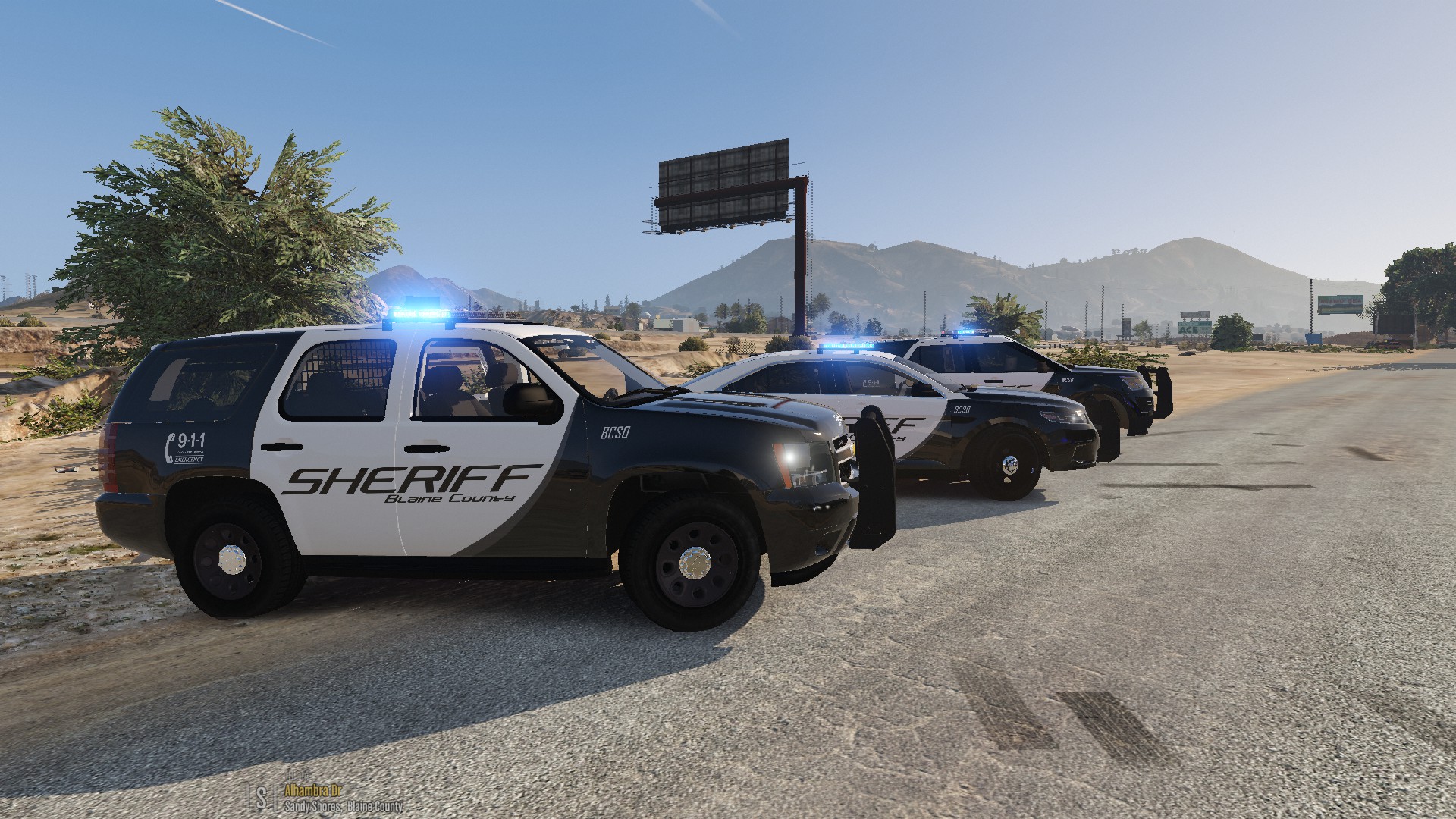
Blaine County Sheriff's Office Pack 1.2.0

(25 reviews)

9 Screenshots

Hi!


I'm proud to present to you, a BCSO Pack. This pack contains 7 vehicles . I have also included an all blue setup in a separate download. If you spot any bugs, please let me know. I will do my best to fix them. In the meantime, I hope you enjoy.


Thanks to Epic Gaming for the screenshots!


Pack includes:

2015 Dodge Charger

2015 Chevrolet Tahoe

2011 CVPI

2016 Dodge Challenger

2016 FPIU

2016 FPIS

2013 Chevrolet Tahoe


Make sure you have ELS installed.

Link for ELS:

MAKE A BACKUP!!!

I'M NOT RESPONSIBLE FOR ANY DAMAGE TO YOUR GAME!!!


DO NOT UPLOAD TO OTHER WEBSITES WITHOUT MY CONSENT!!!


Instructions:

Spoiler


1. Choose which light setup you want, all blue or red and blue.
2. Launce OpenIV. Enable Editing Mode.
3. Navigate to: (root folder)update/x64/dlcpacks.
4. Place bcsopack in the directory. If OpenIV imports only dlc.rpf, please create a folder named bcsopack
   and place it into the directory. Place the dlc.rpf into bcsopack.
5. Navigate to: (root folder)update/update.rpf/common/data and export dlclist.xml to your desktop.
6. Open the xml file with Notepad.
7. Add this line:
   <Item>dlcpacks:\bcsopack\</Item>
8. Save and close.
9. Replace the old dlclist with the new dlclist.
10. Navigate to: (root folder)/ELS/pack_default.

11. Add the VCF Files.

12. Close OpenIV then launch GTA V and enjoy!


If windows/lightbar is tinted black:

Spoiler

1. Launch OpenIV.
2. Navigate to: update/update.rpf/common/data/levels/gta5.
3. Open vehicles.meta
4. Go to the police4 line.
5. Replace the diffuseTint value to : <diffuseTint value="0x00FFFFFF" />
6. Close and save.


Credits: If I have forgotten someone, please let me know!

Spoiler


Model:
2015 Dodge Charger
- 2015 Dodge Charger R/T by Turn 10 Studios
- Modifed into 2015 PPV and converted to GTA V by OfficerUnderwood
- Seats by SimRaceway, Radio by OfficerUnderwood

2015 Chevrolet Tahoe
- Orignal suburban Scratch modeled by Shadydk311 
- Converted and edited to V by BritishGamer88
- Converted to Tahoe by Thehurk & Allaboutk9
- MAJOR edits by Thehurk 
- Convert to PPV By Thehurk
- Rims purchased by Him1250
- Normals and wireframe fixed by Thehurk
- Textured by Thehurk

2011 Crown Victoria Police Interceptor
- CVPI Model from Driver SF, converted to IV by F5544, modified by KevinDV, CJ24, and OfficerUnderwood
- CVPI Wheels from NFS:MW, converted yb trewq34, textures by GreenAid
- CVPI Interior parts by Ubisoft, modified by OfficerUnderwood
 -CVPI door handles by Lundy
- CVPI Hubcaps by Bueno

2016 Dodge Charger SRT Hellcat
- Model ripped by dmn
- Converted to gta iv by MrPotato 
- Converted to gta v and textured by MrPotato
- Interior by Turn 10 Studios
- Engine from CSR2 
- Templated by MrPotato

2016 Ford Police Interceptor Utility
- 2016 Ford Explorer model from humpster3d Converted to a 2016 Ford Police Interceptor by JasonCT203, Converted to GTA IV by JasonCT203 and to GTA V by JasonCT203
- 2016-Current Ford Police Interceptor Wheel modeled by VooDoo, Centercap by Jasonct203 converted to GTA V by JasonCT203
- 2013 ford explorer interior from thunderchickens explorer interior textures by voodoo

2016 Ford Police Interceptor Sedan
- 2010 Ford Taurus SHO by Turn 10 Studios, modified into 2016 Ford Taurus Police Interceptor by OfficerUnderwood
- Rear bumper, headlamps, & dash by be fast, modified by OfficerUnderwood & Carper
- Front bumper by Ridgerunner, Grill by Vertex3D, modified by OfficerUnderwood
- Chassis parts by Ubisoft, Reverse lights by OfficerUnderwood
- Rims by BxBugs123, Centercap by Carper

Lights:
Federal Signal Valor
- Federal Signal Valor Modeled and textured by RoegonTV.
- Mounts modeled by RoegonTV.

Whelen Inner Edge XLP
- Whelen Inner Edge XLP scratch modeled by Five0
- Converted to GTA 5 by Five0

Federal Signal Latitude Signalmaster
- FS Latitude Signalmaster by DannyBoy1909
- Converted to IV by Him1250
- Textures by Him1250

Code 3 XT4 and XT6
- Made by Macgregor

Soundoff Fascia
- Made by Sgt. Goetz or Zach Plays or Officer Goetz

Equipment:
Generic Rambar
- Made by Black Jesus

Dell Latitude 6430/20 ATG
- Made by OfficerUnderwood

Partition
- ???

Console
- Made by SheriffVan DyckSkin:


Screenshots:

Screenshots by Epic Gaming


Skin:
- Blaine County Sheriff's OfficeCounty Sheriff's Office by Kafloopy888



16


What's New in Version 1.2.0

Released

  • Added the Blue ELS VCF Files.

User Feedback

Recommended Comments

Just installed this today, only had problems due to my own incompetence so if anyone has issues I may be able to assist.


Loving all of these cars so much!!

20170415175028_1.jpg

TheShroom

Members

(edited)

I did everything according to the instructions, I created the new folder named bcsopack in my dlcpacks folder, placed the bcsopack.rpf in bcsopack, added <Item>dlcpacks:\bcsopack\</Item> to my dlclist.xml, put all the vcf files in pack_default and when I run gta and spawn the sheriff cars, it only spawns the default gta v cars, and when I spawn sheriff3 and the others through the console, nothing happens. Pleeease help me, I really want this pack!

Edited by TheShroom

Royal Jay

Members

(edited)

@Kafloopy888 how easy or hard is it to make a Challenger with a Whelen or Code 3 lightbar? Something I can Google in do in an hour or so, or we taking days? I ask because I'd like to replace with Valor with a Whelen.

Edited by MrAnarchy

billiarboy

Members

(edited)

Is there  hand spotlights? I seem too not be able to get them in the trainer!

Could not get the dlc pack too work, so I broke them down in another swapped pack!

Also where are the antennas?

Edited by billiarboy

MrMaoamm

Members

On 23-4-2017 at 10:48 AM, TheShroom said:

I did everything according to the instructions, I created the new folder named bcsopack in my dlcpacks folder, placed the bcsopack.rpf in bcsopack, added <Item>dlcpacks:\bcsopack\</Item> to my dlclist.xml, put all the vcf files in pack_default and when I run gta and spawn the sheriff cars, it only spawns the default gta v cars, and when I spawn sheriff3 and the others through the console, nothing happens. Pleeease help me, I really want this pack!

Do you still need a solution? If so, let me know and I will help you.

APD657

Members

13 hours ago, MrMaoamm said:

Do you still need a solution? If so, let me know and I will help you.

I need a solution I am having the same issue with The CHP pack and this pack Please help 

MrMaoamm

Members

1 hour ago, APD657 said:

I need a solution I am having the same issue with The CHP pack and this pack Please help 

The installation for this sheriff pack given in the instructions did not work for me either. Instead I downloaded the Captain14's sheriff pack because it comes with an oiv-installer which is very easy to install with OpenIV. Just follow the instructions given in Captain14's pack, and the install will overwrite the original GTAV sheriff cars. This is very easy because the oiv-installer file uses an integrated package-installer in OpenIV. You should now have a steady sheriff pack. When you've installed this pack it is very easy.

1. Open OpenIV and activate Edit Mode.

2. Navigate to your "mods" folder (which should be created by now because of the oiv-installer in Captain14's pack) and click on "update".

3. Click on "dlcpacks".

4. Click on "sheriffpack". You should enter a page with a "dlc.rpf" file.

5. Simply right-click on the "dlc.rpf" file and choose "Replace".

6. Navigate to the download of this sheriff pack and click on the "dlc.rpf" given in this download. It should replace Captain14's pack with this one and all will be fine.


You can then eventually swap some cars around if you want to.

This goes as follows:

1. Click on the "sheriff pack".

2. Click on "dlc.rpf".

3. Click on "x64".

4. Click on "levels".

5. Click on "gta5".

6. Click on "vehicles".

7. Click on "bcsopack.rpf".

8. Then you can easily replace a car by renaming the new car to one of your slots. So for instance you downloaded a car that is named police.ytd/police.yft/police_hi.yft etc. rename the files to for example sheriff3.ytd/sheriff3.yft/sheriff3_hi.yft. Then, while in Edit Mode select the files and drag them to the directory i poined out above and the car should be replaced. You can always look at an example of how a car looks by clicking on the .yft file. It will provide you with a 3D model of how the car wil look ingame.


As for the CHP pack, TheHurk actually provided an oiv-installer for this pack. When downloading the file do not pick the pack itself but pick the 'Add-on Download Link.txt'. This is a text document with a link to a Google-drive download. If you download that file it will come with an oiv-installer for the whole pack which works exactly the same as Captain14's pack and will fully download the pack for you. You can then navigate to the pack as pointed out above and can also replace cars the way I pointed out above. Good luck and if you need any more help please let me know because I would love to help you if this instructions do not work for you.

APD657

Members

8 hours ago, MrMaoamm said:

The installation for this sheriff pack given in the instructions did not work for me either. Instead I downloaded the Captain14's sheriff pack because it comes with an oiv-installer which is very easy to install with OpenIV. Just follow the instructions given in Captain14's pack, and the install will overwrite the original GTAV sheriff cars. This is very easy because the oiv-installer file uses an integrated package-installer in OpenIV. You should now have a steady sheriff pack. When you've installed this pack it is very easy.

1. Open OpenIV and activate Edit Mode.

2. Navigate to your "mods" folder (which should be created by now because of the oiv-installer in Captain14's pack) and click on "update".

3. Click on "dlcpacks".

4. Click on "sheriffpack". You should enter a page with a "dlc.rpf" file.

5. Simply right-click on the "dlc.rpf" file and choose "Replace".

6. Navigate to the download of this sheriff pack and click on the "dlc.rpf" given in this download. It should replace Captain14's pack with this one and all will be fine.


You can then eventually swap some cars around if you want to.

This goes as follows:

1. Click on the "sheriff pack".

2. Click on "dlc.rpf".

3. Click on "x64".

4. Click on "levels".

5. Click on "gta5".

6. Click on "vehicles".

7. Click on "bcsopack.rpf".

8. Then you can easily replace a car by renaming the new car to one of your slots. So for instance you downloaded a car that is named police.ytd/police.yft/police_hi.yft etc. rename the files to for example sheriff3.ytd/sheriff3.yft/sheriff3_hi.yft. Then, while in Edit Mode select the files and drag them to the directory i poined out above and the car should be replaced. You can always look at an example of how a car looks by clicking on the .yft file. It will provide you with a 3D model of how the car wil look ingame.


As for the CHP pack, TheHurk actually provided an oiv-installer for this pack. When downloading the file do not pick the pack itself but pick the 'Add-on Download Link.txt'. This is a text document with a link to a Google-drive download. If you download that file it will come with an oiv-installer for the whole pack which works exactly the same as Captain14's pack and will fully download the pack for you. You can then navigate to the pack as pointed out above and can also replace cars the way I pointed out above. Good luck and if you need any more help please let me know because I would love to help you if this instructions do not work for you.


It worked, thanks for your help now I just need to be able to get one more thing to work then I will be set. The Rage Hook console isn't working at all I have tried multiple fixes and nothing. I have everything installed properly. I am wanting to set up my custom sirens but I can't because the ragehook console isn't working to reload scripts. But I am still working on looking into this issue. If you have any suggestions can you please pass them my way?

MrMaoamm

Members

2 hours ago, APD657 said:

It worked, thanks for your help now I just need to be able to get one more thing to work then I will be set. The Rage Hook console isn't working at all I have tried multiple fixes and nothing. I have everything installed properly. I am wanting to set up my custom sirens but I can't because the ragehook console isn't working to reload scripts. But I am still working on looking into this issue. If you have any suggestions can you please pass them my way?

Usually the issue is that you have some conflicting mods or scripts which will make it very hard for Rage to load properly. I suggest that you start from scratch and install one mod/script at the time. After installing a mod/script see if the game works or not, that way you can filter out any mods/scripts that cause problems. I personally watched Jeff Favignano's video to help me install everything, he also emphasizes that you should take it easy when installing mods/scripts and not throw in a bunch of them at once. I will link the video below, he walks you through everything you need to know and even has follow-up video's that focus on installing cars, sirens, etc. Best of luck and let me know how it worked out.


Link to the first LSPDFR tutorial of Jeff Favignano:

https://www.youtube.com/watch?v=7ZnBwl7R4cg&t=743s 

TheShroom

Members

On 28/04/2017 at 2:48 PM, MrMaoamm said:

The installation for this sheriff pack given in the instructions did not work for me either. Instead I downloaded the Captain14's sheriff pack because it comes with an oiv-installer which is very easy to install with OpenIV. Just follow the instructions given in Captain14's pack, and the install will overwrite the original GTAV sheriff cars. This is very easy because the oiv-installer file uses an integrated package-installer in OpenIV. You should now have a steady sheriff pack. When you've installed this pack it is very easy.

1. Open OpenIV and activate Edit Mode.

2. Navigate to your "mods" folder (which should be created by now because of the oiv-installer in Captain14's pack) and click on "update".

3. Click on "dlcpacks".

4. Click on "sheriffpack". You should enter a page with a "dlc.rpf" file.

5. Simply right-click on the "dlc.rpf" file and choose "Replace".

6. Navigate to the download of this sheriff pack and click on the "dlc.rpf" given in this download. It should replace Captain14's pack with this one and all will be fine.


You can then eventually swap some cars around if you want to.

This goes as follows:

1. Click on the "sheriff pack".

2. Click on "dlc.rpf".

3. Click on "x64".

4. Click on "levels".

5. Click on "gta5".

6. Click on "vehicles".

7. Click on "bcsopack.rpf".

8. Then you can easily replace a car by renaming the new car to one of your slots. So for instance you downloaded a car that is named police.ytd/police.yft/police_hi.yft etc. rename the files to for example sheriff3.ytd/sheriff3.yft/sheriff3_hi.yft. Then, while in Edit Mode select the files and drag them to the directory i poined out above and the car should be replaced. You can always look at an example of how a car looks by clicking on the .yft file. It will provide you with a 3D model of how the car wil look ingame.


As for the CHP pack, TheHurk actually provided an oiv-installer for this pack. When downloading the file do not pick the pack itself but pick the 'Add-on Download Link.txt'. This is a text document with a link to a Google-drive download. If you download that file it will come with an oiv-installer for the whole pack which works exactly the same as Captain14's pack and will fully download the pack for you. You can then navigate to the pack as pointed out above and can also replace cars the way I pointed out above. Good luck and if you need any more help please let me know because I would love to help you if this instructions do not work for you.

Thank you so much, I'm so grateful I got this BEAUTIFUL pack installed

iJ3F

Members

Hello, is there a non-els version?  or a way to convert to non els?  I really don't like ELS,  I may be the only one though. :(

TimmyZockt

Members

Am 28.4.2017 um 13:48 schrieb MrMaoamm:

The installation for this sheriff pack given in the instructions did not work for me either. Instead I downloaded the Captain14's sheriff pack because it comes with an oiv-installer which is very easy to install with OpenIV. Just follow the instructions given in Captain14's pack, and the install will overwrite the original GTAV sheriff cars. This is very easy because the oiv-installer file uses an integrated package-installer in OpenIV. You should now have a steady sheriff pack. When you've installed this pack it is very easy.

1. Open OpenIV and activate Edit Mode.

2. Navigate to your "mods" folder (which should be created by now because of the oiv-installer in Captain14's pack) and click on "update".

3. Click on "dlcpacks".

4. Click on "sheriffpack". You should enter a page with a "dlc.rpf" file.

5. Simply right-click on the "dlc.rpf" file and choose "Replace".

6. Navigate to the download of this sheriff pack and click on the "dlc.rpf" given in this download. It should replace Captain14's pack with this one and all will be fine.


You can then eventually swap some cars around if you want to.

This goes as follows:

1. Click on the "sheriff pack".

2. Click on "dlc.rpf".

3. Click on "x64".

4. Click on "levels".

5. Click on "gta5".

6. Click on "vehicles".

7. Click on "bcsopack.rpf".

8. Then you can easily replace a car by renaming the new car to one of your slots. So for instance you downloaded a car that is named police.ytd/police.yft/police_hi.yft etc. rename the files to for example sheriff3.ytd/sheriff3.yft/sheriff3_hi.yft. Then, while in Edit Mode select the files and drag them to the directory i poined out above and the car should be replaced. You can always look at an example of how a car looks by clicking on the .yft file. It will provide you with a 3D model of how the car wil look ingame.


As for the CHP pack, TheHurk actually provided an oiv-installer for this pack. When downloading the file do not pick the pack itself but pick the 'Add-on Download Link.txt'. This is a text document with a link to a Google-drive download. If you download that file it will come with an oiv-installer for the whole pack which works exactly the same as Captain14's pack and will fully download the pack for you. You can then navigate to the pack as pointed out above and can also replace cars the way I pointed out above. Good luck and if you need any more help please let me know because I would love to help you if this instructions do not work for you.

I do this and it ownly spawns sheriff and sheriff2 oder names with 3,4,5,.. not found what can i do?   (sorry for my bad english)

MrMaoamm

Members

Hmm... I have not had that before. I suggest you try to install the Captain14 Sherrif Pack and see if that works or not. It should have 3 cars, so have a look if you can spawn all of those. Then you can swap the dlc.rpf and see if it works. That way we can maybe find out if it is Captain14's pack or the steps afterwards. Let me know!

TimmyZockt

Members

@Mrmaoamm the pack ownly works.

TimmyZockt

Members

vor 20 Stunden schrieb MrMaoamm:

Hmm... I have not had that before. I suggest you try to install the Captain14 Sherrif Pack and see if that works or not. It should have 3 cars, so have a look if you can spawn all of those. Then you can swap the dlc.rpf and see if it works. That way we can maybe find out if it is Captain14's pack or the steps afterwards. Let me know!

Now it works. :) thanks


MrMaoamm

Members

3 hours ago, TimmyZockt said:

Now it works. :) thanks


Very good to hear! Have fun!

Gorminator22

Members

Hi there.

I have installed this pack using the instructions. However, the only way I can access the cars is by searching for them in my Trainer (by handwriting SHERIFF6 for example). Is there any way that I can access these models through the Sheriff stations or through the Emergency section of my Vehicle Spawning menu?

Thanks!

MrMaoamm

Members

(edited)

On 2017-5-17 at 9:40 PM, Gorminator22 said:

Hi there.

I have installed this pack using the instructions. However, the only way I can access the cars is by searching for them in my Trainer (by handwriting SHERIFF6 for example). Is there any way that I can access these models through the Sheriff stations or through the Emergency section of my Vehicle Spawning menu?

Thanks!

To my knowledge you can only spawn cars that are not in the vanilla game via the trainer. However you can try to use the Realism Dispatch Enhanced mod that I have linked down below. This mod adds a lot of new departments to the game with cars that do spawn in game I think. If you use the slots provided in the mod and try to swap some cars they might spawn in game, I'm not sure though. But be careful, the mod is extremely heavy I've heard!

Good luck!


The link to the mod:


Edited by MrMaoamm

Pio

Members

I did everything to install this pack and it only shows the charger and the tahoe in game. Why don't all the cars show up? What do I have to do?

zigaliro555

Members

Hey, I noticed a lighting glitch on the emergency lightings on the Sheriff SUV. This only happens if you are more than 5 meters away from the car.  Could you fix it?


5938284600ad4_GTA52017-06-0718-18-42-371.thumb.jpg.fc2af64643159a0f2599722b6c873b35.jpg

That1JdmReefer

Members

some reason i cant get this to work. did everything the readme says and still cant get it to work.

tann3r81

Members

how do I spawn in the vehicles?

EmperorZaid

Members

Will you ever make a Sandy Shores PD, Los Santos PD or SAHP? Cause you're way of doing vehicle models is probably one of the best I've seen so far.

KoalaWolf22

Members

Do I need patchday? If so, where do I find it? Is it already with OpenIV? I am new to adding vehicles to LSPDFR. If anyone could help, that would be great, thanks! :smile:

TheTexasMatt

Members

I follow the instructions yet the vehicles never show up for me to spawn them in the rage console


Create an account or sign in to comment

Latest Mods

Account

Navigation

Search

Search

Configure browser push notifications

Chrome (Android)
  1. Tap the lock icon next to the address bar.
  2. Tap Permissions → Notifications.
  3. Adjust your preference.
Chrome (Desktop)
  1. Click the padlock icon in the address bar.
  2. Select Site settings.
  3. Find Notifications and adjust your preference.









