Skip to content
View in the app

A better way to browse. Learn more.

LCPDFR.com

A full-screen app on your home screen with push notifications, badges and more.

To install this app on iOS and iPadOS
  1. Tap the Share icon in Safari
  2. Scroll the menu and tap Add to Home Screen.
  3. Tap Add in the top-right corner.
To install this app on Android
  1. Tap the 3-dot menu (⋮) in the top-right corner of the browser.
  2. Tap Add to Home screen or Install app.
  3. Confirm by tapping Install.

Dispatch Checkup Script 1.3.0

(22 reviews)

1 Screenshot

Hello LSPDFR community!


Today I'm presenting a small little plugin I created to make your policing career just a little more realistic.


This plugin replicates the "Checkups" performed by dispatchers when officers are in dangerous situations.

Whenever you start a callout or a traffic stop, dispatch will start periodically checking your status. If you feel safe, you can tell dispatch to cancel checkups, and they'll stop bugging you till your next callout.


You can also ask dispatch to send you backup, or, if you're in major trouble, you can scream "Send help!". This will send in the cavalry, with an impressive response of officers closing in, complete with custom "responding" audio.


If, for some reason, you've become incapacitated, or cannot respond (or maybe you just turned your volume down...), Dispatch will try several times to contact you. When unsuccessful, they'll call in a slightly smaller set of cavalry than the "send help" request.


All of these times and responses are configurable, as is your callsign and name.


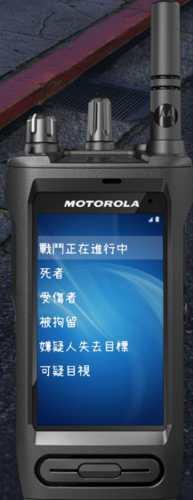
Planned integration with CustomBackup and the upcoming Police SmartRadio modification as well!


Built against RPH 0.50

What's New in Version 1.3.0

Released

---------------------------

VERSION 1.3.0

---------------------------

FEATURE UPDATES:

  • Integration with CustomBackup by PNWParksFan
  • Initial integration with Police SmartRadio by Albo1125
  • Configurable phrases for checkup menu
  • Better feedback for responses - player will play the "radio" animation and a notification will appear to notify the player

BUGFIXES:

  • Fix for notification menu not graying out when out of call

---------------------------

VERSION 1.2.2

---------------------------

BUGFIXES:

  • Better algorithm to detect in-call or in-stop status
  • Assorted other bug fixes


PRIOR VERSIONS

Quote


---------------------------

VERSION 1.2.1

---------------------------

BUGFIXES:

  • Fix issues with the modifier keys not working
  • Fix issue with the code 99 shortcut not working

---------------------------

VERSION 1.2.0

---------------------------

Major update, adding a lot of features and bugfixes

FEATURE UPDATES:

  • VocalDispatch Integration - you can now respond to checks via VocalDispatch
  • ALL THE KEYBOARD SHORTCUTS!
    • Keyboard shortcuts (and modifier keys) added to all the actions (except Send Backup - just use the Backup menu for that)
    • Shortcuts are "None" by default, but may be modified via the ini file.

BUGFIXES:

  • In-call check detection should be much more reliable - You should have less false positives now.


--

VERSION 1.1.0a

--

Really added the ability to configure the menu key. It's in the ini file now...


--

VERSION 1.1.0

--

FEAT: Add ability to configure menu key


--

VERSION 1.0.0a

--

Added the .ini file.


Thanks @easye323


User Feedback

Recommended Comments

OfficerKB

Members

There is no Keyconfig in the .ini File of the newest version. Maybe you forgot to upload the new ini-File? :D

sloosecannon

Members Author

5 minutes ago, OfficerKB said:

There is no Keyconfig in the .ini File of the newest version. Maybe you forgot to upload the new ini-File? :D

I just checked, there is.... did you download the latest 1.1? (after I made it 1.1.0a, I did forget it before...)

OfficerKB

Members

17 minutes ago, sloosecannon said:

I just checked, there is.... did you download the latest 1.1? (after I made it 1.1.0a, I did forget it before...)


Seems like I got downloaded the old file. Thanks for your quick support. Great Plugin!

Nikopol

Members

Nice mod, but I can't get to work the proper callsign: dispatch keeps calling me default 1-Adam-12 despite I've changed both checkup.ini and myOfficer.ini (which came with Agency Callouts if I'm not wrong) to 1-Lincoln-18.


checkup.ini

Spoiler

//INI File for Checkup Plugin

//--------------------------------------------------------------------------
//Information on playing officer. If a "MyOfficer.ini" file exists, that information will be used instead.
//--------------------------------------------------------------------------
[Officer Information]
//The sound files played when the officer's username is called. 
//Default:
//callsign=DIV_01 ADAM BEAT_12
callsign=DIV_01 LINCOLN BEAT_18

//The name or callsign displayed onscreen
//Default:
//name=1-A-12
name=1-L-18

//--------------------------------------------------------------------------
//Settings related to timing of checks and responses
//--------------------------------------------------------------------------
[Timing]
//The initial delay after initiating a traffic stop or callout before sending a check, in seconds
//Default:
//initalDelay=60

initalDelay=60
//Delay after no response to resend check or send backup, in seconds
//Default:
//noResponseDelay=15
noResponseDelay=15

//--------------------------------------------------------------------------
//Settings related to units sent as backup if needed
//--------------------------------------------------------------------------
[Backup settings]
//Minimum number of units to send if the officer fails to respond to 3 checks
//Default:
//noResponseMinUnits=2
noResponseMinUnits=2

//Maximum number of units to send if the officer fails to respond to 3 checks
//Default:
//noResponseMaxUnits=5
noResponseMaxUnits=5

//--------------------------------------------------------------------------
//Settings related to keyboard shortcuts
//--------------------------------------------------------------------------
[Keyboard settings]
//Response menu key
//Default:
//menuKey=F3
menuKey=F11


myOfficer.ini (from Darkmyre's AgencyCallouts - located in Plugins/LSPDFR)

Spoiler

[Officer]
Name=1-L-18

[Radio]
//1-10
Division=1

// Use LAPD Phonetic Alphabet: https://en.wikipedia.org/wiki/LAPD_radio_alphabet
Unit=Lincoln

// 1-24
Beat=18


sloosecannon

Members Author

14 minutes ago, Nikopol said:

Nice mod, but I can't get to work the proper callsign: dispatch keeps calling me default 1-Adam-12 despite I've changed both checkup.ini and myOfficer.ini (which came with Agency Callouts if I'm not wrong) to 1-Lincoln-18.


checkup.ini

  Hide contents

//INI File for Checkup Plugin

//--------------------------------------------------------------------------
//Information on playing officer. If a "MyOfficer.ini" file exists, that information will be used instead.
//--------------------------------------------------------------------------
[Officer Information]
//The sound files played when the officer's username is called. 
//Default:
//callsign=DIV_01 ADAM BEAT_12
callsign=DIV_01 LINCOLN BEAT_18

//The name or callsign displayed onscreen
//Default:
//name=1-A-12
name=1-L-18

//--------------------------------------------------------------------------
//Settings related to timing of checks and responses
//--------------------------------------------------------------------------
[Timing]
//The initial delay after initiating a traffic stop or callout before sending a check, in seconds
//Default:
//initalDelay=60

initalDelay=60
//Delay after no response to resend check or send backup, in seconds
//Default:
//noResponseDelay=15
noResponseDelay=15

//--------------------------------------------------------------------------
//Settings related to units sent as backup if needed
//--------------------------------------------------------------------------
[Backup settings]
//Minimum number of units to send if the officer fails to respond to 3 checks
//Default:
//noResponseMinUnits=2
noResponseMinUnits=2

//Maximum number of units to send if the officer fails to respond to 3 checks
//Default:
//noResponseMaxUnits=5
noResponseMaxUnits=5

//--------------------------------------------------------------------------
//Settings related to keyboard shortcuts
//--------------------------------------------------------------------------
[Keyboard settings]
//Response menu key
//Default:
//menuKey=F3
menuKey=F11


myOfficer.ini (from Darkmyre's AgencyCallouts - located in Plugins/LSPDFR)

  Hide contents

[Officer]
Name=1-L-18

[Radio]
//1-10
Division=1

// Use LAPD Phonetic Alphabet: https://en.wikipedia.org/wiki/LAPD_radio_alphabet
Unit=Lincoln

// 1-24
Beat=18


Gah, yeah, I know what's causing that. It'll be fixed in the next version of the plugin. Should be done a little later today...

Nikopol

Members

18 minutes ago, sloosecannon said:

Gah, yeah, I know what's causing that. It'll be fixed in the next version of the plugin. Should be done a little later today...


Thank you!


A few tips/requests: is it possible to have a key shortcut for the "send help" option like a panic button? When you're in trouble messing with menu could be deadly. If the plugin could read modifier keys it would be great, because now it doesn't and you can't set another key from another plugin (with modifier key) in the same slot. As a simple example: default F3 opens menu, CTRL+F3 triggers panic button.

sloosecannon

Members Author

(edited)

22 minutes ago, Nikopol said:


Thank you!


A few tips/requests: is it possible to have a key shortcut for the "send help" option like a panic button? When you're in trouble messing with menu could be deadly. If the plugin could read modifier keys it would be great, because now it doesn't and you can't set another key from another plugin (with modifier key) in the same slot. As a simple example: default F3 opens menu, CTRL+F3 triggers panic button.

Yep, shortcuts are coming for all the actions (except send backup, cause there's a whole menu to do that...) in the next version :)

Edited by sloosecannon

This looks dank ill have to try it! Can you add something perhaps? I've always thought LSPDFR needed a Hang around option. In example : You are in the hood and find a group of 4 gang members loitering, you go to ID them but feel something may go down, so you need back up to stick around until the situation is resolved instead of what always happens... calling back up and they leave a few seconds later after they don't see any "issues". a Officers hang around button would be legit and very useful. 

TrooperA1868

Members

Dispatch checks in on me every 60 seconds even when im not doing a callout or traffic stop is it suppose to be like that if so thats so anoying

10 hours ago, OfficerJamesCarter said:

This looks dank ill have to try it! Can you add something perhaps? I've always thought LSPDFR needed a Hang around option. In example : You are in the hood and find a group of 4 gang members loitering, you go to ID them but feel something may go down, so you need back up to stick around until the situation is resolved instead of what always happens... calling back up and they leave a few seconds later after they don't see any "issues". a Officers hang around button would be legit and very useful. 

aggreed

sloosecannon

Members Author

1 hour ago, iGoDPrince said:

Dispatch checks in on me every 60 seconds even when im not doing a callout or traffic stop is it suppose to be like that if so thats so anoying

aggreed

Do you get callout notifications? Those technically put you in a callout, even if you don't take them, and if it happens often enough, you might get a check because of it

TrooperA1868

Members

5 minutes ago, sloosecannon said:

Do you get callout notifications? Those technically put you in a callout, even if you don't take them, and if it happens often enough, you might get a check because of it

oh i see well i think it should be once you take the call out then the mod should start cuz then it just gets to repetitive and annoying. 

sloosecannon

Members Author

26 minutes ago, iGoDPrince said:

oh i see well i think it should be once you take the call out then the mod should start cuz then it just gets to repetitive and annoying. 

I wish I could...


Unfortunately that's the only API available.


In the next version, though, I've got a slightly better algorithm that should decrease those false positives.

12 hours ago, OfficerJamesCarter said:

This looks dank ill have to try it! Can you add something perhaps? I've always thought LSPDFR needed a Hang around option. In example : You are in the hood and find a group of 4 gang members loitering, you go to ID them but feel something may go down, so you need back up to stick around until the situation is resolved instead of what always happens... calling back up and they leave a few seconds later after they don't see any "issues". a Officers hang around button would be legit and very useful. 

I'd love to do that, but I'm not sure where to start with that. All of my backup is handled by LSPDFR, and that's just what it does.


I might look into improving it somehow though. That's much more complex than my plugin though :)

Nikopol

Members

Thank you for the update, it's definitely on a great path and already a must have plugin :)


Still a few issues unfortunately:

- Modifier Key does not work (I've tried FKeys with ControlKey or Alt modifiers using .NET Framework keys enumeration - for example: ControlKey+F11 for menu works without pressing the modifier, so you can't set F11 for simple status check)

- Panic Button shortcut not working at all (FKey without modifier)

sloosecannon

Members Author

6 minutes ago, Nikopol said:

Thank you for the update, it's definitely on a great path and already a must have plugin :)


Still a few issues unfortunately:

- Modifier Key does not work (I've tried FKeys with ControlKey or Alt modifiers using .NET Framework keys enumeration - for example: ControlKey+F11 for menu works without pressing the modifier, so you can't set F11 for simple status check)

- Panic Button shortcut not working at all (FKey without modifier)

Taking a look, thanks for the report...

DaWoodz

Members

I said in the review section it would be nice to relay a option "have one in custody" for the callout if even possible....????

Quakex64

Members

//Information on playing officer. If a "MyOfficer.ini" file exists, that information will be used instead.

I'd thought I'd mention this but your MyOffice.ini is save as MyOfficerIni.dllpJ34sZG.png

you can simply change the extension to ini but its unusable then, has all kinds of crazy language stuff

sloosecannon

Members Author


5 minutes ago, Quakex64 said:

//Information on playing officer. If a "MyOfficer.ini" file exists, that information will be used instead.

I'd thought I'd mention this but your MyOffice.ini is save as MyOfficerIni.dllpJ34sZG.png

you can simply change the extension to ini but its unusable then, has all kinds of crazy language stuff

Yeah, that's a library, not an INI.


I didn't provide a MyOfficer.ini file, but, if you're using another plugin that has one, you can edit it and I'll pick it up.

Quakex64

Members

so it will work with Traffic policers name option:

//Default: OfficerDisplayNameOverride=
OfficerDisplayNameOverride=

and

police radio:

[Main]
//Change the player name to whatever you like for when you request something to dispatch
PlayerName = NoNameSet


how would I go about making one though, if you didn't include it?

sloosecannon

Members Author

5 minutes ago, Quakex64 said:

so it will work with Traffic policers name option:

//Default: OfficerDisplayNameOverride=
OfficerDisplayNameOverride=

and

police radio:

[Main]
//Change the player name to whatever you like for when you request something to dispatch
PlayerName = NoNameSet


how would I go about making one though, if you didn't include it?

I don't think TP uses the ini file, so no I doubt it would. I think one of Darkmyre's scripts uses it though.


If you don't have one, I don't think any of your plugins uses it, so you can just use the individual plugins' configuration.

Quakex64

Members

you mean to say, some of the current mods released may not use this feature? I only gave you two of the mods I use otherwise I'm lost because I thought the MyOfficer thing was referring to those..

sloosecannon

Members Author

10 minutes ago, Quakex64 said:

you mean to say, some of the current mods released may not use this feature? I only gave you two of the mods I use otherwise I'm lost because I thought the MyOfficer thing was referring to those..

Correct, in fact, most mods don't use it. There are a few that do, so if you have one that does, I've integrated it.

Quakex64

Members

do you have a list of possible mods that have this working?

Nikopol

Members

16 minutes ago, Quakex64 said:

do you have a list of possible mods that have this working?


Darkmyre's Agency Callouts

Create an account or sign in to comment

Latest Mods

Account

Navigation

Search

Search

Configure browser push notifications

Chrome (Android)
  1. Tap the lock icon next to the address bar.
  2. Tap Permissions → Notifications.
  3. Adjust your preference.
Chrome (Desktop)
  1. Click the padlock icon in the address bar.
  2. Select Site settings.
  3. Find Notifications and adjust your preference.