Skip to content
View in the app

A better way to browse. Learn more.

LCPDFR.com

A full-screen app on your home screen with push notifications, badges and more.

To install this app on iOS and iPadOS
  1. Tap the Share icon in Safari
  2. Scroll the menu and tap Add to Home Screen.
  3. Tap Add in the top-right corner.
To install this app on Android
  1. Tap the 3-dot menu (⋮) in the top-right corner of the browser.
  2. Tap Add to Home screen or Install app.
  3. Confirm by tapping Install.

Emergency Lighting System 1.05

(234 reviews)

3 Screenshots

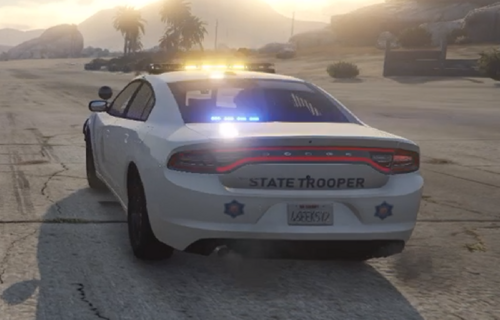
Emergency Lighting System V brings one of the most popular modifications ever created for a GTA title (ELS-IV) to Grand Theft Auto V. ELS-V will add a whole new dimension to  your patrols. With a fresh look and many more features than its predecessor, it's also sure to brighten up your game and satisfy the emergency lighting enthusiast in anyone.


DESCRIPTION
− ELS provides an alternate and incredibly in-depth way of controlling emergency vehicle lights and sounds.
− ELS requires vehicle models specifically designed to make use of its features.
− ELS includes over 200 unique lighting patterns scattered across 4 light groups and lighting formats.


NOTES
Please consult the ELS USER GUIDE and other provided documentation prior to using ELS.

− As of V1.00 ELS is not compatible with any form of multiplayer.
− A visual enhancement mod is recommended to improve the appearance of ELS lights in game.


BASIC INSTALLATION
− A GTAV ScriptHook must be installed for any .asi modification to work. The original may be found HERE.
− Using script modifications in GTA Online can result in a temporary or permanent ban from the service.

− 1. Place ELS.asi, ELS.ini, the ELS folder, and  AdvancedHookV.dll inside your main GTA V game directory.
− 2. Download and install (a) pro-ELS vehicle model(s).
− 3. Start your game.


CREDITS
− ELS is coded by Lt.Caine.

− AdvancedHookV and vehicle damage feature coded by LMS.
− ELS-V testing team (alphabetical order): Albo1125, BxBugs123, GravelRoadCop, PoliceWag, and Prophet.

What's New in Version 1.05

Released

  • Removed auto deletion of discarded ELS vehicles to prevent crashes when using certain LSPDFR plugins.
  • Removed ELS manipulation of AI vehicles as persistent/not persistent for same reason.
  • Removed strobe corona flash sounds (while retaining sound effects for halogen patterns).
  • Toggling the ELS information panel will now reload everything in the ELS.ini.
  • Fixed error in ELS User Guide that incorrectly associated SCNL with extra_11 and TKDL with extra_12 (the opposite is true).
  • Updated ELS User Guide to reflect new changes.
  • ELS.ini change: Added "AllowController" option to CONTROL section to allow enabling/disabling controller input for ELS.
  • ELS.ini change: Added "TogKeysLock" option to CONTROL section to allow changing ELS key lock button.


Please download the AdvancedHookV fix if you are using game build 3258.

User Feedback

Recommended Comments

assessedsugar21

Members

I'm having a problem where if I open the lighting board (CTRL+P) LSPDFR will crash anyone know the reason.


thanks in advance 

IssaAJ

Members

I may have found a mini solution to the ELS/AdvancedHook crashes. I had to downgrade the version of DLS because for some reason the newest version causes ELS & or Advance Hook to crash upon loading into gta

velcbersec

Members

Me to after instaling els 1.05 with advancehookV my game still crash

Southamper

Members

(edited)

Is anyone can help me about changing emergency light colors?

edit: I found it

second time edit: It dosen't work. I still need help.

Edited by Southamper

ThisIsBennieD

Members

Is there any way to change the blackout mode controller bind from "A" or disable it completely? ELS.ini key bind changes are not doing it.

twig 2418 107

Members

im having an issue where i'll activate ELS in game and nothing happens. i dont understand why and i've tried all the fixes in the comments and nothing has changed.

IceGuy221

Members

On 2/27/2025 at 11:19 AM, ThisIsBennieD said:

Is there any way to change the blackout mode controller bind from "A" or disable it completely? ELS.ini key bind changes are not doing it.

You need to go into your config file, and change the bind manually. There should be instructions that come when you download the mod.

On 1/10/2025 at 6:34 PM, JDeuce21 said:

Thanks! This is the only option that I have found that is solid. 100% works everytime!🤓

so 1.05 is a dud then? cause this hasn't worked with the "newer" version

MrWester96

Members

So when i press the siren keys it lags for a second and drops fps anyone know a fix?

IceGuy221

Members

els.asi errors still occur even with latest advancedhookv package, this mod is outdated

Enmanuel perez

Members

1 hour ago, IceGuy221 said:

els.asi errors still occur even with latest advancedhookv package, this mod is outdated

The worst thing is that it doesn't show up and it doesn't seem to care about updating this file.

sr0ff

Members

On 3/16/2025 at 11:02 PM, Enmanuel perez said:

The worst thing is that it doesn't show up and it doesn't seem to care about updating this file.

I had the same error, my solution was to remove DLS this mod seems to conflict. Once I removed it everything worked fine!

IceGuy221

Members

Hey everyone! Running into ELS.asi errors? Here's a quick semi-solve to reduce the frequency with these errors! As you may have figured out, this mod is currently outdated, but still has not been marked as so. The current and only quote on quote "fix" for this issue, is to install the latest version of AdvancedHookV. Yes, you will still get these errors from time to time. The frequency does increase if you run any version of Natural Vision; but this is only due to that mod being a complete visual overhaul, requiring a higher demand on graphics resources. Regardless of any visual mods, ELS can and will run into these errors.

If you run DLS, some users have found this to cause a conflict between scripts in some instances. I have not tested this myself, as I have no desire to use DLS or vehicles which require it. However, you can either uninstall DLS, or ELS depending on which one you actually are using.

Another method that can help re-stabilize you game while ELS is running, is reinstalling the latest AdvancedHookV; even if you already have it installed. I have found this to work on multiple occasions, and typically I'll go about a week of on/off game-play before the error occurs again. However, if you have the capability on your computer to defrag your game files, this can do wonders for the overall stability of your game. "Defraging" is a term that not a lot of people are familiar with. Sometimes, whether it occurs naturally, when a game updates, or most especially when you mod a game, fragments can appear. "Fragments are spaces that were once taken up/reserved for another file or text that was removed or moved within the games files. So when you add a mod file, and then remove text, or remove the mod, this can create a fragment; or when your game updates, bug fixes can include the removal of coding and other files, or the movement of said files. These things cause fragments, and can cause your computer a longer period of time to read or locate files, coding, and other text. To speed up this reading process, you need to defragment your game. I personally use Razor Cortex for this, which is a perk of owning a Razor product like a mouse or keyboard, but the app can be found in the Microsoft store. There are plenty of different ways to defrag your system tho.


Also be sure to clean your system of unused or junk files regularly, and ensure all your drivers are up to date. If these things don't resolve your ELS, it could be file corruption within ELS files itself, or confliction in your game files. That, or you just need to do a quick reinstall of ELS as a whole. Every solution is temporary tho, as I said before, this script is outdated. Lt.Caine if you ever read this, please update this mod. I hope this helps anyone who is confused on why these errors are occurring (It's kinda unpreventable, but reduce-able)

uswet

Members

hi, can ELS conflict with other mods and plugins? ELS used to work for me, but after reinstalling GTA5 and downloading new plugins, it stopped working for me, nothing happens. and when you press E, the standard flashing lights work. in the comments it says to download the latest version of AdvancedHookV, but this does not help

IceGuy221

Members

21 hours ago, uswet said:

hi, can ELS conflict with other mods and plugins? ELS used to work for me, but after reinstalling GTA5 and downloading new plugins, it stopped working for me, nothing happens. and when you press E, the standard flashing lights work. in the comments it says to download the latest version of AdvancedHookV, but this does not help

this can be dependent on what mods you have installed. Some users have reported that DLS does conflict with it. It could also potentially be an install issue if you happened to place a file in the wrong place, whether its an .xml file for an ELS vehicle, or ELS.asi/other els required files themselves


OfficialHexy

Members

Is there a way to change the size of the ui or move it around 


ashefell

Members

(edited)

.

Edited by ashefell

bm1

Members

hi curious if there is a .oiv file because im new to modding and cant figure it out.

IceGuy221

Members

On 3/5/2025 at 4:07 PM, IceGuy221 said:

You need to go into your config file, and change the bind manually. There should be instructions that come when you download the mod.

so 1.05 is a dud then? cause this hasn't worked with the "newer" version

1.05 works, but ELS will not work without the newest AdvancedHookV, which is the separate download titled "AdvancedHookV_b3258.zip" when you click download on this mod. You will still have occasional crashes related to this mod, as well as some bugs with sirens and horns from time to time due to this mod not being updated. It still runs fine, just has it's moments.

Idk if there's a solution to this problem I'm having, but I recently discovered after much troubleshooting that ELS is preventing non-ELS vehicles from spawning with extras enabled via Ultimate Backup, the agency.xml, or the vehicles.meta. I remember setting up LSPDFR with non-ELS vehicles and using ELS with them and all the extras worked fine. I doubt ELS will receive an update since Lt. Caine hasn't been on since 2016, but if anyone has ran into the same problem recently and has found a solution do let me know as changing from ELS to DLS will more than likely axe the ELS vehicles I want to use.

eazbox

Members

Still no news on when AdvancedHookV will be bug free?

ashefell

Members

(edited)

.

Edited by ashefell

Lemurrinio

Members

Does ELS work? I installed everything fresh, uploaded ELS and vehicles and unfortunately the lights do not light up. The sirens work and nothing else. Is there a way to do this?

Catharasiss

Members

(edited)


On 5/19/2025 at 5:27 PM, Lemurrinio said:

Does ELS work? I installed everything fresh, uploaded ELS and vehicles and unfortunately the lights do not light up. The sirens work and nothing else. Is there a way to do this?

uninstall and reinstall advancedhookv

Edited by Catharasiss

Officer Tricks

Members

What if we tried that?

LEOo1

Members

I installed fresh and did the new AdvancedHookV in but nothing work.
My english is not that good so sorry for that.

Create an account or sign in to comment

Latest Mods

Account

Navigation

Search

Search

Configure browser push notifications

Chrome (Android)
  1. Tap the lock icon next to the address bar.
  2. Tap Permissions → Notifications.
  3. Adjust your preference.
Chrome (Desktop)
  1. Click the padlock icon in the address bar.
  2. Select Site settings.
  3. Find Notifications and adjust your preference.