


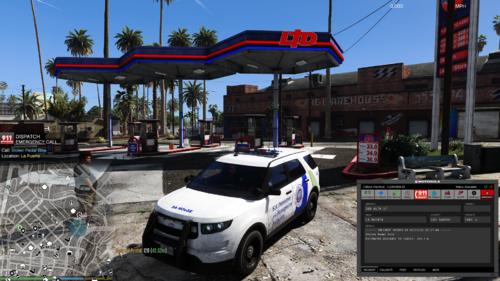
N.O.o.S.E Granger (Lightbar)
Created by Gask77
12/14/16
A more official looking, marked version of the original unmarked granger used by swat teams, now has a lightbar
I'd love feedback!
Installation:
-In OpenIV, go to GTA V/update/x64/dlcpacks/patchday2ng/dlc.rpf/x64/levels/gta5/vehicles/rpf
-Import the 4 files
-Run GTA V and enjoy
Uninstall:
-Import fbi2 original files into previous location
-Delete fbi2+hi.ytd
gask77





.thumb.png.616be9d67781977562d321f2d40aacd8.png)



![OCRP Postal Map - Fixed Duplicate Postals and Atlas Style [FiveM]](http://s3-screenshots.int-cdn.lcpdfrusercontent.com/resize/500/-/monthly_2026_07/624688352-f61f6a95-cab2-4dbf-8e15-eac238807cc7.thumb.jpg.f9356ce9ac807f74bb9d897e93a8242d.jpg)


Recommended Comments
Create an account or sign in to comment