Skip to content
View in the app

A better way to browse. Learn more.

LCPDFR.com

A full-screen app on your home screen with push notifications, badges and more.

To install this app on iOS and iPadOS
  1. Tap the Share icon in Safari
  2. Scroll the menu and tap Add to Home Screen.
  3. Tap Add in the top-right corner.
To install this app on Android
  1. Tap the 3-dot menu (⋮) in the top-right corner of the browser.
  2. Tap Add to Home screen or Install app.
  3. Confirm by tapping Install.

V Idle stance 1.0.1

(0 reviews)

2 Screenshots

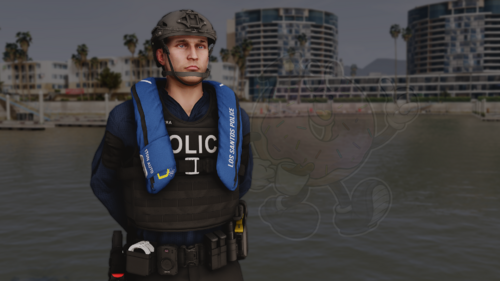
This Is new Idle stance from GTA V. When officers are idle they'll take this position. This has been extracted right from GTA V Much more realistic.  MAKE SURE YOU BACK UP YOUR FILES. 

What's New in Version 1.0.1

Released

Positioned hands closer and elbows out wider. 

Fixed overall animation. 

User Feedback

Recommended Comments

Janis28

Members

Awesome :woot:

Maybe in future is possible to make something like gta 5 diving jump animation, when I run after criminal I jump on and throw him on the ground.. :D

NYPDDetectiveODonnell

Members Author

:) Already spotted it. Too easy  I AM Currently working on the arrest animation where officers grad arm and place behind back. after that I'll try and get that in. 

Deputy Tahoe

Members

1 hour ago, NYPDDetectiveODonnell said:

:) Already spotted it. Too easy  I AM Currently working on the arrest animation where officers grad arm and place behind back. after that I'll try and get that in. 

Looking forward to the future content!!! Can't wait for the arrest animation. Awesome job :thumbsup:

NYPDDetectiveODonnell

Members Author

5 hours ago, cord85 said:

Looking forward to the future content!!! Can't wait for the arrest animation. Awesome job :thumbsup:

Hello guy I am stil hoping to release 1.6 today so far I am trying to fix the code so that it works on all resolutions Just bare with me guys Almost there. 

Very Good, and make GTA V Pistol Animation(GTA V Styled Low Ready Gun Stance)

OliveiraFGV

Members

(edited)

good

Edited by OliveiraFGV

Tysyphen

Members

Can you please tell me how to install this? It looks really cool!

Create an account or sign in to comment

Latest Mods

Account

Navigation

Search

Search

Configure browser push notifications

Chrome (Android)
  1. Tap the lock icon next to the address bar.
  2. Tap Permissions → Notifications.
  3. Adjust your preference.
Chrome (Desktop)
  1. Click the padlock icon in the address bar.
  2. Select Site settings.
  3. Find Notifications and adjust your preference.