Skip to content
View in the app

A better way to browse. Learn more.

LCPDFR.com

A full-screen app on your home screen with push notifications, badges and more.
To install this app on iOS and iPadOS
  1. Tap the Share icon in Safari
  2. Scroll the menu and tap Add to Home Screen.
  3. Tap Add in the top-right corner.
To install this app on Android
  1. Tap the 3-dot menu (⋮) in the top-right corner of the browser.
  2. Tap Add to Home screen or Install app.
  3. Confirm by tapping Install.

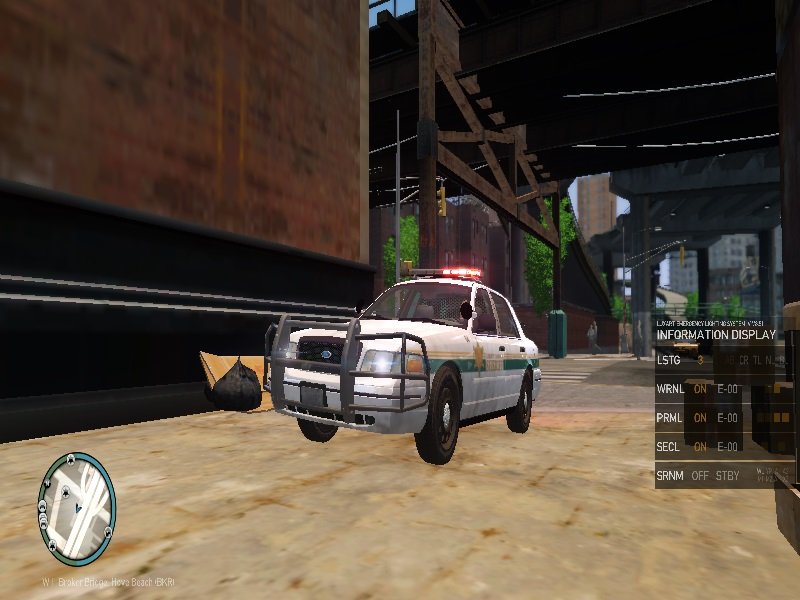
My first model enjoy 1.0.0

(9 reviews)

3 Screenshots

User Feedback

Recommended Comments

thegreathah

Friends of LSPDFR

3 minutes ago, M67v said:

<snip>

Agreed, I really do think this model could amount to something awesome. It's pretty much a nice, "generic" looking car.

otatoprm

Members

43 minutes ago, M67v said:

Well, this escalated very quickly.

For the record, I didn't mean to offend you,@Copman553. Looking back, my comment wasn't the nicest one. I should've given you the benefit of the doubt.

As for you @MrMaticks, I actually prefer this over your first model. Yeah, the SUV rambar is questionable, but at least the model itself mostly makes sense in terms of setup. Meanwhile, you have a slicktop with tons of over-scaled lights on the back, and few lights up front.

As long as you replace the SUV rambar, and fix the credits, we might have a winner.

Don't forget the textures! he didn't add any!

MJSillah67

Members

3 hours ago, MrMaticks said:

Don't forget the textures! he didn't add any!

It was an honest mistake! There's no need to give him hell for it!

RyWilson

Members

there is no question that this needs work, but the fact that you did attempt a model is very good for this forum. we are always in need of new guys to learn the trade and make new things for our game. so just keep up the good work, ask questions from others if needed, and don't let anything said keep you from continuing your progress :thumbsup:

Deactivated Member

Deactivated

On 8/13/2016 at 10:57 AM, FRGamer said:

You might want to lock your models...

What. No.

FRGamer

Members

3 minutes ago, Lundy said:

What. No.

I agree but I only said that because he uses Bugs' parts and you know how bitchy he is. Wait nvm you probably don't. #12hourstocumply

Deactivated Member

Deactivated

3 minutes ago, FRGamer said:

I agree but I only said that because he uses Bugs' parts and you know how bitchy he is. Wait nvm you probably don't. #12hourstocumply

Bugs's parts are unlocked for DEV use. You don't have to lock your models containing his unlocked parts. If he has a problem, he'd tell you directly.

FRGamer

Members

4 minutes ago, Lundy said:

Bugs's parts are unlocked for DEV use. You don't have to lock your models containing his unlocked parts. If he has a problem, he'd tell you directly.

Nope, when all perms weren't even revoked, you'd have to lock the model, he said it himself. Now you can't use any of his shit on public releases. Why do you think Gump's tahoe still hasn't been released?

Deactivated Member

Deactivated

2 minutes ago, FRGamer said:

Nope, when all perms weren't even revoked, you'd have to lock the model, he said it himself. Now you can't use any of his shit on public releases. Why do you think Gump's tahoe still hasn't been released?

I use Bugs's parts all the time and I leave my models unlocked. 1998 CVPI rims, his partition, 2003-2005 rims, ect. He did restate, if he didn't send a PM regarding permissions, you're fine to keep using his parts.

FRGamer

Members

3 minutes ago, Lundy said:

I use Bugs's parts all the time and I leave my models unlocked. 1998 CVPI rims, his partition, 2003-2005 rims, ect. He did restate, if he didn't send a PM regarding permissions, you're fine to keep using his parts.

Because you're... friends with him?

Create an account or sign in to comment

Latest Mods

Account

Navigation

Search

Search

Configure browser push notifications

Chrome (Android)
  1. Tap the lock icon next to the address bar.
  2. Tap Permissions → Notifications.
  3. Adjust your preference.
Chrome (Desktop)
  1. Click the padlock icon in the address bar.
  2. Select Site settings.
  3. Find Notifications and adjust your preference.











