


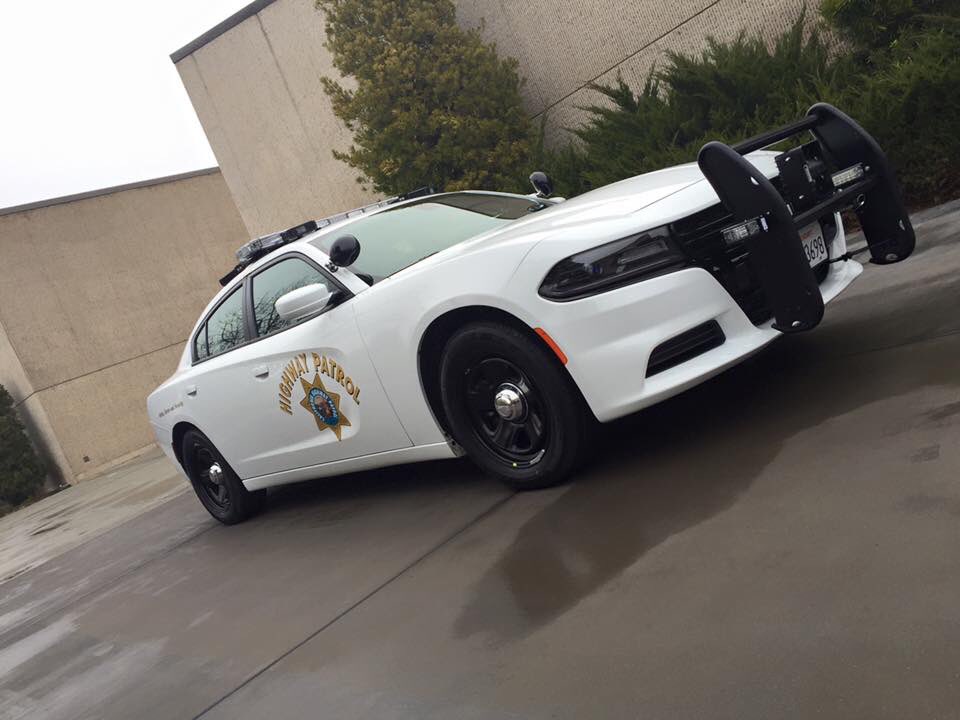
This is the new 2015 Dodge Charger that is used by the California Highway Patrol. It is equipped with a guncase, dashcam and much more! The vehicle is used to especially enforce traffic laws on the highway. i highly recommend that you download Polecat's "CHP siren" mod.
I have tried to make it as realistic as possible. You will find read steady burns with a traffic advisor on secondary lights (K).
YOU ARE NOT ALLOWED TO USE THIS MODEL IN ANY CLAN WITHOUT MY PERMISSION.
I DO NOT TAKE ANY RESPONSIBILITY FOR CRASHES OR ERROR IN YOUR GAME!
YOU ARE NOT ALLOWED TO UPLOAD THIS MODEL TO ANY OTHER SITE WITHOUT PERMISSION BY ME (LÉVO)
The model provided to you is LOCKED.
ELS V8 SETTINGS
WRNL: LEDS 2
PRML: LEDS 3
SECL: DRCT 4
I've used multiple real-life images

Original 2015 Dodge Charger from Forza Horizon 2 (F&F DLC)
- modified to PPV version and converted to GTAIV by IronicRainbow
- Converted into a Police vehicle by IronicRainbow
- Converted into an AWD version by IronicRainbow
- Rims by GerryStudio, IronicRainbow, & Bxborgs123
- Polygon filling by TheHurkLights: Lévo
- Other Editing: Lévo
Rambar: Vertex3D
Whelen Liberty By KevinDV, edited by Lévo
Antennas: Priman
Texture: Lévo
Automatic License Plate Recognition system: BxBugs123, Lévo
DASHCAM: johnclark1102
Toughbook C19: PFCBarefoot
Guncase: Evan.B
Spotlight: BxBugs123
Console: Unknown
Emissive lights: Lévo
Equipment: Unknown
- 2C9 and BlueSteelShield
-
 2
2




![[FiveM] Holster Management Enhanced](http://s3-screenshots.int-cdn.lcpdfrusercontent.com/resize/500/-/monthly_2026_08/12016060-d833-4323-9dda-fef599478f4d.thumb.png.ca92b6f53641c86e4e614c0fcd24ea4c.png)
![[FiveM] Weapon Management Enhanced](http://s3-screenshots.int-cdn.lcpdfrusercontent.com/resize/500/-/monthly_2026_08/d172dd32-6d42-4a44-8c8e-7359933e93a2.thumb.png.8334522e6715b361820c1cfae3a6bf30.png)
![[ELS][Addon|Replace] Los Santos County Sheriff's Department](http://s3-screenshots.int-cdn.lcpdfrusercontent.com/resize/500/-/monthly_2026_08/PGTA52115079501.png.be571ddbe42a9ab8437eb2035f2fd5bc.thumb.png.4e47642158ad4c67138b7a707ad2bc05.png)


Recommended Comments
Create an account or sign in to comment