


2018-04-12-10-57-56.thumb.JPG.c82214dd16ab6b416fe8c9b697000533.JPG)


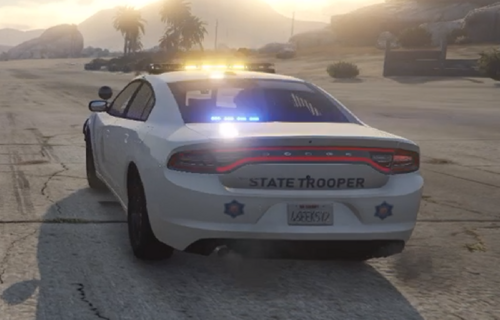
This is the detective/slicktop version of Vapid Stanier police cruiser that I made.
It's similar to most of the undercover Vapid cruisers out there, but recently I added a red beacon light on top and some interior decorations.
The disclaimer follows up with my previous mod.
Now it is possible to put on an Undercover Skin from Abraxas' mod here.
What's New in Version 1.1
Released
- Recreated the cruiser from scratch, unlike ELS version that has no partition for console placement
- Uses 8-module of Tomar 200S instead of 6-module
- Tomar's extra dummies converted to siren dummies for NOoSE lights
- Detective rotator swapped to generic dome with emissive textures (since rotators are not working when replaced as noose)
- GPS unit, Z3 Siren Control Box, Bearcat Scanner, and DAS Controller added
- Decatur Radar changed to Stalker II MDR Dual Radar
- Slimlighter bar made different and non-ELS-mapped
- New Tomar/Detective Light/Slimlighter LODs (L1)
- New IDE Settings for lights adjustment (since they can be random and may spawn occasionally with 3 lights)
Vapid Stanier Police Cruiser
- Model is Original vapid cruiser by Rockstar Games, UV-Mapped and provided in open, unlocked format by Lt. Caine
- Numberplate added to livery, lightbar & indicator update, attachment and modification of other equipment, etc. by Ekalb
- New Liberty State Police Livery by Yard1
- Highly modified to add decorations by Naruto607
Red Beacon Light
- Red Beacon Light modeled by Toothpick22
- Rotators and Textures by Lt.Caine
- Converted to non-ELS variant by Naruto607
Tomar 200S Traffic Advisor 8-module
- Tomar 200S modeled and ELS-mapped by NickieB
- ELS mapping converted to non-ELS by Naruto607
Whelen Slimlighter TIR6
- 3-D Modeled by Master Yoda
- Textured by Master Yoda
- Non-ELS siren mapping, rescaling, and placing to front windscreen done by Naruto607
Code 3 Z3 Siren Control Box
- 3D modeled by Stephen14284
- Textured by Stephen14284
Uniden Bearcat Police Scanner & Code 3 Dual ArrowStik Controller
- Parts scratch-made from A whole bunch of Police Equipment mod by Casey1989
GARMIN nuvi GPS Unit
- GARMIN nuvi GPS Unit Modeled & converted for GTA IV by Bxbugs123
- Main textures made by Bxbugs123
Whelen SA314 Series
- Whelen SA314 Series Modeled & converted for GTA IV by Bxbugs123
- Main textures made by Bxbugs123
Stalker II MDR Dual Radar
- Radar unit scratch modeled and converted to GTA IV by jasonct203
- Textures by jasonct203
- Model is Original vapid cruiser by Rockstar Games, UV-Mapped and provided in open, unlocked format by Lt. Caine
- Numberplate added to livery, lightbar & indicator update, attachment and modification of other equipment, etc. by Ekalb
- New Liberty State Police Livery by Yard1
- Highly modified to add decorations by Naruto607
Red Beacon Light
- Red Beacon Light modeled by Toothpick22
- Rotators and Textures by Lt.Caine
- Converted to non-ELS variant by Naruto607
Tomar 200S Traffic Advisor 8-module
- Tomar 200S modeled and ELS-mapped by NickieB
- ELS mapping converted to non-ELS by Naruto607
Whelen Slimlighter TIR6
- 3-D Modeled by Master Yoda
- Textured by Master Yoda
- Non-ELS siren mapping, rescaling, and placing to front windscreen done by Naruto607
Code 3 Z3 Siren Control Box
- 3D modeled by Stephen14284
- Textured by Stephen14284
Uniden Bearcat Police Scanner & Code 3 Dual ArrowStik Controller
- Parts scratch-made from A whole bunch of Police Equipment mod by Casey1989
GARMIN nuvi GPS Unit
- GARMIN nuvi GPS Unit Modeled & converted for GTA IV by Bxbugs123
- Main textures made by Bxbugs123
Whelen SA314 Series
- Whelen SA314 Series Modeled & converted for GTA IV by Bxbugs123
- Main textures made by Bxbugs123
Stalker II MDR Dual Radar
- Radar unit scratch modeled and converted to GTA IV by jasonct203
- Textures by jasonct203
- ThatOneHick and RyWilson
-
 2
2





![NickCallouts [1.0.0]](http://s3-screenshots.int-cdn.lcpdfrusercontent.com/monthly_2026_08/nickcallouts.thumb.png.d48107f3a2ee842ba856502362042914.png)
Recommended Comments
Create an account or sign in to comment