Skip to content
View in the app

A better way to browse. Learn more.

LCPDFR.com

A full-screen app on your home screen with push notifications, badges and more.

To install this app on iOS and iPadOS
  1. Tap the Share icon in Safari
  2. Scroll the menu and tap Add to Home Screen.
  3. Tap Add in the top-right corner.
To install this app on Android
  1. Tap the 3-dot menu (⋮) in the top-right corner of the browser.
  2. Tap Add to Home screen or Install app.
  3. Confirm by tapping Install.

Lore Friendly GrammarPolice Radio 1.0.0

(0 reviews)

3 Screenshots

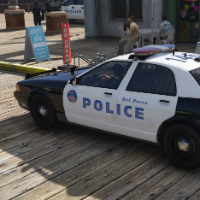
Do you play LSPDFR lore friendly with GrammarPolice and notice the Motorola radio on the side? Well here is your solution with this texture edit of its radio to be lore friendly. Comes with two brands, Celltowa, the lore friendly equivalent of Motorola, and Wiwang, for anyone who thinks that is the lore police radio brand to use.


Installation steps in README.txt


271590_20250924014649_1.thumb.png.5e3d46518b92ce8c6ff94973dd798848.png


Uses GrammarPolice mod: 


Short Description

Lore friendly edit of the GrammarPolice radio

User Feedback

Recommended Comments

There are no comments to display.

Create an account or sign in to comment

Account

Navigation

Search

Search

Configure browser push notifications

Chrome (Android)
  1. Tap the lock icon next to the address bar.
  2. Tap Permissions → Notifications.
  3. Adjust your preference.
Chrome (Desktop)
  1. Click the padlock icon in the address bar.
  2. Select Site settings.
  3. Find Notifications and adjust your preference.











