


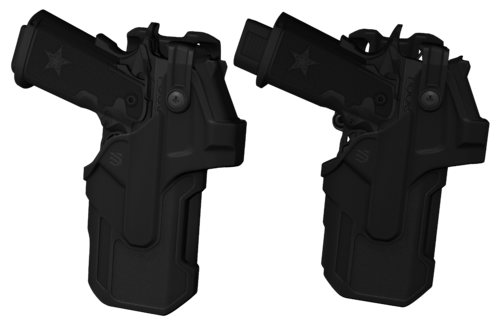
I made these in Zmodeler as i needed some for a car am making and i thought i would post them. Yes i know they are not the best but I don't know a lot about Blender so i could not make them in blender. Give me credits if used or dont i really dont care just do not post them anywhere else. the polys are 12 for both or 6 each.
Modeled and textured by Drew F.






![[PL] Motoambulans - BMW R 1200RT](http://s3-screenshots.int-cdn.lcpdfrusercontent.com/resize/500/-/monthly_2026_05/Zrzutekranu2026-05-24204701.thumb.png.021f3679ae041bf19941ec0436deab39.png)
![[PL] Pojazd Operacyjny ASR (Ambulans Szybkiego Reagowania) - Audi Q7](http://s3-screenshots.int-cdn.lcpdfrusercontent.com/resize/500/-/monthly_2026_05/Zrzutekranu2026-05-24204615.thumb.png.ad7dc0bd99f4aabca3558e39f5f70d11.png)

![Federal Signal Valor 2020 Ford Explorer [N-ELS]](http://s3-screenshots.int-cdn.lcpdfrusercontent.com/monthly_2026_05/Screenshot2026-05-24114013.thumb.png.8741ddf467a66c5b080784c21c365c95.png)
![[PL] Pojazd Operacyjny ASR (Ambulans Szybkiego Reagowania) - Volvo XC90](http://s3-screenshots.int-cdn.lcpdfrusercontent.com/resize/500/-/monthly_2026_05/Zrzutekranu2026-05-24172326.thumb.png.88057a1bfb4a88be5cd2e8c4568a5271.png)
![[PL] Pojazd Ratowniczy GOPR - Volkswagen Amarok](http://s3-screenshots.int-cdn.lcpdfrusercontent.com/resize/500/-/monthly_2026_05/Zrzutekranu2026-05-24165655.thumb.png.ba50fc8bd539ba5d7c995f61b6bea61c.png)
![[PL] Pojazd Operacyjny LPR (Lotnicze Pogotowie Ratunkowe) - Volvo XC90](http://s3-screenshots.int-cdn.lcpdfrusercontent.com/resize/500/-/monthly_2026_05/Zrzutekranu2026-05-24164319.thumb.png.42cbc81ed73b0b6a6b914dbb1d664ebe.png)
![[PL] Polski Ambulans - Volkswagen Transport](http://s3-screenshots.int-cdn.lcpdfrusercontent.com/resize/500/-/monthly_2026_05/Zrzutekranu2026-05-24162709.thumb.png.ea7671a4d962299cfa6678024fb16aee.png)
![[PL] Polski Ambulans - Mercedes Sprinter](http://s3-screenshots.int-cdn.lcpdfrusercontent.com/resize/500/-/monthly_2026_05/Zrzutekranu2026-05-24161527.thumb.png.496ea823ecf0277eda9a42bd0dfc50e4.png)
Recommended Comments
Create an account or sign in to comment