
Skip to content
View in the app

A better way to browse. Learn more.

LCPDFR.com

A full-screen app on your home screen with push notifications, badges and more.

To install this app on iOS and iPadOS
  1. Tap the Share icon in Safari
  2. Scroll the menu and tap Add to Home Screen.
  3. Tap Add in the top-right corner.
To install this app on Android
  1. Tap the 3-dot menu (⋮) in the top-right corner of the browser.
  2. Tap Add to Home screen or Install app.
  3. Confirm by tapping Install.
Due to overzealous filtering on Microsoft’s side, some emails to Outlook and Hotmail addresses may not be delivered. If you’re affected, please use a different email address or try again later.

Advanced Duty System v1.6.1 (Standalone) (X1Studios) 1.6.1

(0 reviews)

10 Screenshots

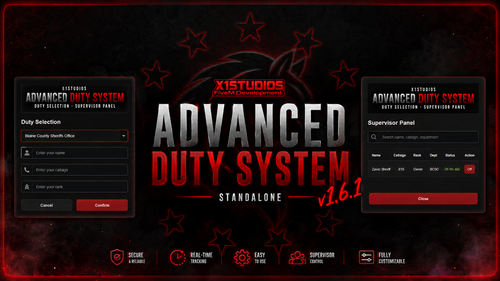
X1S-AdvDutySystem v1.6.1.png

X1Studios Advanced Duty System

The X1Studios Advanced Duty System is a fully standalone, feature-rich duty management system designed for FiveM roleplay servers. It provides a clean and configurable way for departments to manage on-duty personnel, department ranks, callsigns, duty blips, supervisor actions, and emergency dispatch calls.

The system supports multiple departments, Discord role-based permissions, Discord logging, a Supervisor Panel, and an integrated 911 & Panic Alert System — all without requiring a framework.


Requirements

Nothing — Fully Standalone

The X1Studios Advanced Duty System does not require ESX, QBCore, Qbox, or any other framework.


Core Features

  • Discord ACE Permissions using Discord roles

  • Discord Webhook Logging

  • Multiple Departments

  • Create and configure additional departments

  • Custom department names

  • Custom ranks

  • Custom callsigns

  • Customizable duty system

  • Duty Blips

  • /dutymenu duty menu

  • /offduty command

  • /supervisormenu Supervisor Panel

  • Supervisors can force personnel off duty

  • Chat-based system notifications

  • Clean and modern UI

  • Fully configurable system


911 Emergency Call System

The integrated 911 system allows civilians to quickly notify on-duty emergency personnel of an incident.

  • /911 emergency call command

  • 911 calls are sent only to on-duty officers

  • Displays the caller's information

  • Displays the reported location

  • Displays the reason for the call

  • Creates a map blip at the call location

  • Configurable 911 blip behavior

  • Discord webhook logging

  • Discord role ping when a 911 call is received

  • Automatically handles calls without requiring officers to constantly monitor chat


Panic Alert System

The Panic System gives on-duty personnel a quick way to request emergency assistance.

  • Panic alert system

  • Panic notifications

  • Panic alerts sent to other on-duty personnel

  • Panic location displayed on the map

  • Panic alert blip

  • Designed for officer-down and emergency situations

  • Discord logging support


Supervisor System

Supervisors have access to additional tools for managing personnel while on duty.

The Supervisor Panel allows authorized supervisors to:

  • View active/on-duty personnel

  • Monitor department members

  • Force a player off duty

  • Manage duty status

  • Use supervisor-only controls

  • Restrict supervisor features through Discord ACE permissions


Discord Integration

The system integrates directly with Discord to provide permission management and logging.

Discord ACE Permissions

Permissions can be assigned through Discord roles, allowing server owners to control who can access:

  • Duty menus

  • Supervisor menus

  • Supervisor functions

  • Other restricted system features

Discord Logging

Important system events can be sent to Discord through webhooks, helping server staff keep track of duty activity and emergency events.


Version History

v1.1.0 — 911 System Update

  • Added /911 Call System

  • 911 calls are sent to on-duty officers only

  • Added 911 location blips

  • Added 911 Discord webhook

  • Added Discord role ping functionality

v1.2.0 — Emergency Update

  • Added Panic System

  • Added Panic Alert notifications

  • Added Panic Alert map blips

  • Added disconnect/off-duty logging

  • Updated 911 call blip system

v1.6.1 — Major System Revamp

  • Completely revamped UI

  • Fully reworked duty system

  • New notification system

  • Fixed and improved duty blips

  • Improved overall system functionality

  • Performance and stability improvements

  • Numerous additional improvements and fixes


Documentation

The documentation covers everything you need to get the X1Studios Advanced Duty System running on your FiveM server.

Inside the documentation, you will find information on:

  • Installation

  • Configuration

  • Department setup

  • Rank configuration

  • Callsign configuration

  • Discord ACE permissions

  • Discord role setup

  • Webhook configuration

  • Duty menu configuration

  • Supervisor permissions

  • 911 configuration

  • Panic system configuration

  • Duty blip configuration

  • Commands

  • Troubleshooting

  • Frequently asked questions

View the Full Documentation


Support & Updates

Need help installing or configuring the system? Join the X1Studios Discord for support, updates, previews, and announcements.

You can also see upcoming free FiveM EUP packs, liveries, scripts, and other X1Studios projects.

Join the X1Studios Discord

YouTube Video Showcase — Updated

Edited by X1Studios
Reworked The Script

What's New in Version 1.6.1

Released

!!! VERSION 1.6.1 !!!
 Fully Revamped UI
 Fully Reworked System
 New Notifications
 Fixed Duty Blips
 And much more...


Short Description

X1Studios Advanced Duty System

AI disclosure

The author has disclosed that AI tools were used in creating the following aspects of this file:

  • Images

User Feedback

Recommended Comments

There are no comments to display.

Create an account or sign in to comment

Account

Navigation

Search

Search

Configure browser push notifications

Chrome (Android)
  1. Tap the lock icon next to the address bar.
  2. Tap Permissions → Notifications.
  3. Adjust your preference.
Chrome (Desktop)
  1. Click the padlock icon in the address bar.
  2. Select Site settings.
  3. Find Notifications and adjust your preference.