

Skip to content
View in the app

A better way to browse. Learn more.

LCPDFR.com

A full-screen app on your home screen with push notifications, badges and more.

To install this app on iOS and iPadOS
  1. Tap the Share icon in Safari
  2. Scroll the menu and tap Add to Home Screen.
  3. Tap Add in the top-right corner.
To install this app on Android
  1. Tap the 3-dot menu (⋮) in the top-right corner of the browser.
  2. Tap Add to Home screen or Install app.
  3. Confirm by tapping Install.

How to Import Skins Onto a Vehicle

HowtoImportBanner_zps9e46b11d.png

So, you're tired of the skins that came with the car, or you found some really cool ones online. This tutorial is going to teach you how to put those epic skins in action!

Warning: Some Skins may not work on some models due to different templates being used. Please check file before downloading to ensure compatibility.

1.Download Skins

2. Open the file, Find the correct file. It will be a PNG.

Example:
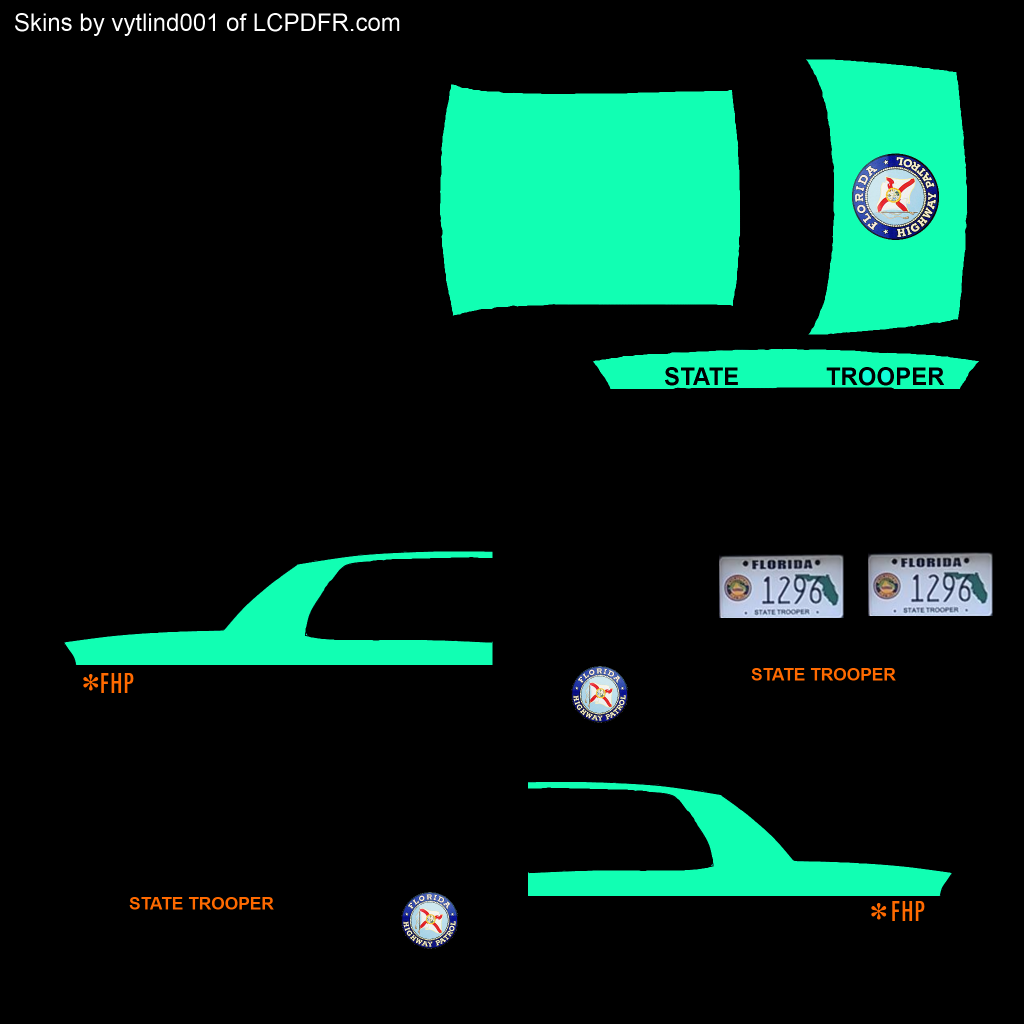
FHPCVPI_zps2629b487.png

3. Drag the skin(s) to your desktop

4. Open your preferred program for installing car mods (OpenIV/Spark IV)

5. Import the textures.

a) For Open IV do the following:

i) Click "Models" (Highlighted Here)
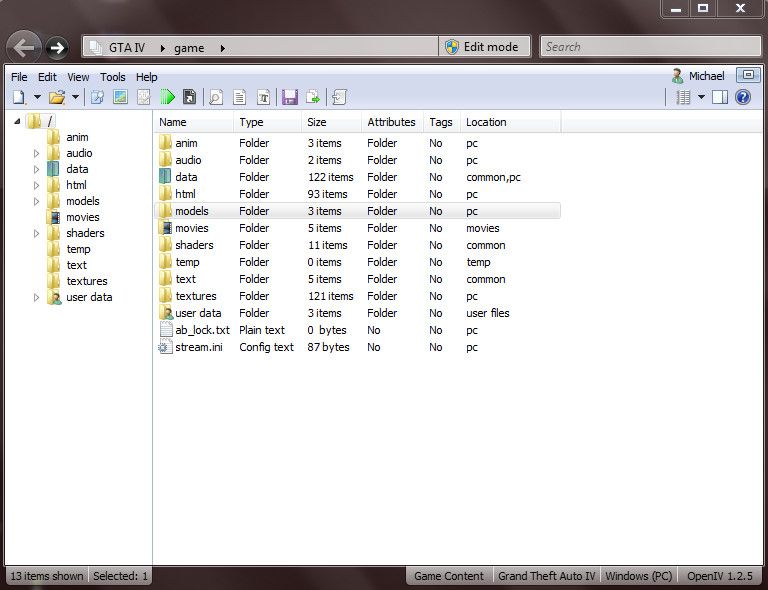
bandicam2012-11-2121-44-20-992_zpsbf6300

ii) Click "CDImages"

bandicam2012-11-2121-44-27-496_zpscd9f79

iii) Click "Vehicles.img"

iv) Click Edit Mode (Highlighted here) and follow the prompt
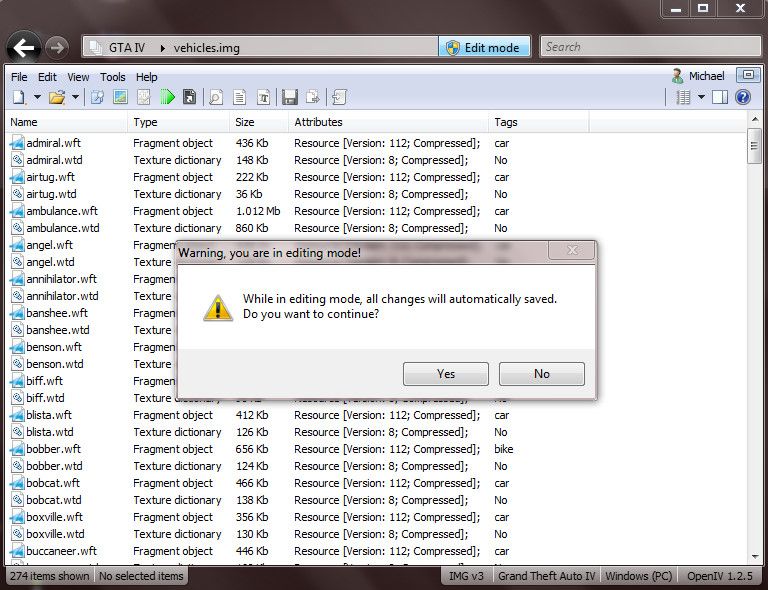
bandicam2012-11-2121-45-29-131_zps8ed124

v) Find the vehicle you want to put the skin on. Mine is in the "police" slot
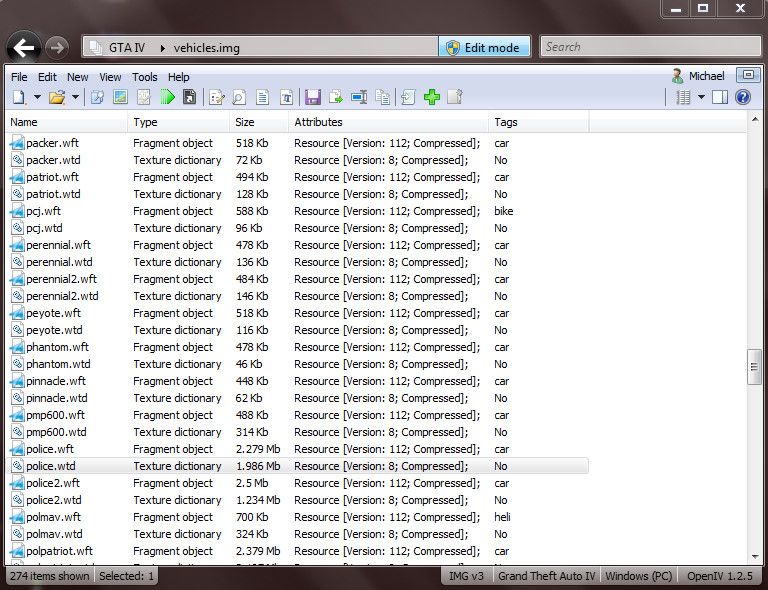
bandicam2012-11-2121-45-42-420_zpsd60f2f

vi) Click on the .wtd file for the vehicle.

vii) Find the texture called "police_sign_1" or "paintjob_sign_1" or similar.

bandicam2012-11-2121-46-14-957_zps12ab13

viii)Click "Replace" at the top

ix) Find and click on your Skin
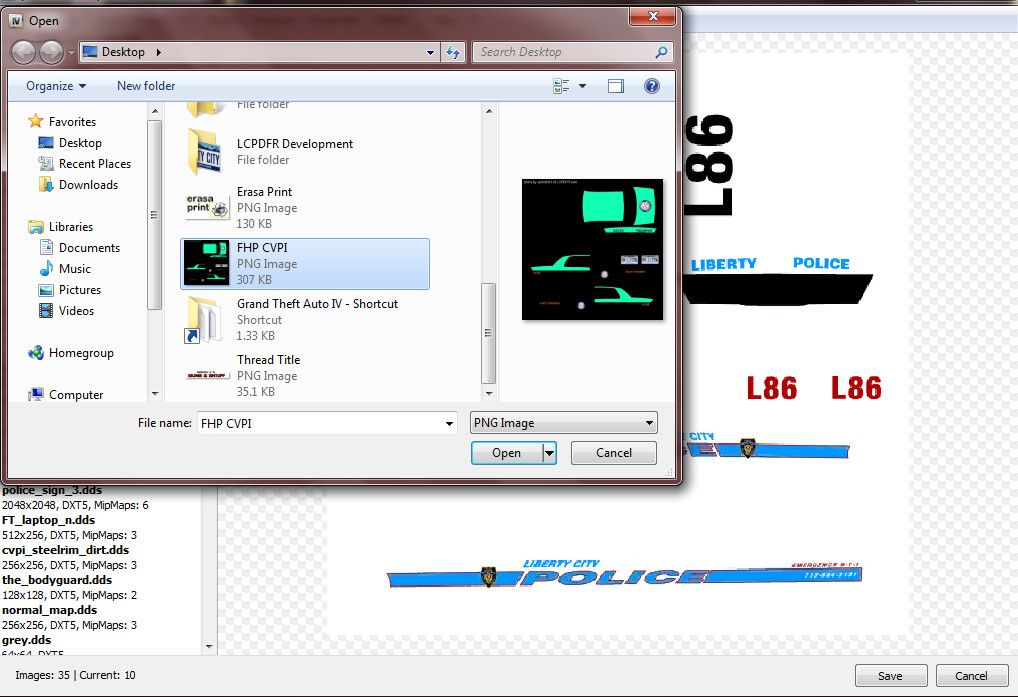
bandicam2012-11-2121-46-30-132_zpsb74f97

x) Click "Open"

xi) Repeat for (INSERT NAME HERE)_sign_2, 3 and 4 if desired

xii) Click Save
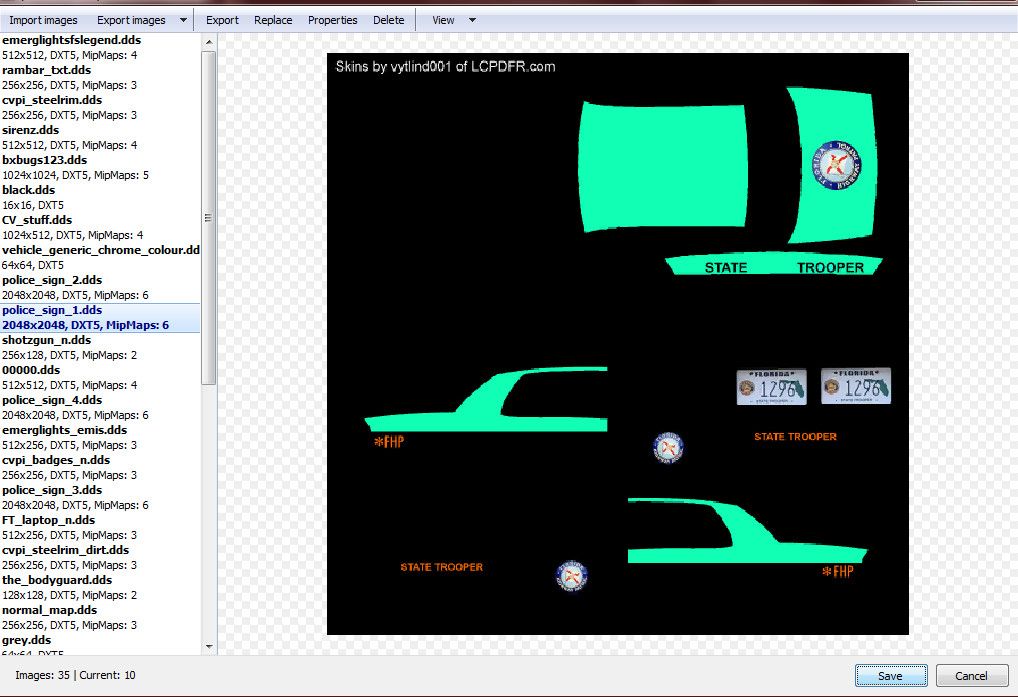
bandicam2012-11-2121-46-51-760_zpsb93a03

xiii) Enjoy.

b)

i) Click "Browse", or in the newer versions, click the GTA IV or EFLC button

bandicam2012-11-2122-19-16-729_zpsc044c6

ii) Scroll down and click "cdimages"

bandicam2012-11-2122-19-36-177_zpsd6bc51

iii) Double Click "vehicles.img"

bandicam2012-11-2122-19-50-692_zps8136ed

iv) Find the vehicle you want to put the skin on
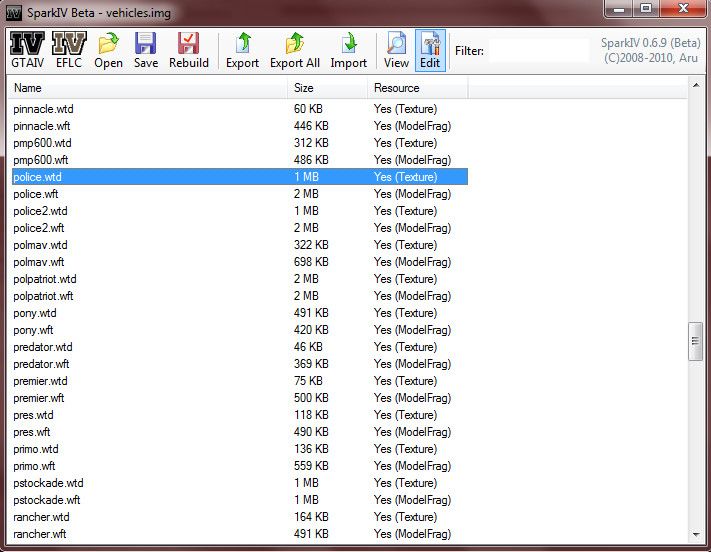
bandicam2012-11-2122-20-36-781_zpsdebb62

v) Click the .wtd file and click "Edit" at the top

vi)Find and click the entry called "police_sign_1", "subu_sign_1", "chgr_sign_1" or similar

vii) Click the Import Texture button at the top, find my texture and click "Open"

bandicam2012-11-2122-21-57-144_zps6ca8a3

viii) Do the same for ..._sign_2, 3 or 4 or as many slots you want to put it in

ix) Save and Close

x) Enjoy

Post any questions you may have below. Thanks for reading. Hope it helps.

User Feedback

Recommended Comments

MichaelV

Friends of LSPDFR

Nice Thanks!

Your Welcome.

pdracer

Members

i get to the replace part but none of my skins show up in the search help me please

MichaelV

Friends of LSPDFR

i get to the replace part but none of my skins show up in the search help me please


The Search?

OfficerJB

Members

Hey I have a question about changing a skin. I have Chasez's Policeb bike mod and I followed all the steps but none of the textures when I go the edit option are named _sign_1 or _sign_2 ect. I Please help me! Thanks

MichaelV

Friends of LSPDFR

Look for the entry that has the default skin. Just replace that one.

i8pikachu

Members

How do you open the img file? What's the default program?

MichaelV

Friends of LSPDFR

How do you open the img file? What's the default program?


You need Open IV or Spark IV to do so.

QASParamedic

Members

Hi guys, 


Essentially I've made my own skin, and am wanting to apply it to a new model that was released (2008 Subaru Forester and a Toyota Landcruiser), however both these vehicles are essentially ''civillian'' cars, and do not have the pre-registered police_sign_1/paintjob.dds/subaru_sign_1 etc. in the texture slots when open in Spark/OpenIV. I was just wondering if there's any way around this issue?


Thanks heaps in advance :)

LegitxxPancakes

Members

Hey, new to doing all the modding to the GTA for PC and I have a  question to ask. I run LCPDFR fine but when I try to change the skin of a car, no cars on the map spawn. I use SparkIV to mod and have nothing but LCPDFR and ELS (I've tried with and without ELS). If you could be any help to me, I would thank you forever!

LeSheriff

Members

Some of the models I downloaded. They have the template texture.... That's usable right?

Oytz

Members

On Spark IV there is not option at the top that says IMPORT. it only says Save Texture.

is it police livery for the version after gta 5 was realesed because i only have 3 textures when i open my wtd

imadoofus

Members

is it police livery for the version after gta 5 was realesed because i only have 3 textures when i open my wtd


This. Only seeing three textures. I'll try OpenIV.

Taco1

Members

This may be a dumb question, but how do i know what vehicle each one is? Just downloaded a big pack, but dont know which to replace.

Slushy

Members

This may be a dumb question, but how do i know what vehicle each one is? Just downloaded a big pack, but dont know which to replace.


It's all to do with the pack, just test them out, and with your results change the name. Sorry there is no way around it. :{

Seether

Members

When I open the vehicles.img and scroll down to police.wtd and open that one in the Edit-mode (SparkIV) I only see hree things, police_badges, police_badges_n and noose_lights. I can't seem to find the sign och paintjob anywhere. This problem is both in SparkIV and OpenIV despite reinstalling the game.


Any clues?

  • Management Team

When I open the vehicles.img and scroll down to police.wtd and open that one in the Edit-mode (SparkIV) I only see hree things, police_badges, police_badges_n and noose_lights. I can't seem to find the sign och paintjob anywhere. This problem is both in SparkIV and OpenIV despite reinstalling the game.


Any clues?


You need to have a multiple-livery enabled vehicle (pretty much every modded vehicle). The default cars are not multiple-livery enabled.

xXxPolicexXx

Members


You need to have a multiple-livery enabled vehicle (pretty much every modded vehicle). The default cars are not multiple-livery enabled.


Sorry, ignore my last comment, but is there such thing as a modded vehicle that doesn't require ELS? ELS sometimes gives me trouble.

Officer Kayson

Members

Hi, is there a tutorial for vanilla police cars. I can't find any tutorials that will help. Any help appreciated.

jippy1990

Members

I added a skin but Everytime I try to spawn the vehicle it crashes any ideas

Join the conversation

You can post now and register later. If you have an account, sign in now to post with your account.

Guest
Add a comment...

Recently Browsing 0

  • No registered users viewing this page.

Account

Navigation

Search

Search

Configure browser push notifications

Chrome (Android)
  1. Tap the lock icon next to the address bar.
  2. Tap Permissions → Notifications.
  3. Adjust your preference.
Chrome (Desktop)
  1. Click the padlock icon in the address bar.
  2. Select Site settings.
  3. Find Notifications and adjust your preference.