


MSKI8877
Members
-
Joined
-
Last visited
Everything posted by MSKI8877
-
And even then, Holden is owned by GM - and has been since the 1930's. The car still has American roots; especially since every Caprice was designed and assembled in the United States up until the 5th and current generations (with the exception of those assembled at the GM plant in Canada). Regardless of where it's made and by whom, it still is not a bad looking car.
-
-
You wouldn't happen to know where I can find an older model, I was hoping for a 2008 Taurus.
-
Would you happen to have teamspeak, a few friends and I are on quite often and do have realistic gameplay. Add me, BULLETS OF LIFE
-
Thanks, you wouldn't happen to know where I can find it others?
-
I have been unable to find this, so I'm hoping someone would be able to model any or all NON-ELS: 2010+ Ford Expedition, 2013 Ford Interceptor Sedan, 2008 Ford Taurus, and a 2012+ Dodge Charger SRT8 - all with a rambar (you pick what one), Whelen Edge (anything honestly, just not a rotatory light bar) light bar with deck lights. If possible, please include a template!
-
What particular skin? Details and I'll let you know if I can do it or not.
-
-
Same business here! I'm always more than happy to play. BULLETS OF LIFE is my gamer tag. See you guys out there.
-
-
-
-
-
-
-
-
I noticed one additional issue as I was playing with the game today, after adding this vehicle. I noticed some AI officer drove around with the full light bar, and some with the light bar gone. Those who drove without the light bar still had the takedown lights/turnsignal components still floating above the vehicle, even without the rest of the light bar. I was playing around with the "add/remove car components" with trainer and noticed the light bar can be removed. However, when it is removed the turn signal associated lights still float above the car, even when the rest of the light bar is not there. Should the light bar even be able to be removed? Is there a way to make it permanent and not removable so AI driven vehicles don't show up with this problem?
- 29 comments
- 3 reviews
-
Thanks for your reply. I thought that might be the problem, I tried different skins, I put the same one in all 4 slots. It comes in clear in slot one, but the rest are still blurry.
- 18 comments
- 8 reviews
-
This is an amazing vehicle!!! Any plans to put this light bar on your other vehicle models?
- 29 comments
- 3 reviews
-
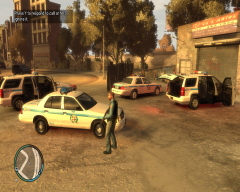 The uniform and vehicles look awesome!
 -
Sorry for not getting back to you sooner. The problem I mentioned about the crashing has been fixed, however there was something else we noticed. I'm not sure if this is just on our end, but after changing the textures on the vehicle, we noticed that 3 of the slots come in blurry. We've tried with the same texture in all 4 slots; it comes in crisp and clear in sign1, but for 2,3,&4 the texture shows up blurry. Thoughts?
- 18 comments
- 8 reviews
-
Is there any way to move the location of the fuel gauge? Possible to above the map? When I'm running LCPDFR and the fuel script together, I'm not able to see the street names because of the script's positioning.
- 37 comments
- 8 reviews
-
-

- 1
-
-
-
-



