


MascottePaper
Members
-
Joined
-
Last visited
Everything posted by MascottePaper
-
-
yeah i know especially the 2.2 vtec... Maybe getting it and then a launch control on it Yeah the body`s are nicer but yeah the older they get the more problems they can have, especially here so this was the best option :/
-
Prelude? I`m driving for personal use, still got some work on it. Needs to be changed with colors , from blue to white, other set of rims and maybe other engine but that is future work Pictures are in the spoiler ( Little bit too big )
-
Was an error, regarding twice the application opened up, re edited my post.
-
Ignore it, it is installed but got an error :
-
Awesome pictures ! Cant wait for it its going to help out alot!
-
Alright, thank you for the reply. I`ll look forward to it
-
Well especially the cloud system would be wonderful, the real time map isn't a big problems in clans ( It requires radio traffic and regular asking for status update ) The cloud system, to work with multiple dispatchers / divisions would be really helpful. And i know a lot of people are appreciating this idea and are going to find this helpful especially the clans and the idea with future reference is also a great idea, maybe an option with a few preset names for tracking. And the option to add custom licence plates. Also i don't know if this is an option : But an option ( And it requires the members of the clan of course ) to add pictures to names, so you can roleplay with it ( Members take a screenshot, dispatch receives it true an mail ( NOT LIVE OR RECENT ) But manually uploading it and sharing between the dispatchers, so there is a picture with a name instead of only a name
-
Nice can't wait for this, would help the clan out a lot :) Love the first idea with starting themed as LA based clans, but also for the future for multiple clans usable . I`ll follow this every time i can. Don't lose faith in this !
-
Fixed it, apparently windows thought there should be duplicates of trainer.ini but then trainerini.ini Topic can be closed
-
I gave him that option just now, Modifications using : clan pack, policehelper , lcpd:fr, braveheart Tried to reinstall it : Didnt fixed it
-
It is already on 1, thats the weird thing.
-
He can spawn them ( atleast thats what i think ) and he sees them, but everytime he launches the game, it says no car ( as you see ) and the rockstar song keeps playing while gaming
-
Hey, When ever a buddy of me starts up his game, he gets an message below the car. It is saying : No car found, which i dont know how to resolve. Picture is included If somebody knows the problem, i would like to hear it. Thank you in advance, Ref
-
At the crashing part, I have the same problems, but it started after i installed some vehicle mods ( Other people dont have it you use it -> Crashing ) So far i know GFWL didn't had any updates ( Computer cant update without notification here ) GFWL Sucks some now and then, but i stopped it because if i joined a server, it would crash me out due the fact i didn't had the same models / images or something.
-
With open IV you open the .wft then check the left. It also depends "too high "for each computer. I think if they stick between 50.000-80.000 it should be ok ( I assume you run a good computer so ) ( link to open IV ) http://openiv.com/WebIV/guest.php?get=0
-
Maybe look at the polygons of your vehicles, if they are high there is your problem. Make sure to look to every single model, hope this helped out
-
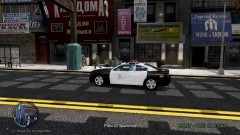 As i replied on another topic. The polygons are high, so i`m making a lower poly one.
 -
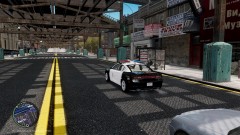 Thanks for this motivation speech :) I don't have to PM you i`ll just wait until you come on the teamspeak :)
 -
It depends, also on the equipment i used that model before and came around the 80/90 and i`m only at 48 so is a difference.
-
Gangren, the link you provided, is a 2013. This is a 2011. Also that model has a pretty high amount of polygons. And i`m not trying to copycat, duplicate or what so ever just trying to learn it, and to get it done by myself. And if you look closely, you`ll see i have to do all of the interior parts. and at @sKuare, thanks for the reply,i`ll try to work in it .
-
Since i already now how to make textures, i started to learn myself how to add lightbars, wigwags and inside components ( the shotguns / laptop etc )
-
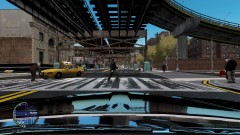
From the album: Learning to mod
Model used is : 2011 Dodge Charger R/T Hemi by Dhruv. Lightbar by kevinvd Advise / opinion is allowed :) -
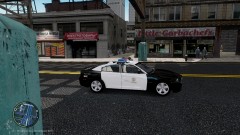
From the album: Learning to mod
Model used is : 2011 Dodge Charger R/T Hemi by Dhruv. Lightbar by kevinvd Advise / opinion is allowed :) -
From the album: Learning to mod
Model used is : 2011 Dodge Charger R/T Hemi by Dhruv. Lightbar by kevinvd Advise / opinion is allowed :)



