


Rich
Members
-
Joined
-
Last visited
Everything posted by Rich
-
I understand the original problem. Your most recent log looks similar to other logs where games crash on startup. The Rage log doesn't tell me when the crash happens, so I'm confirming when exactly the game crashed now that you're launching Rage with no plugins loaded. So in the last log you uploaded, is this what happened?: You launched the game. You got to the flashing lights intro. You alt tabbed and launched Rage. You spawned in the game world. You drove to the problem location. The game crashed.
-
Right, but after you open Rage and it hooks the game, when does the game crash? Immediately? Do you make it into the game world? Are you able to drive to the problem location before it crashes?
-
How far into the game do you get before it crashes when you do the alt-tab launch?
-
So did this happen from you launching Rage to start the game, or were you already in-game you alt-tabbed to launch Rage?
-
Do this in your Rage settings and try again
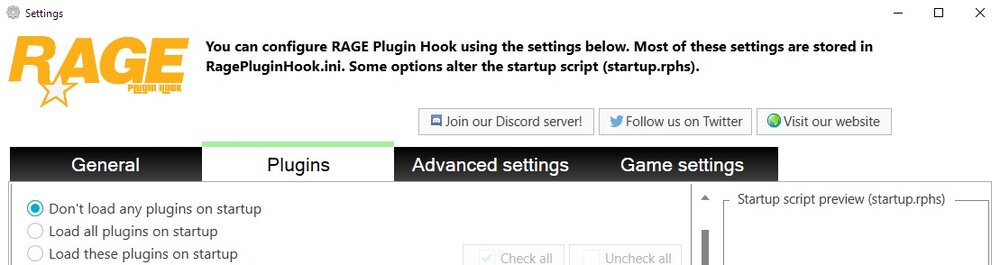
-
LSPDFR is loaded in that log.
-
Very strange. Can you upload a log from you crashing there playing with Rage and no other plugins loaded? The ambient sheriff spawn shouldn't be happening in that case.
-
I don't see a crash in the log.
-
I can't imagine a Windows update would cause a crash at a specific location in GTA. To summarize what we know, is the following correct?: 1. This crash does not happen in normal GTA (launching without Rage) 2. This crash does not happen with just Rage (launching with Rage, no plugins loaded) 3. This crash does happen with LSPDFR loaded.
-
LSPDFR crashed? Or GTA crashed?
-
The purpose of spawning the sheriff car yourself was to check if that car was causing the crash. Since it didn't crash when you spawned it manually, I don't think it's the problem. It spawning ambiently shouldn't make a difference either.
-
This is not your topic. Please pay attention.
-
Try using this instead when you are replying.
-
You have been asked to upload your Rage log 4 times and you failed to do that.
-
Can you go to a place in-game that doesn't cause a crash, then do the following: 1. Open the Rage console (F4) 2. Type "spawn sheriff" (without quotes) 3. Press enter Does this cause a crash?
-
It's going to be difficult to help you if you refuse to follow instructions.
-
I cannot help you without your Rage log.
-
When you reinstalled manually, did you just copy/paste over the old install? Or did you delete everything LSPDFR related, then reinstall?
-
A crash doesn't need to occur to create a log. The log is created when you start the game with Rage, and it updates as you play. If you had just closed your game, you could have uploaded your log from that session. He wanted your log after it crashed by going to the problem location. If it didn't crash, then the problem isn't there anymore.
-
Nope. Upload your RagePluginHook.log (text file) from your GTA main directory.
-
I'm curious what this is. I don't see anything like this in my own log. I don't think it should be happening on a vanilla setup.
-
Ok so I think everyone thought you meant the players name hovering over their head.. not a skin/livery/uniform
-
In the future, please only upload the log file from your main GTA directory; it is the most recent. Try removing MyFirstLSPFRPlugin.
-
If you want this for singleplayer, you need to learn how to code. If you want this for multiplayer, look for FiveM scripts or learn how to code.
-
For a pursuit, I don't think cones and road barriers would be realistic. They didn't even teach us about roadblocks as a tool for pursuits when I went through the academy. It was all about stop sticks and TVIs.


