


Sentinel55
Members
-
Joined
-
Last visited
Everything posted by Sentinel55
-
 I might do that with the next update. But don't expect anything in the next few weeks.
- 325 comments
- 53 reviews
-
-
The chp_decal.png is a partly transparent texture, you just have to delete the text you want to get rid of and you're done
- 325 comments
- 53 reviews
-
You have to export the png and edit it with a photo editing software. Photoshop or paint.net or something. Then import it back into OpenIV
- 325 comments
- 53 reviews
-
That sucks. But it's nice to hear you're taking the challenge! Let me know if you need any assistance at one point. I'll gladly help you
-
-
Dann schmeiß erstmal alle installierten XML files raus. Und dann probier eine nach der anderen wieder einzufügen
-
Klingt für mich als wenn das Fahrzeug welches du nutzen möchtest, die falsche XML Datei verwendet. Solange du mit J die Rückleuchten zum blinken bringen kannst, liest dein Model auch ein XML Datei. Wenn nichts anderes funktioniert allerdings die falsche
-
Feel free to. Don't forget to replace the reflective texture with a transparent texture.
- 325 comments
- 53 reviews
-
Nutzt du die Richtige taste?
-
Du brauchst Fahrzeuge die ELS auch unterstützen. Außerdem muss sich die zum Fahrzeug dazugehörige XML Datei im ELS Ordner befinden.
-
I would just remodel it completely. Trying to reduce the poly count would take ages.
-
You're trying to attach too many polys together. Zmodeler has a polygon limit for objects.
-
Good decision! Keep me updated
-
That's a no-go for the DEV section. No, you don't have to. 109.000 polys is ok.
-
That's a good start. Getting the doors and such to work is pretty easy actually, collisions and IDs shouldn't be an issue either. The hardest part for you is probably the LOD
-
Here is a tip. Before you buy it, start with a free model available somewhere. Either from a 3d website or an old DSF model. You'll see pretty quickly if you're able to convert a model to Gta V. I wouldn't spent the money without any experience.
-
-
That's a big parking space in Northwood. It's just north of the first bridge between Algonquin and Bohan.
- 19 comments
- 2 reviews
-
-

- 1
-
-
No. I don't have a Zmodeler license at the moment.
-
-
Just change this line: <OutOfVeh Enabled="true" You'll find it three times in a VCF file, just set it to false.
- 325 comments
- 53 reviews
-
 The polarbear was made in a hurry just hours before uploading. I'll look into it.
- 85 comments
- 36 reviews
-
-
- 1
-
-
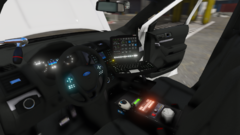 You should look up the Iforce System, the keyboard is too big and the Monitor is too small.
 -
You want the black and white slicktop in white? You can do that without my help, just use the polarbear textures.
- 85 comments
- 36 reviews

