


Creators: Due to background reprocessing of files, approvals and file security checks may be delayed. Thanks for your patience.

DLer
Members
-
Joined
-
Last visited
Everything posted by DLer
-
![enb2013 2 2 5 37 25 [8]](//s3-gallery.int-cdn.lcpdfrusercontent.com/gallery/album_954/sml_gallery_9318_954_68121.jpg)
From the album: Misc. Liveries
-
![enb2013 2 2 0 40 42 [7]](//s3-gallery.int-cdn.lcpdfrusercontent.com/gallery/album_954/sml_gallery_9318_954_108078.jpg)
From the album: Misc. Liveries
-
![enb2013 1 31 1 28 17 [6]](//s3-gallery.int-cdn.lcpdfrusercontent.com/gallery/album_954/sml_gallery_9318_954_46600.jpg)
From the album: Misc. Liveries
-
![enb2013 1 31 1 27 51 [5]](//s3-gallery.int-cdn.lcpdfrusercontent.com/gallery/album_954/sml_gallery_9318_954_123586.jpg)
From the album: Misc. Liveries
-
![enb2013 1 31 1 22 2 [4]](//s3-gallery.int-cdn.lcpdfrusercontent.com/gallery/album_954/sml_gallery_9318_954_131990.jpg)
From the album: Misc. Liveries
-
![enb2013 1 31 1 18 20 [3]](//s3-gallery.int-cdn.lcpdfrusercontent.com/gallery/album_954/sml_gallery_9318_954_78964.jpg)
From the album: Misc. Liveries
-
![enb2013 1 31 1 3 20 [2]](//s3-gallery.int-cdn.lcpdfrusercontent.com/gallery/album_954/sml_gallery_9318_954_7684.jpg)
From the album: Misc. Liveries
-
-
Love what you have going. I'd like to see that tow truck first. Question for you about the Pinnacle: can you make it so the car badging is removed? Just curious. Thanks again for a great mod there, working on a skin for it currently. I must say very little changes needed, great attention to detail.
-
Rockstar states they'll be releasing the cover art later today as promised. So there's that to look forward to! I am in total agreement with those that say it will be worth the wait. I only hope they consider a shorter lapse between the release and a possible PC version.
-
http://www.rockstargames.com/newswire/article/48591/grand-theft-auto-v-is-coming-9172013.html/#comments So much for Spring! LOL OH ROCKSTAR
-
Very nice, can't wait to see this implemented on not just new but original cars as well. It still makes me wonder though, EVCS and now EVI should team up. More choices means potentially more variants on cars. There should only be one type of system for maximum reach amongst all car models and such. It also has the potential to create hundreds of more files to sift through for the "right" versions for users. Just a thought.
-
There is a free program called Paint.net I use at work that does most of what Photoshop does, and follows the same shortcut commands too. Give that a try. Its also great if you just want to use the printscreen button. Also, there is a program called VSO image resizer that's really simple and will adjust your images with a click and converts to jpeg if you want as well. I believe it is called Light Image Resizer now. Both programs are free. Give those a try guys, its what I use for my screenshots.
-
-
This worked great, thanks cj24!! Thread can be CLOSED.
-
Well met sir
-
-
Hey thanks! I'll give this a try. Hate to say it but let me know if you want to adjust that taxi now that I have the direction for it. I am happy to make some work for you in return :)
-
So after many searches and no answers... I run EFLC only, and would prefer the police bike to be a police car. Has anyone managed this? I recall threads asking how to ADD the police bike in the base GTA IV game, but not replace it with a car should they have EFLC running. Let me know if there's a guide out there I'm missing, I'd like to add the Annis Pinnacle LCPD car to the fleet.
-
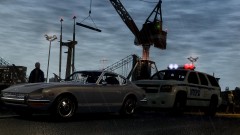 Correct, it is a Datsun 240Z or "Fairlady".
 -
-
Ekalb's moved on from GTA cars. Everything's over, nothing to see here, move along.
- 7 comments
- 9 reviews
-
I like it, very nice. I'll give this some attention and make up some skins perchance.
- 3 comments
- 6 reviews
-
Would you consider making a non-police car handling line to my spec? You seem to have a serious knack for it and was looking for something rather specific. Shoot me a message if you are able, but your studies come first :)
-
SultanGT I play TBOGT exclusively, so I have the model, just wanted the convertible version. Perhaps even a convertible/hardtop version in one model using extras like the Stallion!
- 14 comments
- 5 reviews

![enb2013 2 2 5 37 25 [8]](http://s3-gallery.int-cdn.lcpdfrusercontent.com/gallery/album_954/sml_gallery_9318_954_68121.jpg)
![enb2013 2 2 0 40 42 [7]](http://s3-gallery.int-cdn.lcpdfrusercontent.com/gallery/album_954/sml_gallery_9318_954_108078.jpg)
![enb2013 1 31 1 28 17 [6]](http://s3-gallery.int-cdn.lcpdfrusercontent.com/gallery/album_954/sml_gallery_9318_954_46600.jpg)
![enb2013 1 31 1 27 51 [5]](http://s3-gallery.int-cdn.lcpdfrusercontent.com/gallery/album_954/sml_gallery_9318_954_123586.jpg)
![enb2013 1 31 1 22 2 [4]](http://s3-gallery.int-cdn.lcpdfrusercontent.com/gallery/album_954/sml_gallery_9318_954_131990.jpg)
![enb2013 1 31 1 18 20 [3]](http://s3-gallery.int-cdn.lcpdfrusercontent.com/gallery/album_954/sml_gallery_9318_954_78964.jpg)
![enb2013 1 31 1 3 20 [2]](http://s3-gallery.int-cdn.lcpdfrusercontent.com/gallery/album_954/sml_gallery_9318_954_7684.jpg)

