


Sheriff Van Dyck
Members
-
Joined
-
Last visited
Everything posted by Sheriff Van Dyck
-
 Thank you! NicolaiB and NickieB are different members? Because is kinda confusing!
 -
-
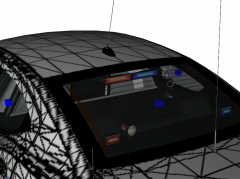
Well, the tail and reversing lights are working as wig wags by now, headlights flash separately, and i have just added a couple of fog lights on the front bumper
-
Crap :-/ I'm sorry dude i'm barely new to this. I did my best trying to map that slimlighter
-
-
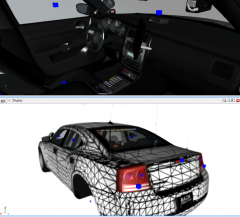 Check the new image and let me know :-)
 -
Check the new image and let me know :-)
-
From the album: WIP
-
I'll take that idea, i like it. LEt me edit it.
-
Thanks bro!
-
From the album: WIP
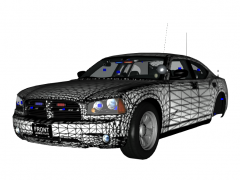
(WIP) Unmarked/Slicktop Charger -
From the album: WIP
Almost done -
-
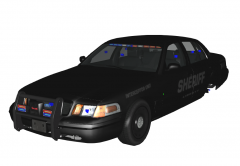 Thanks bro, vehicle is already in the downloads section as "CVPI Pack"
 -
-
-
-
Thanks to all of you for your positive reviews, that gives me the will for making more stuff.
- 28 comments
- 9 reviews
-
-
-
-
-
-
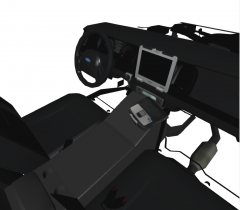 Thanks man! It's right in the Slicktop CVPI i have uploaded. Just gotta wait for approval!
 -
This pack contains 2 versions of the Crown Victoria: 1x Slicktop 1x Police Unit For the slicktop, headlights and tail lights work with primary lights, and the indicators and reversing lights are working as wigwags. I suggest you to use the ELS file provided in the .rar in order for the lighting system to work properly. Both contains my GPD texture pack installed by default, you can change the liveries for whatever skin you like. Credits: CVPI Slicktop made by Sheriff VanDyck - Model is original Ford Crown Victoria by Schaefft, modified for and converted to GTAIV by Chasez. - This version of the CVPI model has been modified by Bxbugs123 & Lt.Caine with permission by Schaefft and Chasez. - Rims By Bxbugs123, Textures By Lt.Caine - Second exhaust piping and indicator/headlight modification by BravoZero - Rim Modeled & converted by Bxbugs123 Textures by Bxbugs123 & LtCaine. - Main textures by Bxbugs123 - SecurCOM Antenns by PriMan - CVPI Grille Guard by TraumaPak - Spotlight made by Cj24. - Panasonic Toughbook CF-31 modeled and converted by Ridgerunner Designs - Panasonic Toughbook CF-31 texture by Ridgerunner Designs - POLICE CONSOLE by PFCBAREFOOT - Setina BodyGuard 6,7 Partition made by deco. - WatchGuard Video System Made & Converted by Bxbugs123 - Textures By Bxbugs123 & WatchGuard Video - CONSOLE PARTS: ICop Video Box Motorola P25 APX 7500 Motorola Spectra Radio Code 3 Dual ArrowStik Controller Uniden Bearcat Police Scanner SoundOff Signal Digital Switch LoJack Box Whelen Siren Boxes All this parts are made by Casey1989 - Feniex Pegasus - Scratch modeled and textured by Reboot23- ELS mapped by Reboot23 - Mini Phantom Max by TraumaPak -Whelen 400 Series by TraumaPak Police Unit made by Sheriff VanDyck - Model is original Ford Crown Victoria by Schaefft, modified for and converted to GTAIV by Chasez. - This version of the CVPI model has been modified by Bxbugs123 & Lt.Caine with permission by Schaefft and Chasez. - Rims By Bxbugs123, Textures By Lt.Caine - Second exhaust piping and indicator/headlight modification by BravoZero - 09 rims Made & converted to GTA IV by Bxbugs123 - Main textures by Bxbugs123 - SecurCOM Antenns by PriMan - Unity Spotlight Modeled & converted for GTA IV by Bxbugs123 - Panasonic Toughbook CF-31 modeled and converted by Ridgerunner Designs - Panasonic Toughbook CF-31 texture by Ridgerunner Designs - POLICE CONSOLE by PFCBAREFOOT - Setina BodyGuard 6,7 Partition made by deco. - WatchGuard Video System Made & Converted by Bxbugs123 - Textures By Bxbugs123 & WatchGuard Video - CONSOLE PARTS: ICop Video Box Motorola P25 APX 7500 Motorola Spectra Radio Code 3 Dual ArrowStik Controller Uniden Bearcat Police Scanner SoundOff Signal Digital Switch LoJack Box Whelen Siren Boxes All this parts are made by Casey1989 - CVPI Mirror Lights: WHELEN ENGINEERING COMPANY® : For Light and Mirror Mount Design TraumaPak™ : 3D Creation Reboot23 : Converting to GTA IV Mapping Textures & ELS PFCBarefoot: Using his "emerglights.png" texture Luxart: Using their "emerglights_emis.png" texture. -Code 3 Defender scratch modeled and converted by Pengi -Mounts by Mathias - Paintjobs made by Sheriff VanDyck (DOES NOT INCLUDE SOME OF THE LICENSE PLATES)
- 28 comments
- 9 reviews
-
-

- 1
-

