


Smillie
Members
-
Joined
-
Last visited
Everything posted by Smillie
-
Simply fantastic RP tool, I leave it running on my old laptop next to me so I don't even have to alt-tab. Adds a great touch of fun to the game. Only suggestion I would have would be perhaps some sort of BOLO list so in game you can RP looking for a particular type of vehicle or person and stop/investigate etc. But really amazing work love how detailed it is.
-
I would be more inclined to say this shows promise if it wasn't for the fact the video says its due for release in like 20 days and yet the gameplay still looks like Alpha level at best. It would be nice if this works out as there is a dearth of good police games but i'm not going to hold my breath.
-
-
Just tried this, oddly it does seem to work. If you get out of the vehicle you spawn on starting LCPDFR and get into one at a police station you seem to be able to use the divide key to use the LCPDFR Lighting.
-
I was having random CTD as well as the lighting issue. I turned off callouts and the random CTD seems to have gone now. But the lighting issue remains.
-
Just did a full fresh installation of GTA IV and installed 1.0 on that and but still got the same issue with the lighting. I thought I would try in case I had accidentally left any mods/scripts or old bits of LCPDFR around but still same problem.
-
Fantastic release, simply superb I'm astounded at the improvements and additions in control of suspect that alone is amazing. On topic I have a similar error, when I try to start the various siren/lighting within any police vehicle using divide the game immediately crashes. I've tried remapping to another key and the same error occurs. I can use the traditional key to start the siren and lights as normal so not a major issue or anything. Logs below. LCPDFR LOG within Spolier, note a main loop error as the most recent entry? hope that means something to you clever chaps.
-
I enjoyed it but a lot of the story had a pointless feel to it, the Madrazo element in particular had a weak feel and I expected more missions given that Trevor kidnapped the wife. Even if it was something expected like linked battles with Madrazo goons. There are some cool story elements that I liked but some of them felt like wasted opportunities to do more.
-
My baby, Vauxhall Vectra 3.0 Ltr V6, so much fun to drive.
-
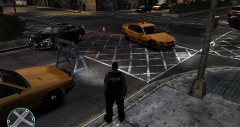
From the album: Random Callouts
Whilst crossing this intersection on lights and siren to respond to a shots fired call I failed to note that the yellow taxi already established in the junction had not yielded. The impact was significant and killed the driver of the taxi, as well as rendering my unmarked car too badly damaged to respond to the call. Remember better to get to the call alive and safe than not at all. On the upside I did get to practice closing the junction and calling out the coroner to clear the scene. -
-
-
The weird naming etc with ATI is one of the reasons I don't buy them anymore, and historically I've not gotten on particularly well with the cards.
-
God if you look at the video, there is a huge dead zone between how much the chap playing is moving the wheel and the point at which the car starts a turn. I would be interested to hear how many people play with no apparent dead zone.
-
I don't think that would be possible would it (opening door for suspects) unless its possible to code it so that you open the door but don't get in and the suspect sees the door as not being there (like if you have crashed and ripped the door off) and ignores the door and just gets in. I'm no coder but that sounds like it would be really hard to implement.
-
-

