



TheProneGuy
Members
-
Joined
-
Last visited
Everything posted by TheProneGuy
-
-
 Been waiting for this update! Hard to patrol without knowing if that dead ped has a warrant or not...
- 28 comments
- 12 reviews
-
-

- 1
-
-
.thumb.png.84adb823f7f653b8d654f1ab13098851.png) My new Main models! Perfect style & model fit right in to the city. Amazing work!
My new Main models! Perfect style & model fit right in to the city. Amazing work!- 89 comments
- 44 reviews
 This thing is Perfect! Plenty of components & the wheels are NICE! Amazing work!
- 158 comments
- 54 reviews
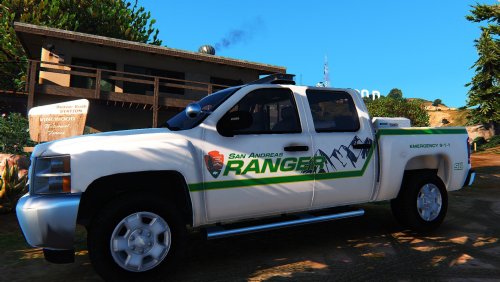 Awesome texture! The mountain backdrop is perfect for that park ranger feel. My new main texture. Amazing work!
Account
Navigation
Search
Configure browser push notifications
Chrome (Android)
- Tap the lock icon next to the address bar.
- Tap Permissions → Notifications.
- Adjust your preference.
Chrome (Desktop)
- Click the padlock icon in the address bar.
- Select Site settings.
- Find Notifications and adjust your preference.
Safari (iOS 16.4+)
- Ensure the site is installed via Add to Home Screen.
- Open Settings App → Notifications.
- Find your app name and adjust your preference.
Safari (macOS)
- Go to Safari → Preferences.
- Click the Websites tab.
- Select Notifications in the sidebar.
- Find this website and adjust your preference.
Edge (Android)
- Tap the lock icon next to the address bar.
- Tap Permissions.
- Find Notifications and adjust your preference.
Edge (Desktop)
- Click the padlock icon in the address bar.
- Click Permissions for this site.
- Find Notifications and adjust your preference.
Firefox (Android)
- Go to Settings → Site permissions.
- Tap Notifications.
- Find this site in the list and adjust your preference.
Firefox (Desktop)
- Open Firefox Settings.
- Search for Notifications.
- Find this site in the list and adjust your preference.


.thumb.png.84adb823f7f653b8d654f1ab13098851.png)
