


Creators: Due to background reprocessing of files, approvals and file security checks may be delayed. Thanks for your patience.


CptLuckyStar
Members
-
Joined
-
Last visited
Everything posted by CptLuckyStar
-
Was the issue with the vehicles.meta ever updated/fixed? "Temporary fix: replace vehicles.meta in LML/Coastal Callouts/data/ships with this version. It will disable the two large ship files which are causing problems. It may take some time for LML to get updated. I ask is because I believe my crash is due to that issue, My RPH crashes with the last line "LSPD First Response: [CoastalCallouts] Adding 0x8e79490e(The Sea Urchin) to deep ambient list" Everything is installed correctly with latest gameconfig, LML installed and working with other plugins, Update the vehicles.meta file fixed it so if anyone is getting the same problem download the meta file it's on one of the support pages on here.
-
I so can related to customizing my world more than playing it, but like you said, it's rewarding figuring it all out, so far I have DPPD and RHPD set up correctly with Jurisdictions + Option 6 and Ultimate Backup, I wonder if it's possible to set up in Ultimate Backup more specific jurisdictions like West Vinewood LSSD, I know I saw specific vehicles that have those liveries that are related precisely to that area and they say that on the vehicle like LSSD with West Vinewood on the door just like in IRL in West Hollywood, I can't seem to remember what it's called it's some kind of livery pack, any chance you might know what I"m referring to?
-
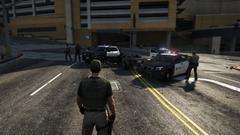 I used to live a few blocks away IRL and saw the real units all the time, nicely done.
 -
That's so odd I even went as far as to manually install 2.0 through LML, Ok I'll give it another shot maybe I missed something. Oh I see what you mean, the plugin itself, my mistake. Yes that was it, I thought for sure I installed the latest one, somehow I must have overlooked it, Thanks.
-
I know it's been close to a month since I posted my request for help but between having issues with GTA and my health I haven't been able to really get anywhere luckily persistence paid off and I finally got everything smoothed out and working, I only have 1 little issue which I can't seem to understand I have installed the 2.0 update with LML but for some reason Coastal Callouts keeps telling me the update is available and it shows I don't have the update installed. It's odd because it seems like the Yacht fire is different as some of the windows seem see through as the update notes point out but I haven't seen the new USCG boat spawn anywhere, I'm not sure but I think I still have the old version installed, I've deleted the file and clicked overwrite in LML but still keeps showing that, should I reinstall LML and start from scratch with the LML Coastal Callouts install? I have to say so far from what I've experienced it's one heck of a extensive mod! I'm attaching the latest RPH that shows what version is installed. RagePluginHook.log
-
Well now I'm not sure if it's related or not but my GTA keeps crashing with mods so I can't go much further till I get that resolved I just cant' catch a break, already verified integrity and still crashing, checked the launch log and it's just a exit code and event viewer doesn't really tell me anything this one is a head scratcher. Managed to get back so we'll see.
-
RagePluginHook.log
-
I was hoping I wouldn't have to ask for help but somehow I have duplicate LML packages of Coastal Callouts installed according to RPH and I don't know how to remove them, the plugin won't work till I remove them latest RPH log attached. Thanks RagePluginHook.log
-
.thumb.png.9d0943161b37f863c291d6d6664edefb.png) Thanks for adding Observer Mode it's what makes this plugin so immersive. If it's not too much trouble could you consider adding a button for SmartRadio in an update. Thanks.
Thanks for adding Observer Mode it's what makes this plugin so immersive. If it's not too much trouble could you consider adding a button for SmartRadio in an update. Thanks.- 368 comments
- 33 reviews
-
I tried to use this mode with LSPDFR but it crashed I don't think it's compatible with RPH.
-
It sure would be great if they were, anyway thanks for bringing it back to life!
- 368 comments
- 33 reviews
-
Is the POV from the heli feature that was in Heliorbit gone? That made it so much more immersive. Also is there no button for Smartradio?
- 368 comments
- 33 reviews
-
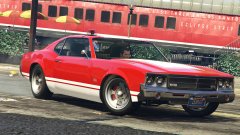 Is this a thing that works?
 -
Has anyone figured out what's causing this error is it only on 4.4?
-
I just want to get some clarification, are some plugins namely Heliorbit no longer working due to GTA updates or LSPFR updates or both? Yes of course you can always rollback LSPDFR updates if you have older versions, hell I even considered going back to 3.1 if it will preserve plugins like Heliorbit, but as you all know it's not so simple when it comes to GTA Updates at least older versions, sure you can always rollback via RPH but will that even solve the issue?
-
Getting a similar PoolWatcher: Found new ped and set them as cop: null error did you find out what it was?
-
-
I can confirm It's the ASI plugins and probably too many LSPFR plugins as well. just either disable ASI IE Scripthook V or reduced the amount of ASI plugins.
-
This is runned without RPH, either way doesn't work. The new launcher only says that it quit unexpectedly no other clue. I have already verified game, removed the Asi Support plugin so that's not the problem, I can run my vanilla install fine so it's not a computer problem, I have disabled Mods and anti virus so that not the problem, although, with mods disabled it just hangs and the launcher does not start, task manager shows GTA V started with "Status Suspended" only 40K memory with UAC Virt. Disabled, I'm really at a loss as to why it won't start? Without Scripthook V it works but with it, no dice. Any thoughts? Edit, it turns out I had Menyoo installed, it would appear the new SHV doesn't like it, so if anyone has it be forewarned.
-
Having the same error, did you ever find out what caused it?
-
Since this question seems to be off topic I thought it would be best to post it here, I've seen on FiveM servers where the Polmav is flown and the cam is operated by a second player, of course that makes sense, when I fly solo in GTA/LSPDFR I can either fly or operate the cam but not both, so what I'm asking if there is a way to do this? The closest thing would be is I'm doing a air patrol and a pursuit callout comes up and the AI takes control of the heli and I'm left to be able to operate the cam, but when the AI takes over it rarely ends well. I really would like to be able to do both at any given time, I wonder if the partner plugin could be modified to either fly the heli or operate the cam, there must be some way to make this happen? I look forward to your replies.
-
I totally agree Foot Pursuit Aid is a must, I chased two suspects yesterday for a good distance before subduing them, hopefully the new updates works for me.
-
I'll check out the thread thanks!
-
That's a new one for me as I too use a Xbox 360 controller and when I do have an issue it's usually with the controller and it affects GTA as well, did you try posting to the RPH Discord for help? If you haven't, you can find a link on the RPH site.
-
I was never able to get 0.3 to work flawlessly always had some kind of a crash or issue, so far 4.0-.1 works much smother albeit still getting crashes now and than, has anyone been able to get the current release or 4.0 to work flawlessly with no crashes, if so what's the secret other than eliminating incompatible plugins? Thanks


.thumb.png.9d0943161b37f863c291d6d6664edefb.png)
