


itsEMT
Members
-
Joined
-
Last visited
Everything posted by itsEMT
-
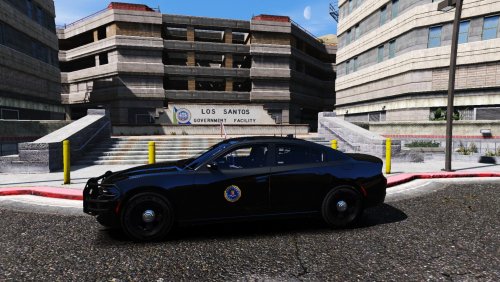 FIB skin for MyPotato's 2015 Dodge Chargers Installation: Find where you installed the model (MrPotato recommends latest patchday, mine is patchday13 > Open the .ytd > Drop the chgr_sign_1 in there and save that puppy! Compatible with: As far as I know. Those are the only 2 I have tested. The FIB logo is most likely blurry, but oh well. I threw it on and painted over the rest of the template (I also don't know how to unblur it using GIMP... ¯\_(ツ)_/¯ ). Don't mind the license plate, I couldn't get it to show in-game, and there is no point in removing it if it isn't causing any issues. Enjoy!
 -
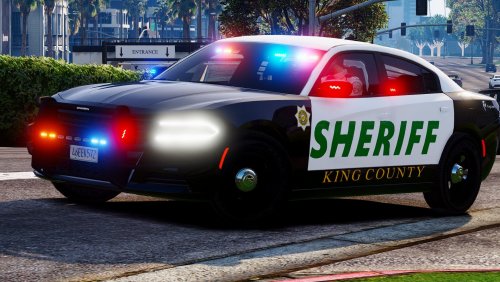 Doesn't look like any potatoes I've ever seen, definitely a 10/10 2015 Charger though.
- 20 comments
- 10 reviews
-
-

- 1
-
-
Noticed a little error in the Installation Guide.txt that you may want to fix: - POLICE2.xml = Place in -> (Grand Theft Auto V\ELS\pack_default Also, if you wouldn't mind adding an unmarked livery, or even one with just an FIB badge, that would be amazing! Thanks for your amazing models, can't wait to see what you have for the future! :)
- 20 comments
- 10 reviews
-
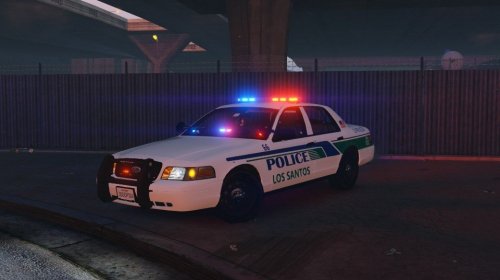 This is actually a really nice pack! Been looking for one to use with the ELS vehicles, and I stumbled upon this. Very clean and high quality! Can't wait to see what you do in the future!
- 8 comments
- 2 reviews
-
 Love the car! The skin is eh, but it's nice. For anybody interested, there is an LAPD skin available. Great car though, very rare to see gems like these!
- 48 comments
- 14 reviews
-
 Great model, however the lights being visible when tipped is not good. Is this the lighting mod I have or the model itself? I am using the Improved Spotlight and LED Lighting mod. Patchday9ng worked for me
- 269 comments
- 67 reviews
-
-
 Not working on modified police cars. I am using this car pack and I installed both this mod and the car pack correctly, but the reflections in the environment don't show up. I linked an example with a modified police1 from the car pack and a stock sheriff2.
- 81 comments
- 16 reviews
-
.thumb.jpg.4066677156985e22489bfecddc2f6c45.jpg) Car is a perfect representation of an LAPD CVPI, the OpenIV installer is a perfect representation of a horrible way to install game files and should be reverted back to manual so I don't have to add the steps below for those who are unaware of how to install this manually. MANUAL INSTALL (For those that can't read a .XML) Extract the .oiv file you want, including or excluding the slicktop variation. After that, rename the .oiv to .rar and open in WinRAR or similar programs, and follow below. sheriff.ytd / sheriff.yft files to: GTA V Directory/update/x64/dlcpacks/patchday5ng/dlc.rpf/x64/levels/gta5/vehicles.rpf - Add your liveries (optional) now carvariations.meta file to: GTA V Directory/update/x64/dlcpacks/mpchristmas2/dlc.rpf/common/data/carvariations.meta - If already edited, extract Inside extracted carvariations.meta, add the following lines: <Item> <modelName>sheriff</modelName> <colors> <Item> <indices content="char_array"> 134 134 156 156 </indices> <liveries> <Item value="true" /> <Item value="false" /> <Item value="false" /> <Item value="false" /> <Item value="false" /> <Item value="false" /> <Item value="false" /> <Item value="false" /> </liveries> </Item> <Item> <indices content="char_array"> 134 134 156 156 </indices> <liveries> <Item value="false" /> <Item value="true" /> <Item value="false" /> <Item value="false" /> <Item value="false" /> <Item value="false" /> <Item value="false" /> <Item value="false" /> </liveries> </Item> <Item> <indices content="char_array"> 134 134 156 156 </indices> <liveries> <Item value="false" /> <Item value="false" /> <Item value="false" /> <Item value="false" /> <Item value="true" /> <Item value="false" /> <Item value="false" /> <Item value="false" /> </liveries> </Item> <Item> <indices content="char_array"> 134 134 156 156 </indices> <liveries> <Item value="false" /> <Item value="false" /> <Item value="true" /> <Item value="false" /> <Item value="false" /> <Item value="false" /> <Item value="false" /> <Item value="false" /> </liveries> </Item> <Item> <indices content="char_array"> 134 134 156 156 </indices> <liveries> <Item value="false" /> <Item value="false" /> <Item value="false" /> <Item value="true" /> <Item value="false" /> <Item value="false" /> <Item value="false" /> <Item value="false" /> </liveries> </Item> </colors> <kits> <Item>157_massacaro2_modkit</Item> </kits> <windowsWithExposedEdges /> <plateProbabilities> <Probabilities /> </plateProbabilities> <lightSettings value="1" /> <sirenSettings value="2" /> </Item> <Item> vehicles.meta file to: update/update.rpf/common/data/levels/gta5/vehicles.meta - If already edited, extract Inside extracted vehicles.meta, add the following lines: <Item> <modelName>sheriff</modelName> <txdName>sheriff</txdName> <handlingId>SHERIFF</handlingId> <gameName>SHERIFF</gameName> <vehicleMakeName /> <expressionDictName>null</expressionDictName> <expressionName>null</expressionName> <animConvRoofDictName>null</animConvRoofDictName> <animConvRoofName>null</animConvRoofName> <animConvRoofWindowsAffected /> <ptfxAssetName>null</ptfxAssetName> <audioNameHash /> <layout>LAYOUT_STANDARD</layout> <coverBoundOffsets>SHERIFF_COVER_OFFSET_INFO</coverBoundOffsets> <explosionInfo>EXPLOSION_INFO_DEFAULT</explosionInfo> <scenarioLayout /> <cameraName>DEFAULT_FOLLOW_VEHICLE_CAMERA</cameraName> <aimCameraName>DEFAULT_THIRD_PERSON_VEHICLE_AIM_CAMERA</aimCameraName> <bonnetCameraName>VEHICLE_BONNET_CAMERA_MID_HIGH</bonnetCameraName> <povCameraName>DEFAULT_POV_CAMERA</povCameraName> <FirstPersonDriveByIKOffset x="0.000000" y="-0.060000" z="-0.060000" /> <FirstPersonDriveByUnarmedIKOffset x="0.000000" y="0.-050000" z="-0.020000" /> <FirstPersonProjectileDriveByIKOffset x="0.000000" y="-0.075000" z="-0.045000" /> <FirstPersonProjectileDriveByPassengerIKOffset x="0.000000" y="-0.075000" z="-0.045000" /> <FirstPersonProjectileDriveByRearLeftIKOffset x="0.000000" y="0.020000" z="0.030000" /> <FirstPersonProjectileDriveByRearRightIKOffset x="0.000000" y="0.020000" z="0.030000" /> <FirstPersonDriveByLeftPassengerIKOffset x="0.000000" y="0.000000" z="0.000000" /> <FirstPersonDriveByRightPassengerIKOffset x="0.000000" y="-0.060000" z="-0.060000" /> <FirstPersonDriveByRightRearPassengerIKOffset x="0.000000" y="0.000000" z="0.000000" /> <FirstPersonDriveByLeftPassengerUnarmedIKOffset x="0.000000" y="0.000000" z="0.000000" /> <FirstPersonDriveByRightPassengerUnarmedIKOffset x="0.000000" y="0.000000" z="0.000000" /> <FirstPersonMobilePhoneOffset x="0.155000" y="0.270000" z="0.508000" /> <FirstPersonPassengerMobilePhoneOffset x="0.136000" y="0.223000" z="0.405000" /> <FirstPersonMobilePhoneSeatIKOffset> <Item> <Offset x="0.136000" y="0.156000" z="0.425000" /> <SeatIndex value="2" /> </Item> <Item> <Offset x="0.136000" y="0.156000" z="0.425000" /> <SeatIndex value="3" /> </Item> </FirstPersonMobilePhoneSeatIKOffset> <PovCameraOffset x="0.000000" y="-0.145000" z="0.645000" /> <PovCameraVerticalAdjustmentForRollCage value="0.000000" /> <PovPassengerCameraOffset x="0.000000" y="0.000000" z="0.000000" /> <PovRearPassengerCameraOffset x="0.000000" y="0.000000" z="0.000000" /> <vfxInfoName>VFXVEHICLEINFO_CAR_GENERIC</vfxInfoName> <shouldUseCinematicViewMode value="true" /> <shouldCameraTransitionOnClimbUpDown value="false" /> <shouldCameraIgnoreExiting value="false" /> <AllowPretendOccupants value="true" /> <AllowJoyriding value="false" /> <AllowSundayDriving value="false" /> <AllowBodyColorMapping value="true" /> <wheelScale value="0.237100" /> <wheelScaleRear value="0.237100" /> <dirtLevelMin value="0.000000" /> <dirtLevelMax value="0.850000" /> <envEffScaleMin value="0.000000" /> <envEffScaleMax value="1.000000" /> <envEffScaleMin2 value="0.000000" /> <envEffScaleMax2 value="1.000000" /> <damageMapScale value="0.600000" /> <damageOffsetScale value="1.000000" /> <diffuseTint value="0x00FFFFFF" /> <steerWheelMult value="1.000000" /> <HDTextureDist value="5.000000" /> <lodDistances content="float_array"> 15.000000 30.000000 60.000000 120.000000 500.000000 500.000000 </lodDistances> <minSeatHeight value="0.839" /> <identicalModelSpawnDistance value="20" /> <maxNumOfSameColor value="10" /> <defaultBodyHealth value="1000.000000" /> <pretendOccupantsScale value="1.000000" /> <visibleSpawnDistScale value="1.000000" /> <trackerPathWidth value="2.000000" /> <weaponForceMult value="1.000000" /> <frequency value="100" /> <swankness>SWANKNESS_1</swankness> <maxNum value="2" /> <flags>FLAG_HAS_LIVERY FLAG_EXTRAS_REQUIRE FLAG_EXTRAS_STRONG FLAG_LAW_ENFORCEMENT FLAG_EMERGENCY_SERVICE FLAG_NO_RESPRAY FLAG_DONT_SPAWN_IN_CARGEN FLAG_REPORT_CRIME_IF_STANDING_ON FLAG_HAS_INTERIOR_EXTRAS</flags> <type>VEHICLE_TYPE_CAR</type> <plateType>VPT_FRONT_AND_BACK_PLATES</plateType> <dashboardType>VDT_GENTAXI</dashboardType> <vehicleClass>VC_EMERGENCY</vehicleClass> <wheelType>VWT_MUSCLE</wheelType> <trailers /> <additionalTrailers /> <drivers> <Item> <driverName>S_M_Y_Sheriff_01</driverName> <npcName /> </Item> </drivers> <extraIncludes /> <doorsWithCollisionWhenClosed /> <driveableDoors /> <bumpersNeedToCollideWithMap value="false" /> <needsRopeTexture value="false" /> <requiredExtras /> <rewards> <Item>REWARD_WEAPON_PUMPSHOTGUN</Item> <Item>REWARD_AMMO_PUMPSHOTGUN_ENTER_VEHICLE</Item> <Item>REWARD_STAT_WEAPON</Item> </rewards> <cinematicPartCamera> <Item>WHEEL_FRONT_RIGHT_CAMERA</Item> <Item>WHEEL_FRONT_LEFT_CAMERA</Item> <Item>WHEEL_REAR_RIGHT_CAMERA</Item> <Item>WHEEL_REAR_LEFT_CAMERA</Item> </cinematicPartCamera> <NmBraceOverrideSet /> <buoyancySphereOffset x="0.000000" y="0.000000" z="0.000000" /> <buoyancySphereSizeScale value="1.000000" /> <pOverrideRagdollThreshold type="NULL" /> <firstPersonDrivebyData> <Item>STD_POLICE_FRONT_LEFT</Item> <Item>STD_POLICE_FRONT_RIGHT</Item> <Item>STD_POLICE_REAR_LEFT</Item> <Item>STD_POLICE_REAR_RIGHT</Item> </firstPersonDrivebyData> </Item> <Item> *OPTIONAL* visualsettings.dat file to: update/update.rpf/common/data/visualsettings.dat
Car is a perfect representation of an LAPD CVPI, the OpenIV installer is a perfect representation of a horrible way to install game files and should be reverted back to manual so I don't have to add the steps below for those who are unaware of how to install this manually. MANUAL INSTALL (For those that can't read a .XML) Extract the .oiv file you want, including or excluding the slicktop variation. After that, rename the .oiv to .rar and open in WinRAR or similar programs, and follow below. sheriff.ytd / sheriff.yft files to: GTA V Directory/update/x64/dlcpacks/patchday5ng/dlc.rpf/x64/levels/gta5/vehicles.rpf - Add your liveries (optional) now carvariations.meta file to: GTA V Directory/update/x64/dlcpacks/mpchristmas2/dlc.rpf/common/data/carvariations.meta - If already edited, extract Inside extracted carvariations.meta, add the following lines: <Item> <modelName>sheriff</modelName> <colors> <Item> <indices content="char_array"> 134 134 156 156 </indices> <liveries> <Item value="true" /> <Item value="false" /> <Item value="false" /> <Item value="false" /> <Item value="false" /> <Item value="false" /> <Item value="false" /> <Item value="false" /> </liveries> </Item> <Item> <indices content="char_array"> 134 134 156 156 </indices> <liveries> <Item value="false" /> <Item value="true" /> <Item value="false" /> <Item value="false" /> <Item value="false" /> <Item value="false" /> <Item value="false" /> <Item value="false" /> </liveries> </Item> <Item> <indices content="char_array"> 134 134 156 156 </indices> <liveries> <Item value="false" /> <Item value="false" /> <Item value="false" /> <Item value="false" /> <Item value="true" /> <Item value="false" /> <Item value="false" /> <Item value="false" /> </liveries> </Item> <Item> <indices content="char_array"> 134 134 156 156 </indices> <liveries> <Item value="false" /> <Item value="false" /> <Item value="true" /> <Item value="false" /> <Item value="false" /> <Item value="false" /> <Item value="false" /> <Item value="false" /> </liveries> </Item> <Item> <indices content="char_array"> 134 134 156 156 </indices> <liveries> <Item value="false" /> <Item value="false" /> <Item value="false" /> <Item value="true" /> <Item value="false" /> <Item value="false" /> <Item value="false" /> <Item value="false" /> </liveries> </Item> </colors> <kits> <Item>157_massacaro2_modkit</Item> </kits> <windowsWithExposedEdges /> <plateProbabilities> <Probabilities /> </plateProbabilities> <lightSettings value="1" /> <sirenSettings value="2" /> </Item> <Item> vehicles.meta file to: update/update.rpf/common/data/levels/gta5/vehicles.meta - If already edited, extract Inside extracted vehicles.meta, add the following lines: <Item> <modelName>sheriff</modelName> <txdName>sheriff</txdName> <handlingId>SHERIFF</handlingId> <gameName>SHERIFF</gameName> <vehicleMakeName /> <expressionDictName>null</expressionDictName> <expressionName>null</expressionName> <animConvRoofDictName>null</animConvRoofDictName> <animConvRoofName>null</animConvRoofName> <animConvRoofWindowsAffected /> <ptfxAssetName>null</ptfxAssetName> <audioNameHash /> <layout>LAYOUT_STANDARD</layout> <coverBoundOffsets>SHERIFF_COVER_OFFSET_INFO</coverBoundOffsets> <explosionInfo>EXPLOSION_INFO_DEFAULT</explosionInfo> <scenarioLayout /> <cameraName>DEFAULT_FOLLOW_VEHICLE_CAMERA</cameraName> <aimCameraName>DEFAULT_THIRD_PERSON_VEHICLE_AIM_CAMERA</aimCameraName> <bonnetCameraName>VEHICLE_BONNET_CAMERA_MID_HIGH</bonnetCameraName> <povCameraName>DEFAULT_POV_CAMERA</povCameraName> <FirstPersonDriveByIKOffset x="0.000000" y="-0.060000" z="-0.060000" /> <FirstPersonDriveByUnarmedIKOffset x="0.000000" y="0.-050000" z="-0.020000" /> <FirstPersonProjectileDriveByIKOffset x="0.000000" y="-0.075000" z="-0.045000" /> <FirstPersonProjectileDriveByPassengerIKOffset x="0.000000" y="-0.075000" z="-0.045000" /> <FirstPersonProjectileDriveByRearLeftIKOffset x="0.000000" y="0.020000" z="0.030000" /> <FirstPersonProjectileDriveByRearRightIKOffset x="0.000000" y="0.020000" z="0.030000" /> <FirstPersonDriveByLeftPassengerIKOffset x="0.000000" y="0.000000" z="0.000000" /> <FirstPersonDriveByRightPassengerIKOffset x="0.000000" y="-0.060000" z="-0.060000" /> <FirstPersonDriveByRightRearPassengerIKOffset x="0.000000" y="0.000000" z="0.000000" /> <FirstPersonDriveByLeftPassengerUnarmedIKOffset x="0.000000" y="0.000000" z="0.000000" /> <FirstPersonDriveByRightPassengerUnarmedIKOffset x="0.000000" y="0.000000" z="0.000000" /> <FirstPersonMobilePhoneOffset x="0.155000" y="0.270000" z="0.508000" /> <FirstPersonPassengerMobilePhoneOffset x="0.136000" y="0.223000" z="0.405000" /> <FirstPersonMobilePhoneSeatIKOffset> <Item> <Offset x="0.136000" y="0.156000" z="0.425000" /> <SeatIndex value="2" /> </Item> <Item> <Offset x="0.136000" y="0.156000" z="0.425000" /> <SeatIndex value="3" /> </Item> </FirstPersonMobilePhoneSeatIKOffset> <PovCameraOffset x="0.000000" y="-0.145000" z="0.645000" /> <PovCameraVerticalAdjustmentForRollCage value="0.000000" /> <PovPassengerCameraOffset x="0.000000" y="0.000000" z="0.000000" /> <PovRearPassengerCameraOffset x="0.000000" y="0.000000" z="0.000000" /> <vfxInfoName>VFXVEHICLEINFO_CAR_GENERIC</vfxInfoName> <shouldUseCinematicViewMode value="true" /> <shouldCameraTransitionOnClimbUpDown value="false" /> <shouldCameraIgnoreExiting value="false" /> <AllowPretendOccupants value="true" /> <AllowJoyriding value="false" /> <AllowSundayDriving value="false" /> <AllowBodyColorMapping value="true" /> <wheelScale value="0.237100" /> <wheelScaleRear value="0.237100" /> <dirtLevelMin value="0.000000" /> <dirtLevelMax value="0.850000" /> <envEffScaleMin value="0.000000" /> <envEffScaleMax value="1.000000" /> <envEffScaleMin2 value="0.000000" /> <envEffScaleMax2 value="1.000000" /> <damageMapScale value="0.600000" /> <damageOffsetScale value="1.000000" /> <diffuseTint value="0x00FFFFFF" /> <steerWheelMult value="1.000000" /> <HDTextureDist value="5.000000" /> <lodDistances content="float_array"> 15.000000 30.000000 60.000000 120.000000 500.000000 500.000000 </lodDistances> <minSeatHeight value="0.839" /> <identicalModelSpawnDistance value="20" /> <maxNumOfSameColor value="10" /> <defaultBodyHealth value="1000.000000" /> <pretendOccupantsScale value="1.000000" /> <visibleSpawnDistScale value="1.000000" /> <trackerPathWidth value="2.000000" /> <weaponForceMult value="1.000000" /> <frequency value="100" /> <swankness>SWANKNESS_1</swankness> <maxNum value="2" /> <flags>FLAG_HAS_LIVERY FLAG_EXTRAS_REQUIRE FLAG_EXTRAS_STRONG FLAG_LAW_ENFORCEMENT FLAG_EMERGENCY_SERVICE FLAG_NO_RESPRAY FLAG_DONT_SPAWN_IN_CARGEN FLAG_REPORT_CRIME_IF_STANDING_ON FLAG_HAS_INTERIOR_EXTRAS</flags> <type>VEHICLE_TYPE_CAR</type> <plateType>VPT_FRONT_AND_BACK_PLATES</plateType> <dashboardType>VDT_GENTAXI</dashboardType> <vehicleClass>VC_EMERGENCY</vehicleClass> <wheelType>VWT_MUSCLE</wheelType> <trailers /> <additionalTrailers /> <drivers> <Item> <driverName>S_M_Y_Sheriff_01</driverName> <npcName /> </Item> </drivers> <extraIncludes /> <doorsWithCollisionWhenClosed /> <driveableDoors /> <bumpersNeedToCollideWithMap value="false" /> <needsRopeTexture value="false" /> <requiredExtras /> <rewards> <Item>REWARD_WEAPON_PUMPSHOTGUN</Item> <Item>REWARD_AMMO_PUMPSHOTGUN_ENTER_VEHICLE</Item> <Item>REWARD_STAT_WEAPON</Item> </rewards> <cinematicPartCamera> <Item>WHEEL_FRONT_RIGHT_CAMERA</Item> <Item>WHEEL_FRONT_LEFT_CAMERA</Item> <Item>WHEEL_REAR_RIGHT_CAMERA</Item> <Item>WHEEL_REAR_LEFT_CAMERA</Item> </cinematicPartCamera> <NmBraceOverrideSet /> <buoyancySphereOffset x="0.000000" y="0.000000" z="0.000000" /> <buoyancySphereSizeScale value="1.000000" /> <pOverrideRagdollThreshold type="NULL" /> <firstPersonDrivebyData> <Item>STD_POLICE_FRONT_LEFT</Item> <Item>STD_POLICE_FRONT_RIGHT</Item> <Item>STD_POLICE_REAR_LEFT</Item> <Item>STD_POLICE_REAR_RIGHT</Item> </firstPersonDrivebyData> </Item> <Item> *OPTIONAL* visualsettings.dat file to: update/update.rpf/common/data/visualsettings.dat- 376 comments
- 81 reviews
-
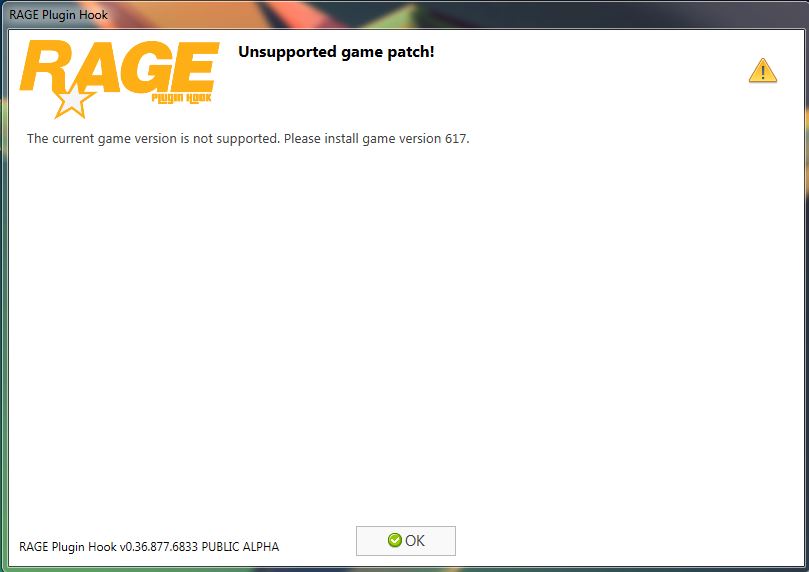
Not sure if this is where it should be posted, but I know a lot of people are having this issue and I was wondering if there was any known fix for it, like downgrading RPH?
-
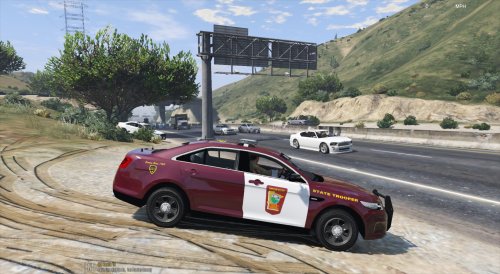 Loving the skin pack. They go amazing with the snow mod! Only thing is, you forgot the license plate on the Explorer, other than that, they're fantastic! Maybe a state trooper skin for LSSD next? Some screenshots I took of the vehicles with the textures applied!
- 14 comments
- 3 reviews
-
-
- 1
-
-
Yup, everything is working fine. Thanks!
-
Now that I think of it, I did manually edit a carvariations.meta for Bxbuggs123 CVPI. I made a backup so I'll test that and reply back.
-
I have tested it with a stock version of GTA V, so it is a modding problem. It started last night after installing some cars and skins, nothing that hasn't worked before. These are the two files which I believe to be the crash logs (Not entirely sure). The RHP is the one from the main Grand Theft Auto V/Logs and the other one is from my Documents/Rockstar Games/GTA V folder. If more info is needed, just ask. Thanks! RagePluginHook_23012016_193522.log Documents_Rockstar Games_GTA V.txt
-
I really like it, but could you include a link to the vehicles it is made for? Like the CVPI and Explorer model link. Thanks!
- 14 comments
- 3 reviews
-
-
- 1
-
-
@Bxbugs123 I like the Radiance mod, but it's way to bright. Any way to turn that down?
- 376 comments
- 81 reviews
-
I am trying to use the dr intimidator siren. I replace the 4 audio files in the vehicles folder and then re-paste the .oac into OpenIV but in-game it's still the same siren (American Siren Pack I believe). I have tried everything. I have gotten a fresh .awc file and exported, I have replaced the 4 audio files that dr intimidator comes with and re-pasted the .oac file in OpenIV but nothing has worked so far. Any help would be appreciated!
-
The site is extremely slow for me also, I don't have type or click lag but page load times are bad. I also have about 160 Mbps download speed so my internet is not the issue.
-
 I wouldn't mind a video. I'm new to modding GTA so that'd be helpful for more than just me I'm sure. Thanks! :) EDIT: Never mind, I got it working. Say I wanted a different siren, could I just go into the "old" folder and replace whatever siren file with a different one?
- 316 comments
- 31 reviews
-
-
- 1
-
-
.oac broken. vehicles.oac(Line 1): Not supported format version, actual: "10" but expected "11"
- 316 comments
- 31 reviews
-
I got a reply to why I couldn't install. but now it will give me an error when I try to launch it through Steam "SecuLauncher: failed to start application. [2000]" Any help for this? I just got GTA IV about 5 hours ago.

.thumb.jpg.1db0be3e377ccefdd47e57a95ec56762.jpg)
.thumb.jpg.4066677156985e22489bfecddc2f6c45.jpg)
